TR7 GNSS System User Manual
17
www.titanposition.com
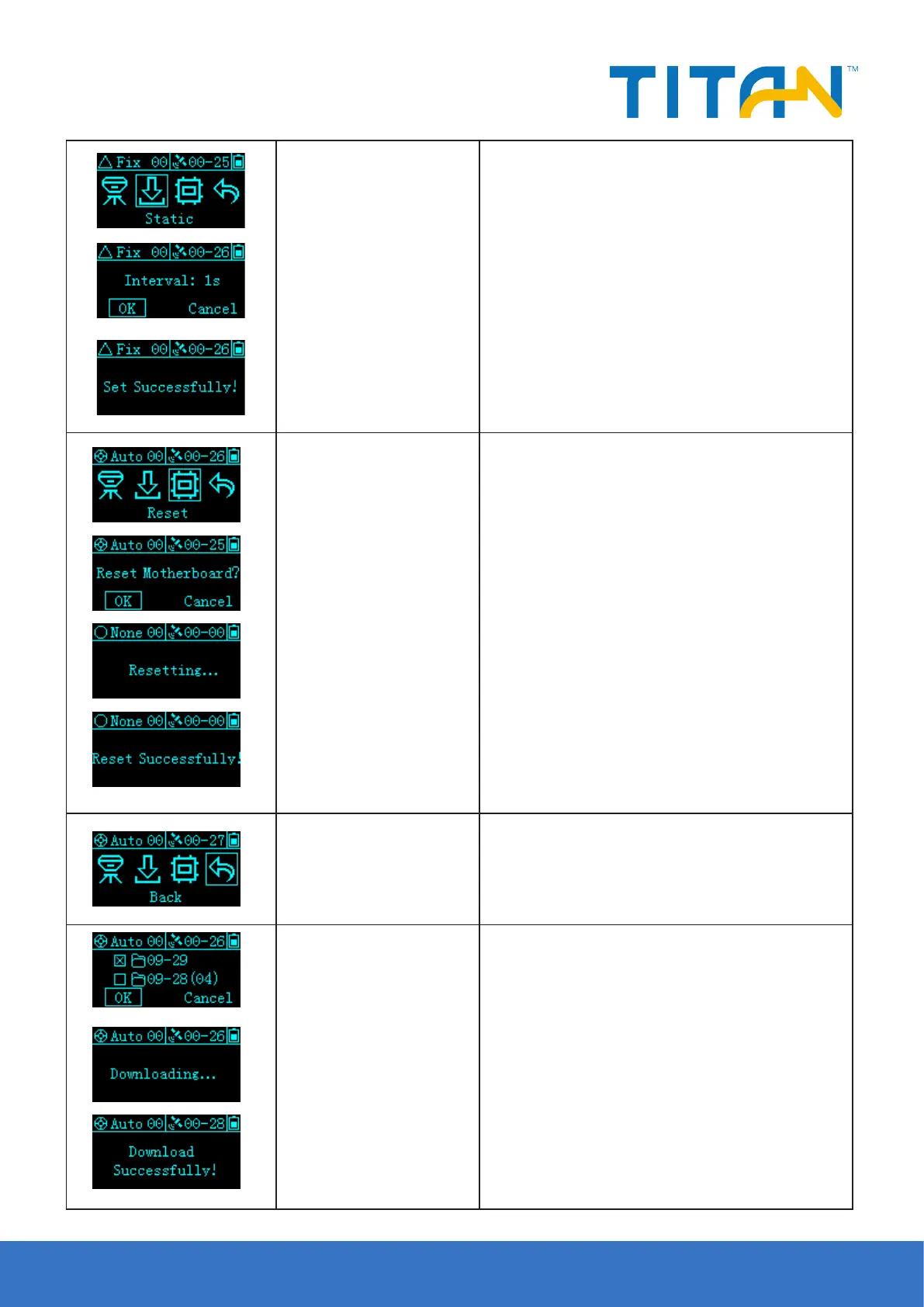
Static Collection
Click the Fn button to select
Static, then click the power
button to conrm
Click the FN button to select Static, and then click
the power button to confirm: static acquisition is not
enabled, the collection interval setting interface is
displayed, and 1S/5S/10S/15S/30S can be set. Static
acquisition is enabled, and “Stop recording?” is displayed.
Select “Conrm” or “Cancel”, select the conrmation and
display the collection interval setting interface, stop
recording at the same time, and the voice broadcast
“stop recording”, select “Cancel” and return to the setting
interface.
Reset the motherboard
Click the Fn button to select
Reset, then click the power
button to conrm
Enter reset motherboard setting interface, display
"Reset motherboard?", select "conrm" or "cancel",
select conrm, "reset motherboard"; reset success, voice
broadcast "reset success", OLED screen display "reset
success", After 2S, it jumps to the status interface; if the
reset fails, the voice broadcasts “Reset failed”, the OLED
screen displays “Reset failed”, and then jumps back to the
reset interface after 2S. During the reset process of the
motherboard, double-click the power button to turn o
the display of the OLED screen.
Return
Click the Fn button to select
Back, then click the power
button to conrm
Return to the status screen.
OTG
After using the OTG function, the U disk is connected
to the host through the OTG cable. The OLED screen
displays the last two days of static les. The folder is
displayed by the day. The number of static les that
are not downloaded is displayed in the parentheses of
the folder name. The maximum number is 99. "...", after
pulling out the USB ash drive, it automatically jumps
back to the status interface.


 To Next Page