39
[Electrical characteristics]
Input
Open voltage: 3.3 V DC
Short-circuit current: Under 1 mA
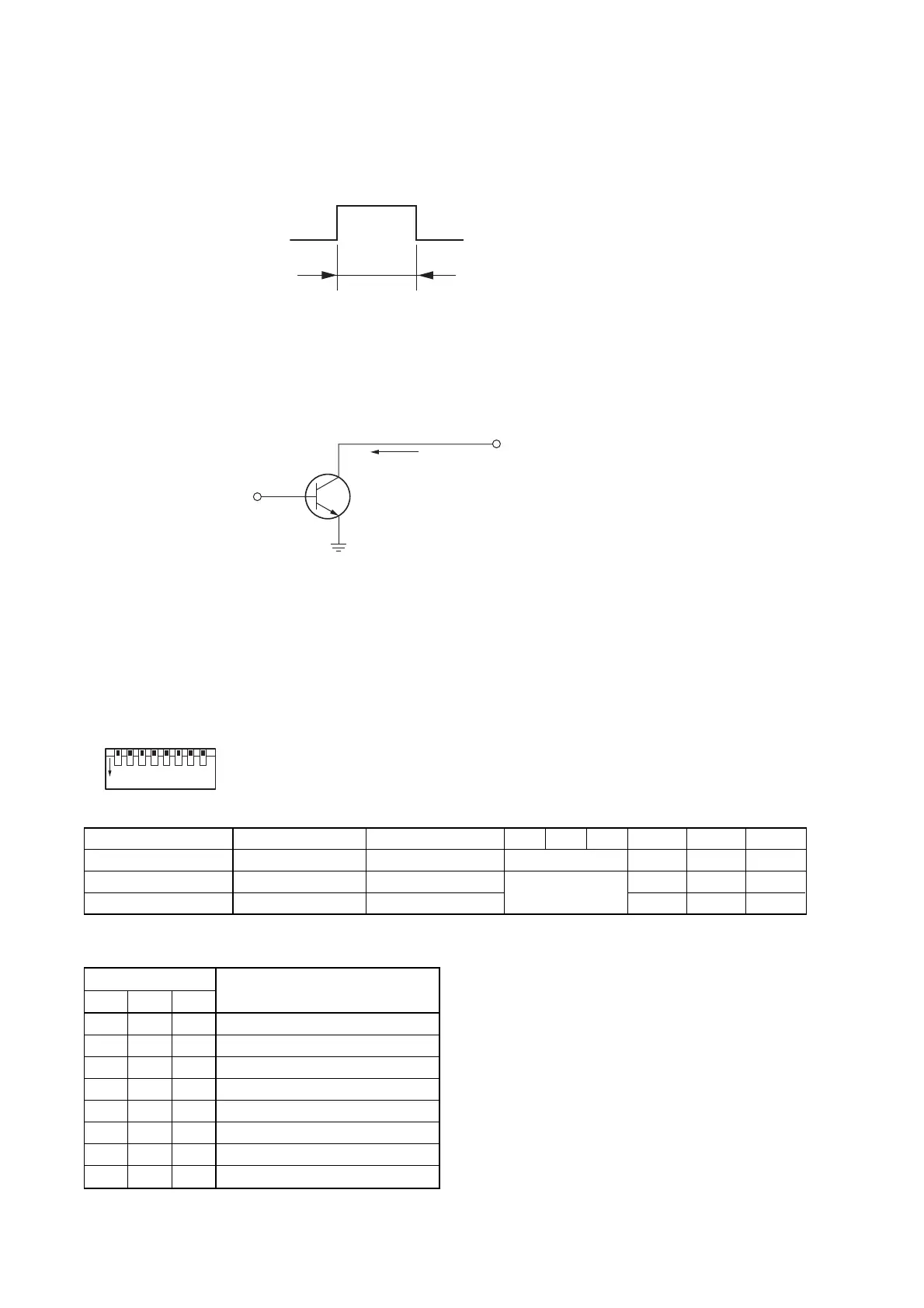
Activation: No-voltage make contact (one-shot signal is shown below.)
Output
Circuit: Open collector (See below.)
Withstand voltage: 30 V DC
Control current: Under 10 mA
Over 100 ms
Control current
Chime Selection table
*
1
An ascending 4-tone chime is sounded when the
broadcast begins.
*
2
An ascending 4-tone chime is sounded when the
broadcast begins, and a descending 4-tone chime
is sounded upon broadcast completion.
*
3
The chime sound source must be pre-recorded into
a CF (CompactFlash) card to be inserted into the
optional EV-200M Voice Announcement Board.
*
4
Simultaneously turns on or off the phantom power of
Inputs 1 – 3. For the method to switch off the
phantom power for the individual Inputs 1 to 3,
consult the shop from whom the unit was purchased.
23. FUNCTION SWITCH OPERATION
23.1. VM Amplifier's Rear Panel-Mounted Function Switches
Set the rear panel-mounted SETTINGS switch (p. 10 No. 29) as shown below.
SETTINGS
All switches No. 1 – 8 are factory-preset to the OFF position.
12
ON
345678
Switch No. 1 2 3 4 5 6 7 8
Function Phantom Power*
4
Telephone Paging Chime Selection Input 3 Input 2 Input 1
OFF (Up position) OFF Chime ON Mic Mic Mic
ON (Down position) ON Chime OFF Line Line Line
Switch No.
Chime Tone
345
OFF OFF OFF 2-Tone Chime
OFF OFF ON OFF
OFF ON OFF 4-Tone Chime (Up) *
1
OFF ON ON Single-Tone Chime
ON OFF OFF 4-Tone Chime (Up & Down) *
2
ON OFF ON OFF
ON ON OFF Pre-recorded Chime *
3
ON ON ON OFF
See the Chime
Selection table



 To Next Page