48
24.5. Recorded Message-to-Group Assignment Operation
Here, the operation example of assigning Recorded Message 1 to Broadcast Groups 1, 3, and 4 will be
explained. (See p. 42 "Message 1 to group" setting example.)
Step 1. Entry to recorded message setting mode
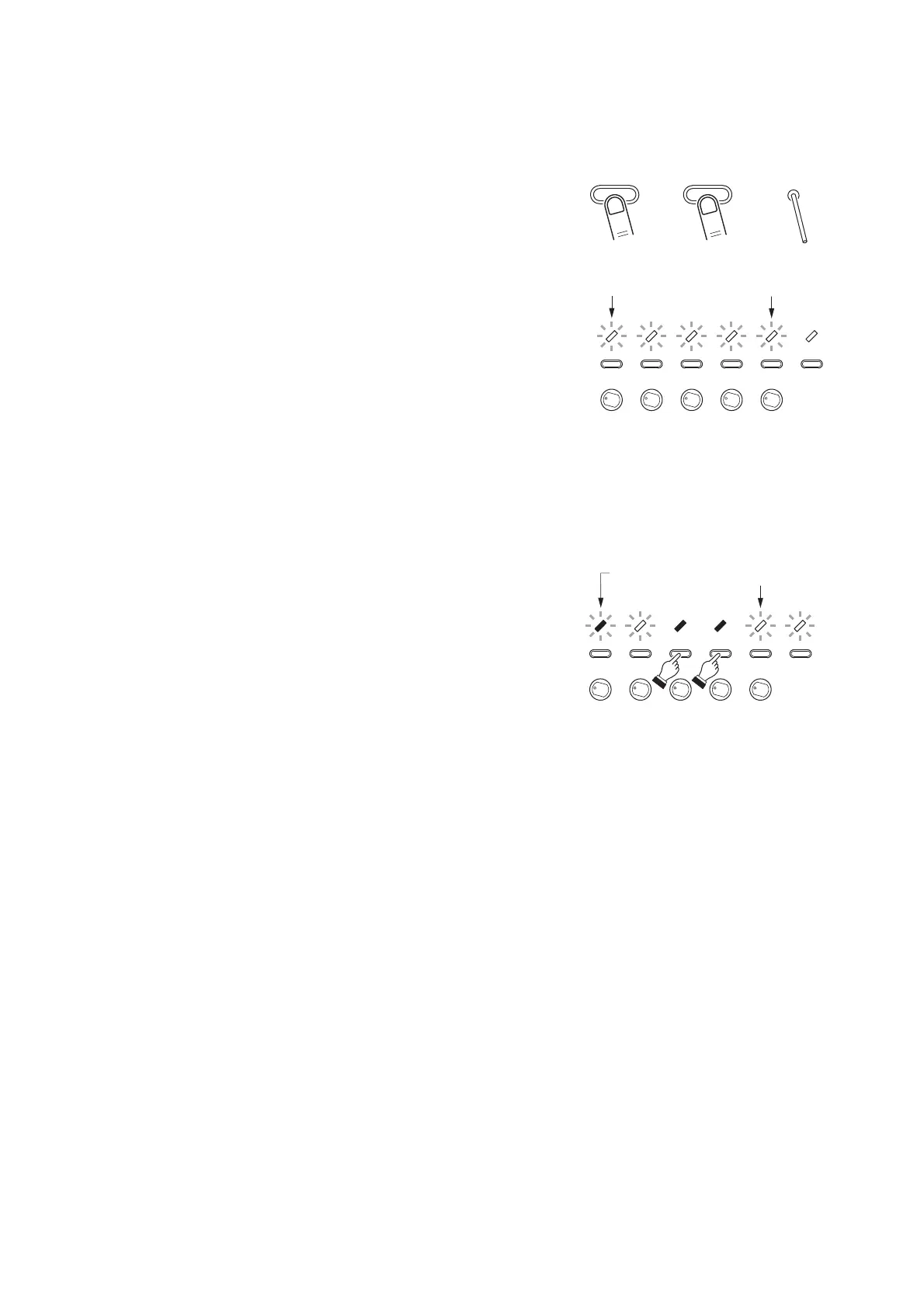
Press and release the Reset key while holding down the
ZONE 1 and ZONE 3 keys. When all indicators for
Zones 1 – 5 begins to flash (2 – 3 seconds after),
release both the ZONE 1 and ZONE 3 keys.
The unit will be placed in recorded message setting
mode.
The 5 indicators for ZONE 1 through ZONE 5 begin to
flash. (They indicate Message 1 through Message 5.)
Operations of Steps 2 – 6 described hereinafter are the same as those described in the previous section
"Control Input/Telephone Paging-to-Group Assignment Operation." However, read 4 setting items of inputs 1 – 3
and TEL paging as Messages 1 – 4, and note that Message 5 is assigned to ZONE 5 key in step 2.
Shown on the right is the status of each indicator that results
from the group number setting (Example. Groups 1, 3, and 4)
performed in Step 4.



 To Next Page