43
24.3. Zone-to-Group Assignment Operation
• Here, the operation example of assigning Broadcast Zones 2 – 4 to Group 2 will be explained for a 5-zone
(Master unit only) configuration. (See p. 41 "Group 2 to zone" setting example.)
• In the case of 10 broadcast zones (i.e. connection of a master unit to a sub-unit), use the sub-unit's Zone
selector keys 1 – 5 as Zone keys 6 – 10.
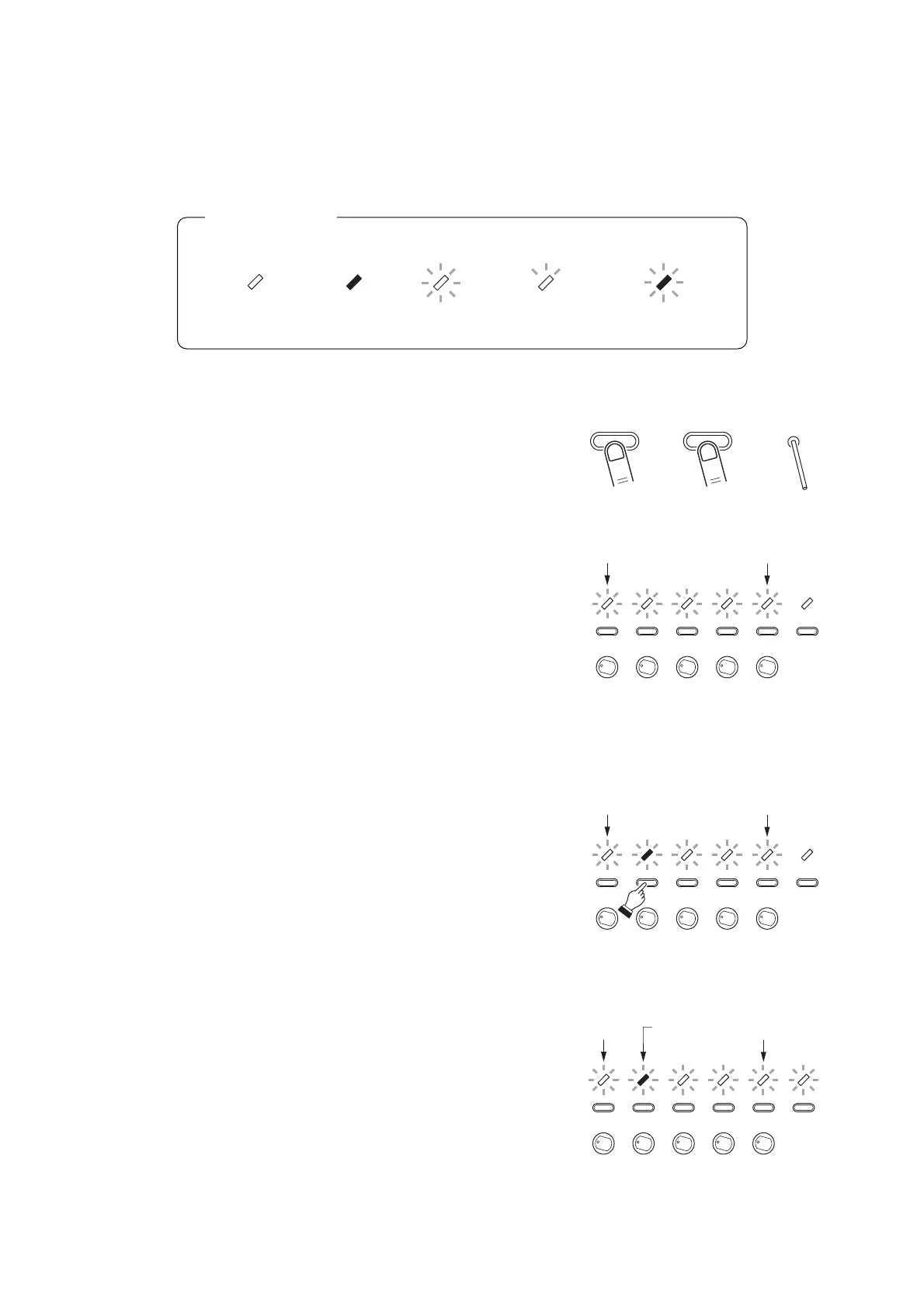
Step 1. Entry to broadcast group setting mode
Press and release the Reset key while holding down the
ZONE 1 and ZONE 2 keys. When all indicators for
Zones 1 – 5 begin to flash (2 – 3 seconds after), release
both the ZONE 1 and ZONE 2 keys.
Use a precision screwdriver or other long, pointed
object (2.5 mm in diameter and over 30 mm in length)
when pressing the Reset key.
Note: Even when a sub-amplifier is connected, perform
this setting entry operation on the master
amplifier only.
The unit will be placed in broadcast group setting mode.
The 5 indicators for ZONE 1 through ZONE 5 begin to
flash. (They indicate Group 1 through Group 5.)
Another 5 indicators for ZONE 6 through ZONE 10 will
also flash if a Sub-amplifier is connected.
Step 2. Group number selection (Example: Group 2)
Press the ZONE 2 key to select the Group 2.
The ZONE 2 indicator will slowly flash* to indicate that
Group 2 was selected.
Pressing other selector key will change the group
number
Step 3. Group number programming
Press the POWER switch.
The Group 2 will be programmed and the unit will be
placed in Zone Selection mode for Group 2.
• The ZONE 2 indicator changes from "quick flashing" to
"slow flashing*," indicating that Group 2 was selected
and that Zone 2 was set (default setting).
• The remaining indicators, ZONE 1, ZONE 3, ZONE 4,
ZONE 5, and ALL flash. (This indicates that Zones 2
was set as default.)



 To Next Page