42
24.1.3. Recorded Message-to-Group assignment
Activated messages (1 – 5) are broadcast to their respectively assigned groups 1 – 5. (See p. 48 "Recorded
Message-to-Group Assignment Operation.")
Setting example ( mark indicates "Set" state.)
Messages are broadcast to the zones selected in the above Zone-to-Group assignment.
[Default setting]
Only "All zones" is assigned to each of Messages 1 – 5. (Example: Message 3 setting in the above table)
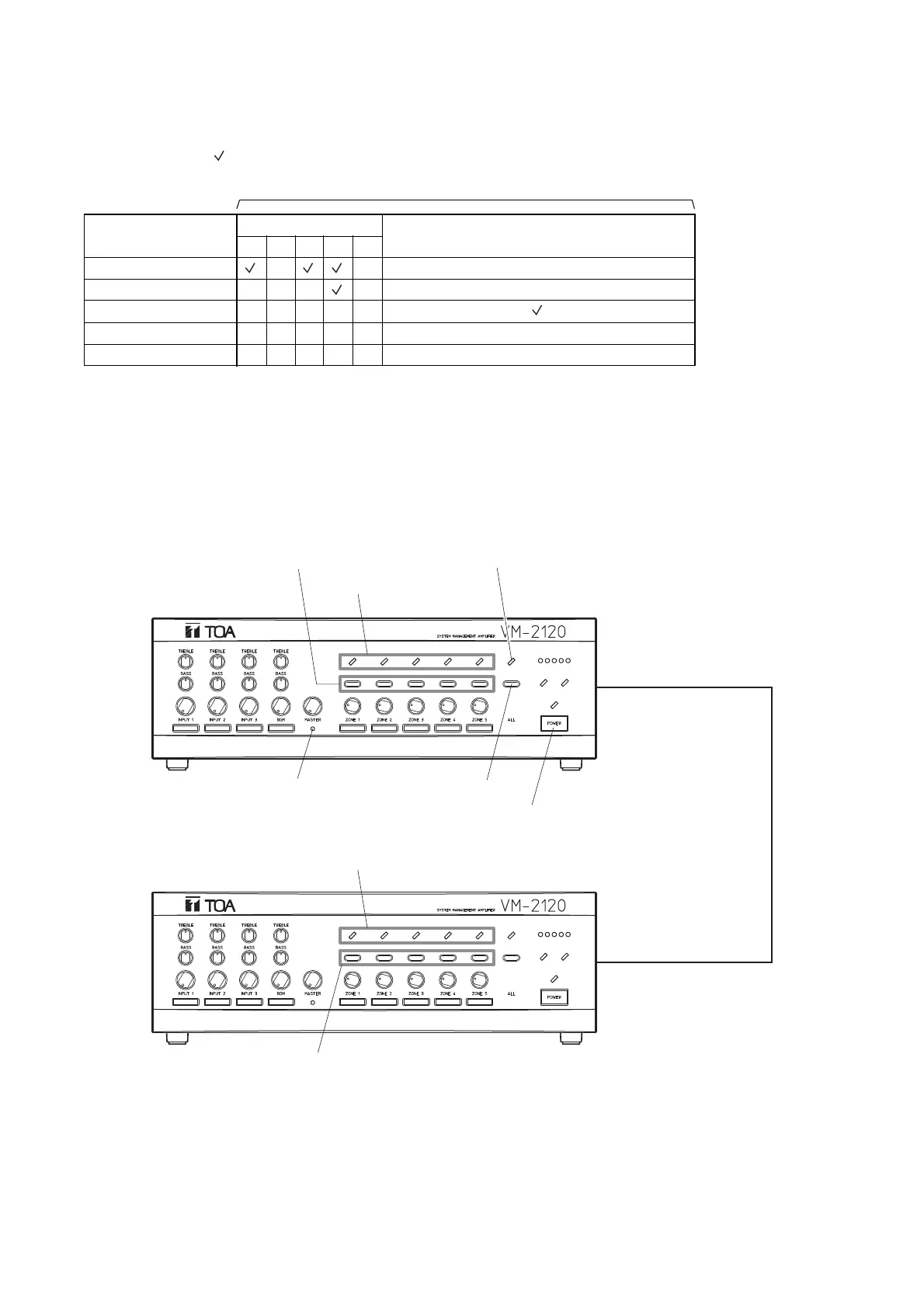
24.2. Operating Keys
*
1
See p. 45 "Indicator status."
*
2
Function as the indicators or keys for the setting items (Group 1 – 5, Message 1 – 5, etc.) as well according
to the setting steps.
• Note that the Sub-unit's zone selector keys function as the ZONE 6 through ZONE 10 keys.
• The figure above shows a 10-zone broadcast system where master unit and sub-unit are linked together.
A 5-zone broadcast system requires the master unit only.



 To Next Page