45
[Group setting contents check]
Complete Steps 1, 2, and 3, then jump to Steps 5 and 6 without executing Step 4 (zone number setting).
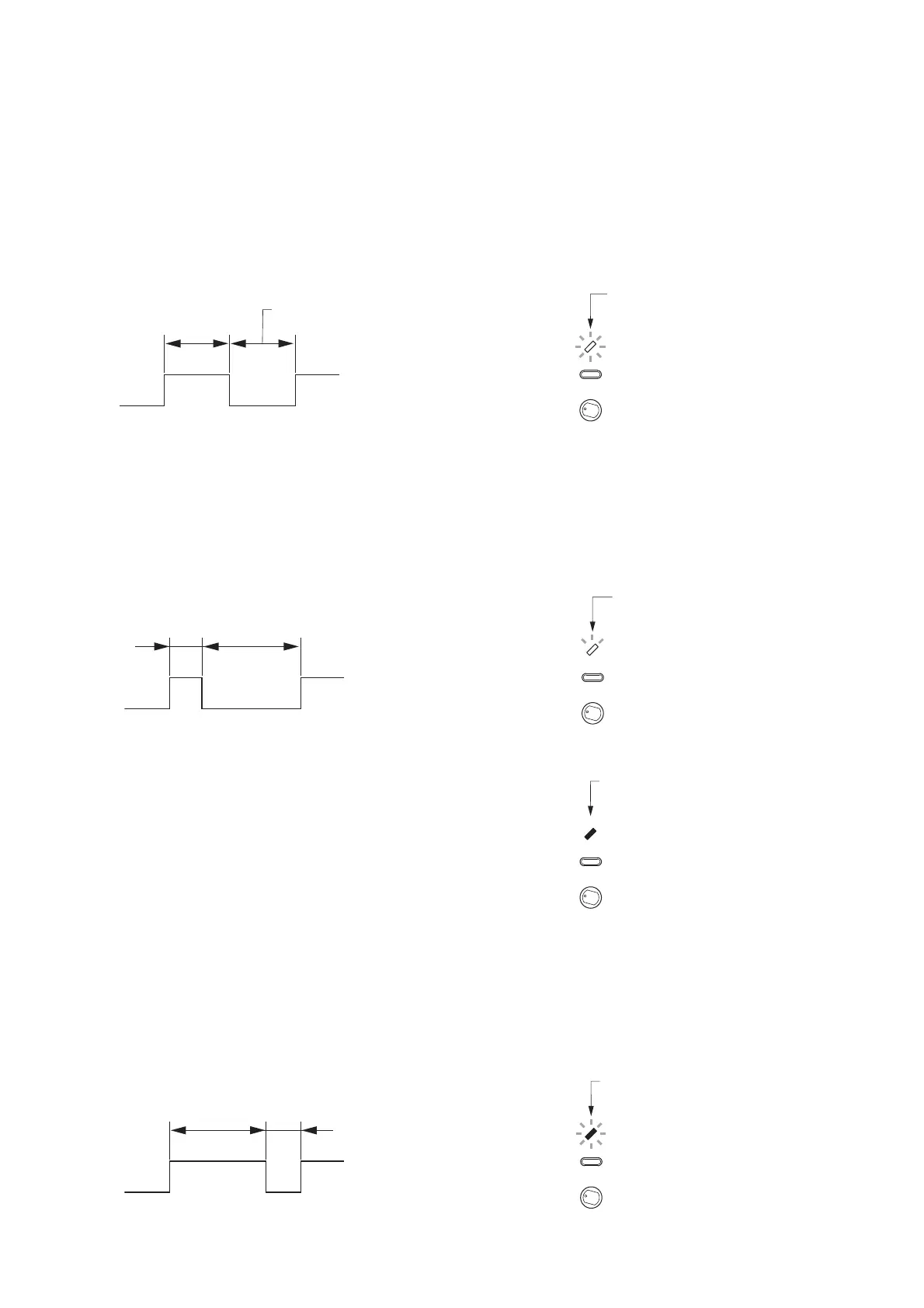
[Indicator status]
(1) Flashing
Equal duration "ON" and "OFF" indicator flashing.
Indicates that the corresponding setting contents (Example: Zone number) have not yet been selected
(setting contents can be selected).
(2) Quick flashing
Indicator flashing with a shorter "ON" duration than "OFF" duration.
Indicates that the corresponding setting item (Example: Group No. 2) was already selected when in the
state of (1) above.
Example: The indicator quickly flashes when Group 2 was selected, but Zone 2 has not yet been selected
(Zone 2 selectable).
(3) Steady on
Indicates that the setting contents were selected.
(4) Slow flashing
Indicator flashing with a longer "ON" duration than "OFF" duration.
Indicates that the corresponding setting item (Example: Group No. 2) was already selected when in the
state of (3) above.
Example: The indicator slowly flashes when both Group 2 and Zone 2 were selected.



 To Next Page