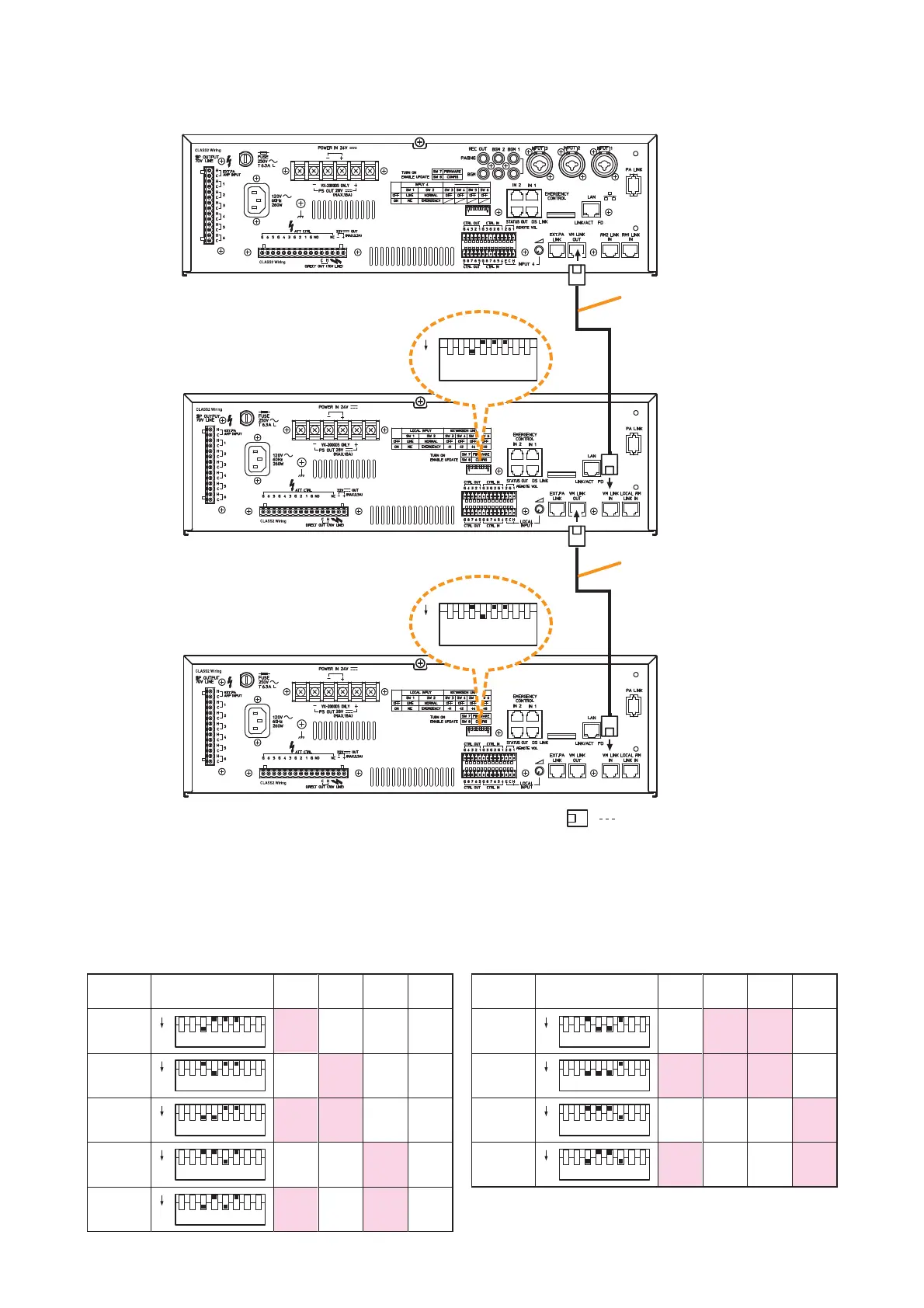
Cat. 5 STP
Unit ID No. 1
Cat. 5 STP
Unit ID No. 2
ID No. 1
ID No. DIP switch
ID No. 2 OFF ON OFF OFF
ID No. 3 ON ON OFF OFF
ID No. 4 OFF OFF ON OFF
ID No. 5 ON OFF ON OFF
ID No. 6
ID No. DIP switch
SW 3 – 6 are DIP switch numbers.
ID No. 7 ON ON ON OFF
ID No. 8 OFF OFF OFF ON
ID No. 9 ON OFF OFF ON
13.8. Connections between VM Amplifiers
Notes
•
When connecting 2 VM-3240E units or more in a system, set the Unit ID with the DIP switch located on each
unit’s rear panel. Make individual Unit ID numbers different because duplicating ID numbers causes unit
malfunction.
•
When the Unit ID of VM-3240E has been changed while the system power is on, be sure to restart the
system by pushing the front-mounted reset switch on the VM-3240VA.



 To Next Page