21
USING THE INSTRUMENT
MEASURING A PROGRESSIVE LENS FOR NEAR VISION
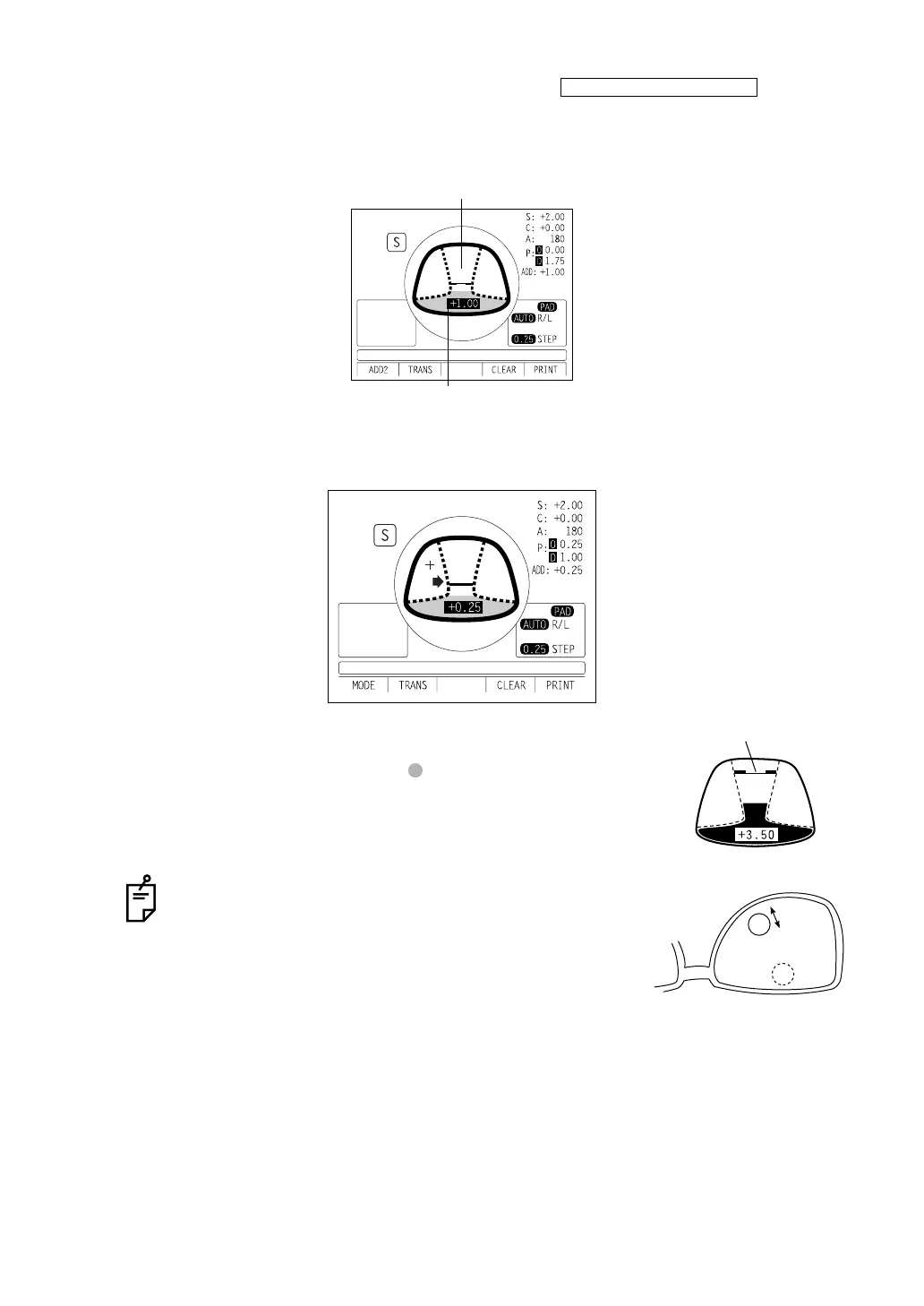
1 While watching the screen, draw out the lens table forward: the bar-meter extends and the
“+” appears. To bring this “+” to the bar-meter center, swing the lens right-left and extend
the bar-meter.
2 The condition illustrated below indicates that a position outside of the progressive zone is
being measured. Move the lens in the direction of the arrow to bring the "+" into the center
of the progressive zone.
3 The “+” becomes larger as it comes closer to the near vision
positon.
4 By pressing the MEMORY button , the ADD power is saved,
the progressive lens measurement is completed.
When measuring a lens mounted in a large frame, the
ADD power may be higher because some lenses
increase the ADD power at a position below the near
vision region. Accordingly, if the lens is measured at a
point lower than the near vision eye point, the ADD
power reading may be higher. If you want to know the
accurate prescription, it is advisable to check the mea-
surement position at the hidden mark.
NEAR MEMORY/OFF
Indicates the maximum value that was measured
ADD value
Indicates the maximum
value that was measured



 To Next Page