Ch 1 Getting Started 3
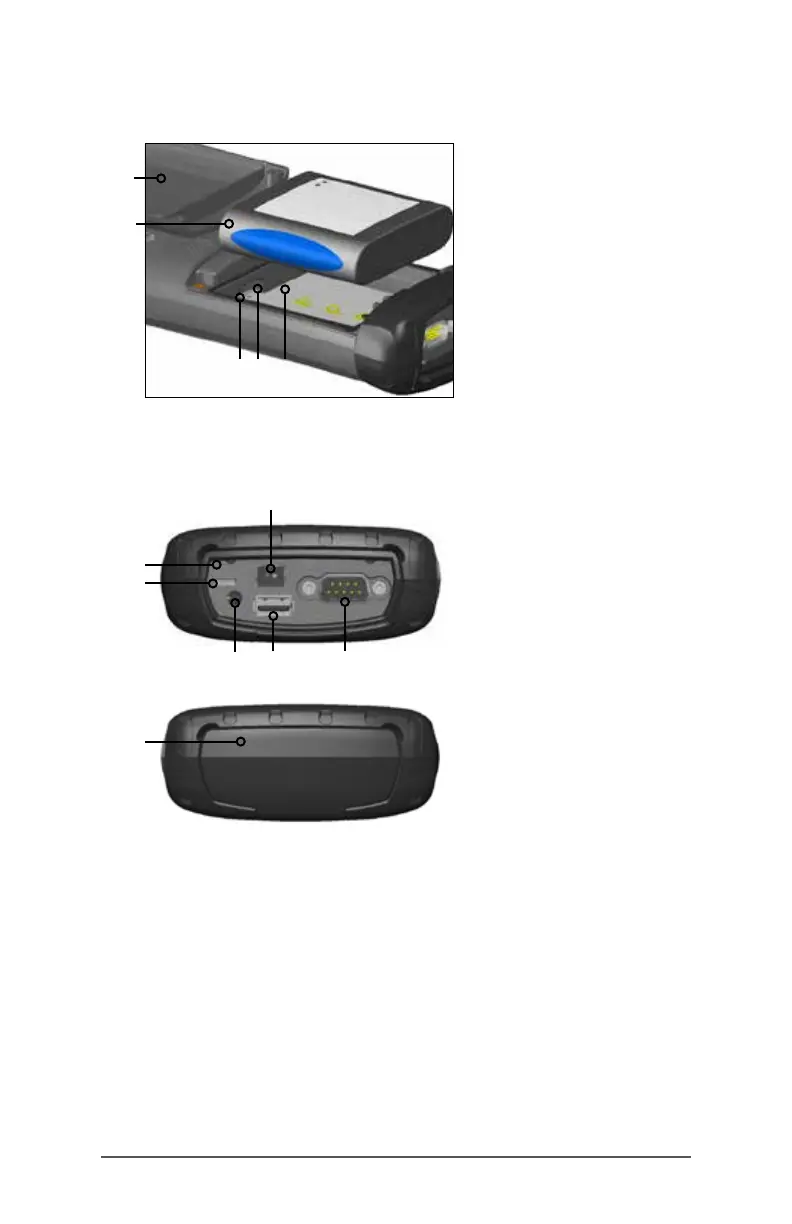
Battery Compartment and Card Slots
Connector Module and Connector Protector
Perform Initial Tasks
When you receive your FC-500, perform the tasks outlined in
this section before rst use.
Review Documentation
You can download the FC-500 Handheld Field Controller
operator’s manual and quick start guide from www.
TopconTotalCare.com.
1 Battery Door (screws and
door removed)
2 Battery Pack
3 SIM Card Slot
4 SD/SDHC Card Slot, Micro
5 Battery Compartment
1
2
3 4 5
1
3
4
5
6
1 Connector Module
2 USB Client, Micro
3 Microphone/Speaker Jack
4 USB Host, Full Size
5 9-pin Serial Port
6 12V DC Jack
7 Connector Protector
2
7



 To Next Page