53
3 STANDARD MEASUREMENT MODE
3.2.3 Measuring from the Required Horizontal Angle
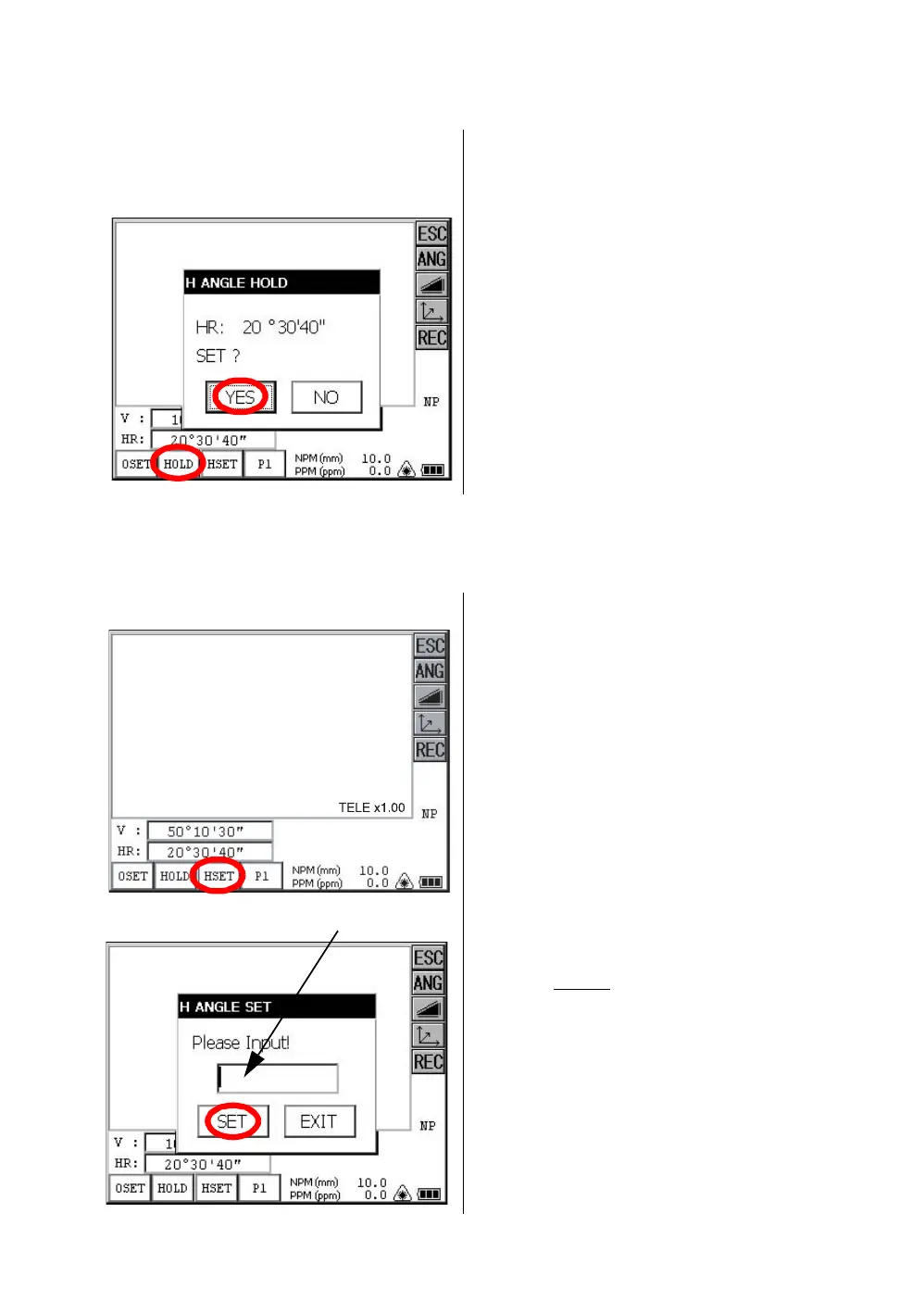
1) Setting by Holding the Angle
Make sure the mode is angle measurement.
2) Setting a Horizontal Angle from the Keys
Make sure the mode is angle measurement.
1 Set the required horizontal angle, using
Horizontal tangent screw.
Example : 20°30'40"
2 Press the [HOLD] key .
3 Collimate the target.*1)
4 Press the [YES] key to finish holding the
horizontal angle.
The display turns back to normal angle
measurement mode.
*1)To return to the previous mode, press the [NO] key.
1 Collimate the target.
2 Press the [HSET] key .
3
Input the required horizontal angle.
For example:70°20'30"
Input 70.2030
4 Press the [SET] key. *1)
When completed, normal measuring from the
required Horizontal angle is possible.
*1)With wrong input value(for example 70'), setting will not be completed. Input again from step 3.
70.2030



 To Next Page
 Loading...
