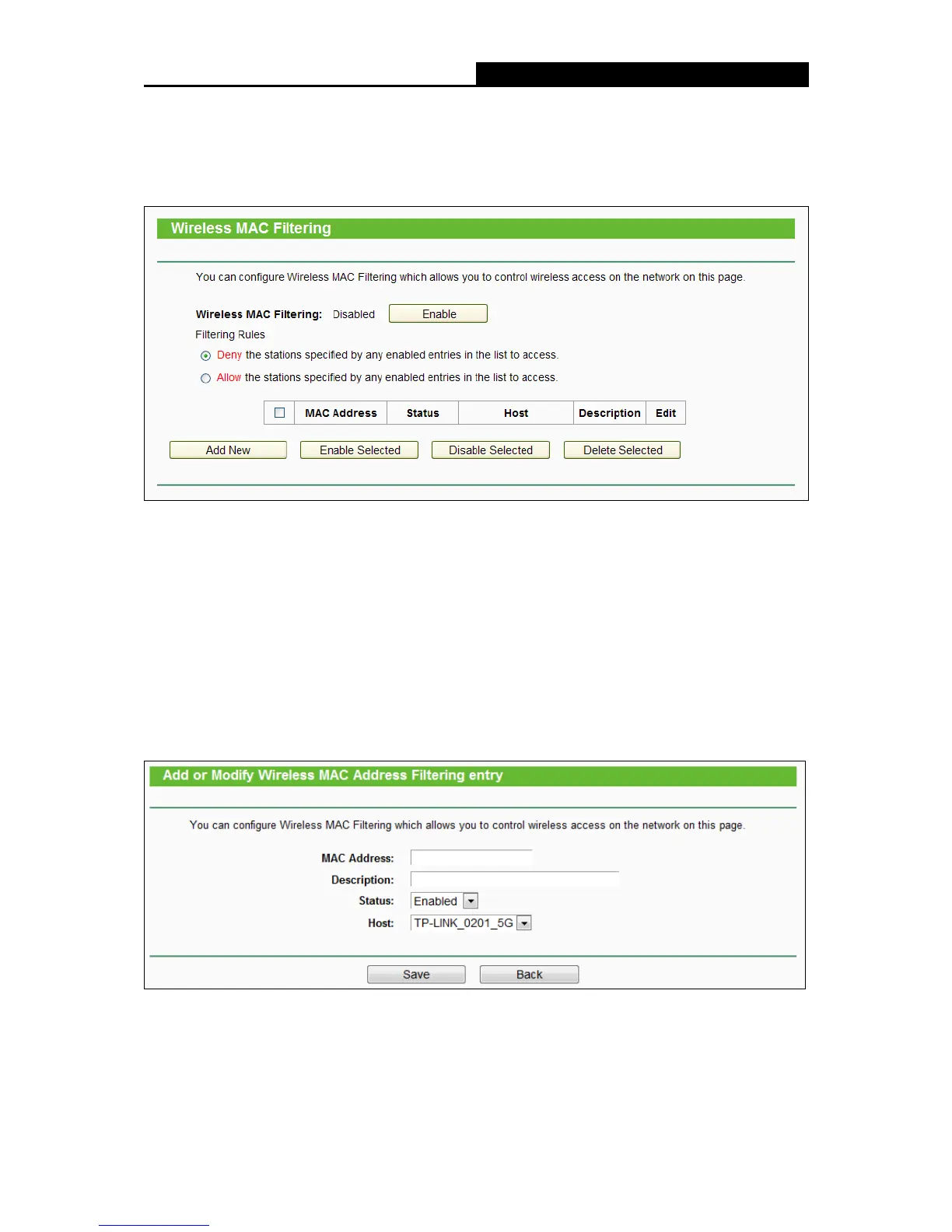
MAC Filtering”, you can control the wireless access by configuring
the Wireless MAC Filtering function, shown in the following figure.
To filter wireless users by MAC Address, click Enable. The default setting is Disabled.
MAC Address - The wireless station's MAC address that you want to filter.
Status - The status of this entry, either Enabled or Disabled.
Host- The host network for the filetring rules.
Description - A simple description of the wireless station.
To Add a Wireless MAC Address filtering entry, click the Add New button. The "Add or Modify
Wireless MAC Address Filtering entry" page will appear:
To add or modify a MAC Address Filtering entry, follow these instructions:
1. Enter the appropriate MAC Address into the MAC Address field. The format of the MAC
Address is XX:XX:XX:XX:XX:XX (X is any hexadecimal digit). For example:
00:0A:EB:B0:00:0B.















 To Next Page