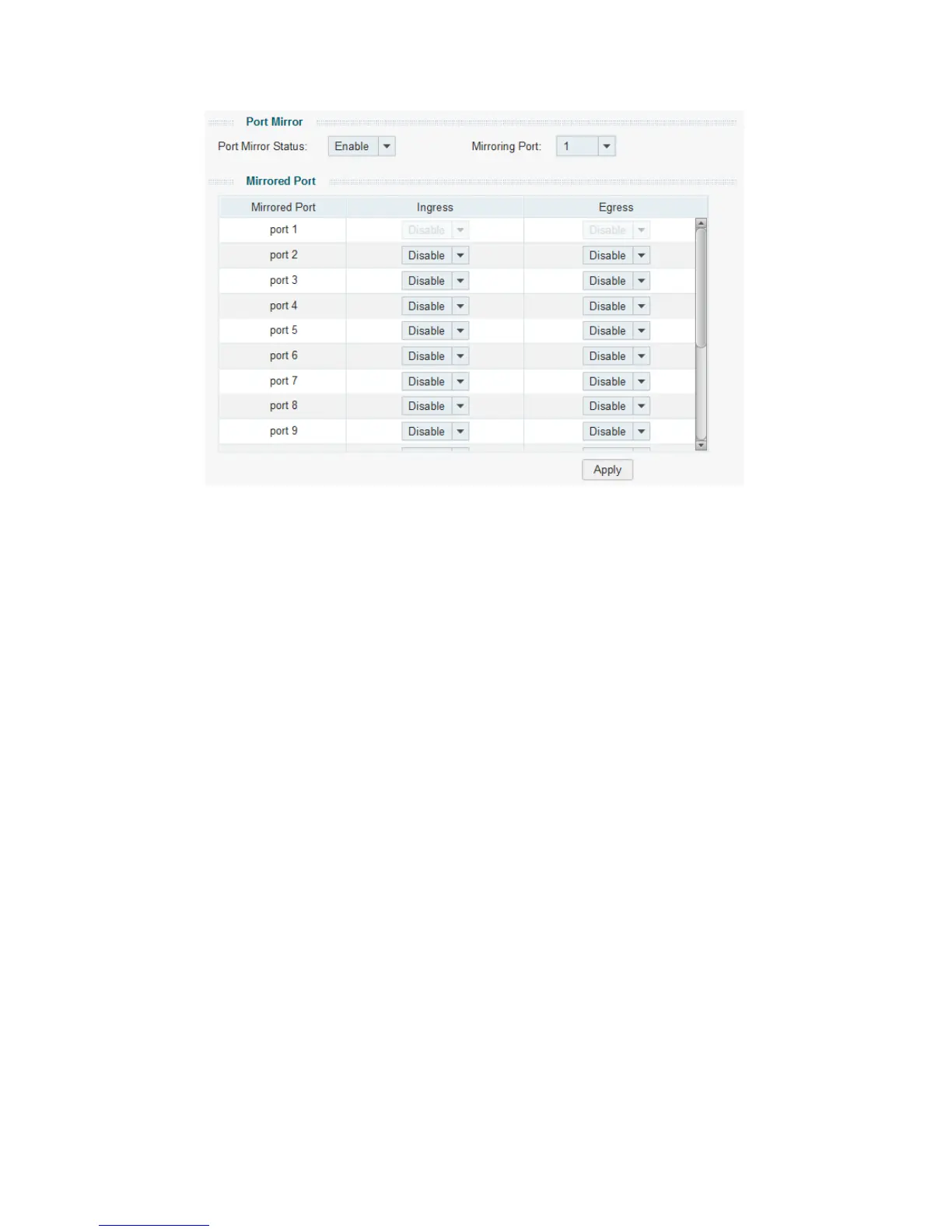
Figure 5-3 Port Mirror (for TL-SG1016DE/TL-SG1024DE/TL-SG1016PE)
The following entries are displayed on this screen:
Port Mirror
Port Mirror Status: Enable or disable the port mirror feature of the specified port.
Mirroring Port: Select a port from the drop-down list as the mirroring port.
Mirrored Port
Mirrored Mode: Select a mode as the mirrored mode.
Ingress: the incoming packets received by the mirrored
be copied to the mirroring port.
Egress:
the outgoing packets sent by the mirrored port will be
copied to the mirroring port.
Both:
all the incoming and outgoing packets of the mirrored port
will be copied to the mirroring port.
Note: For TL-SG1016DE/TL-SG1024DE/TL-
choose enable or disable Ingress and Egress
to control the
packets to be copied.
Mirrored Ports: Click the port icon to select the corresponding port as
port to monitor the traffic.
For TL-SG108E V1.0, with
only one port as mirrored port, it
supports ingress and egress monitoring; when two or more
ports is selected as mirrored ports, it only supports the ingress










 To Next Page