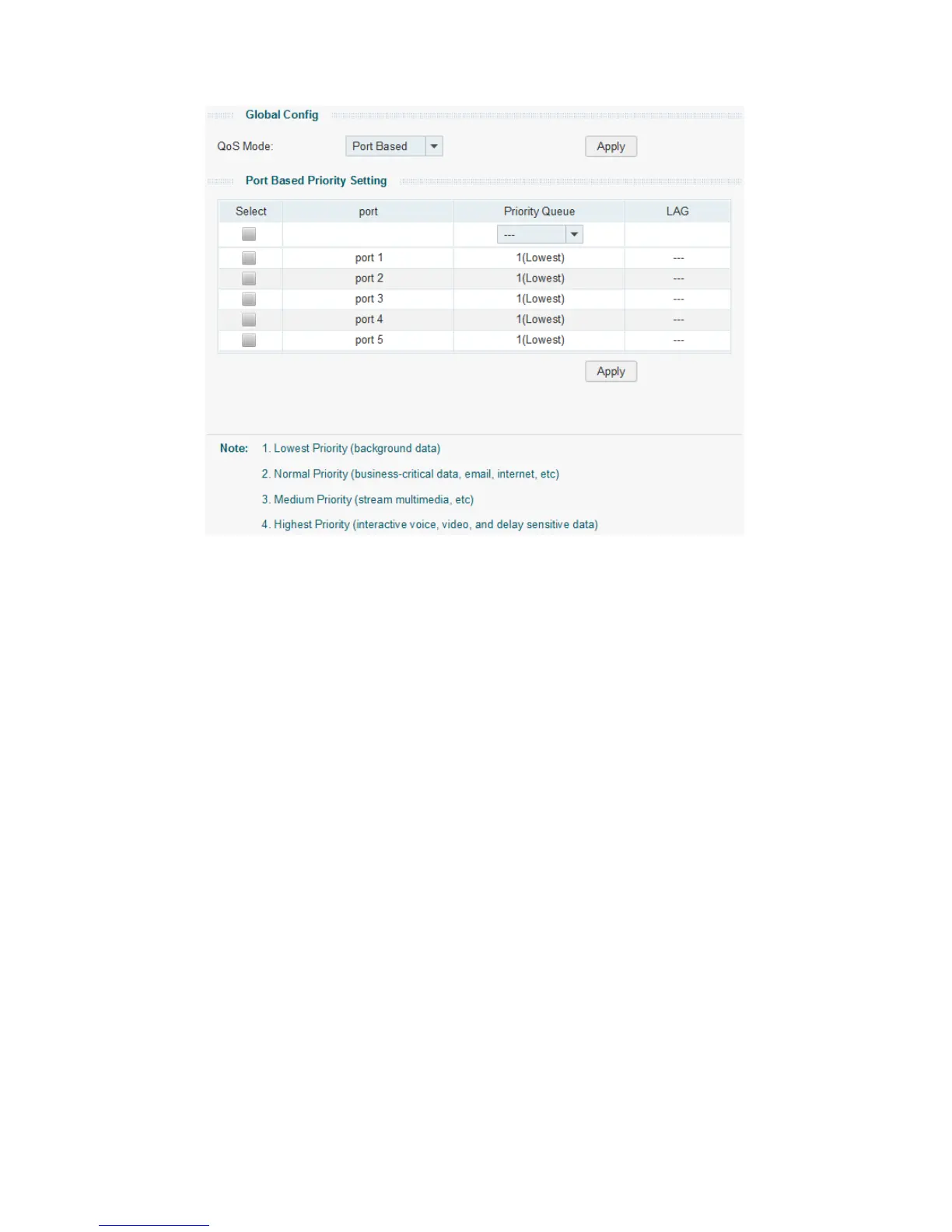
Figure 7-4 QoS Basic
The following entries are displayed on this screen:
Global Config
QoS Mode:
Select the desired QoS mode.
• Port Based:
The packets are mapped to 4 priority levels based on
ingress port.
• 802.1P Based:
The switch classifies the ingress packets
and maps the packets to different priority queues based
on the 802.1p priority field in the 802.1Q tag.
• DSCP Based:
The switch classifies the ingress packets
and maps the packets to different priority queues based
on the DSCP priority field in the IP ToS field.
Port Based Priority Setting
Select:
Select the desired port for configuration. It is multi-optional.
Port:
Displays the port number.
Priority Queue:
Specify the priority queue the packets from the port are
mapped to. The priorities are labeled as 1~4 and among them
the bigger the value, the higher the priority.
LAG:
Displays the LAG number which the port belongs to.
40










 To Next Page