ÿ Rear panel
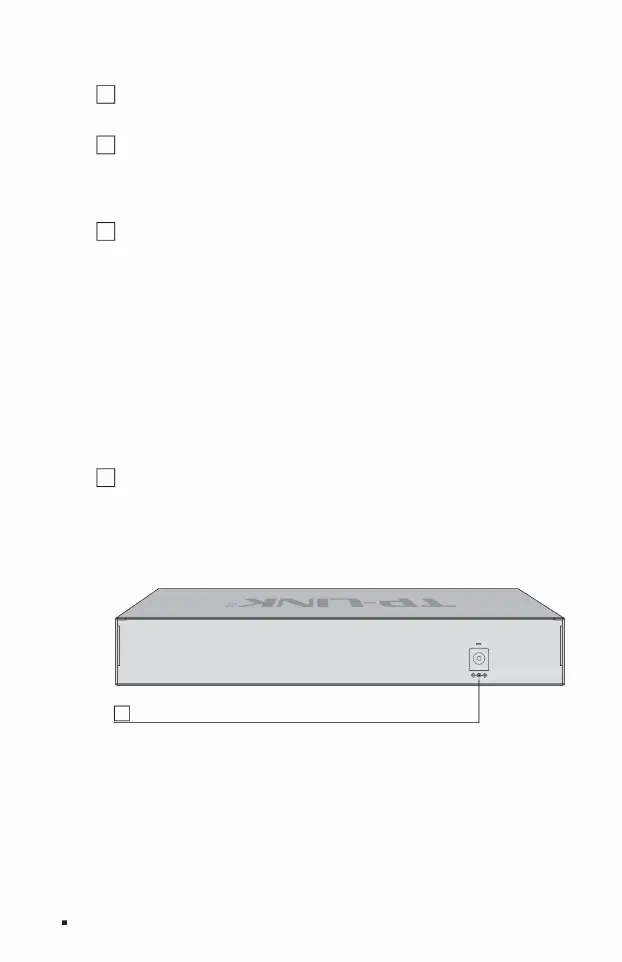
The rear panel of TL-ST2005 is shown in Figure 1-4.
5 system mode selection switch
In this mode, TL-ST2008 is equivalent to a non-managed switch, and all ports can communicate with each other. ÿ VLAN
isolation mode In this mode,
TL-ST2008 is equivalent to a non-managed switch. Ports 1 to 7 are isolated from each other and can only communicate with port 8. ÿ
Cloud management
mode In this mode, TL-
ST2008 supports cloud management. Users can remotely manage the switch through Shangyun APP or TP-LINK commercial cloud
platform, or log in to http://10.18.18.251 to enter the local WEB interface to manage the switch.
ÿ Standard exchange mode
6 Power interface The
DC power interface of TL-ST2008 is connected to the 12VDC/4A DC power supply.
1 power interface
4 Reset button Reset button.
When the switch is powered on, use a pointed object to press and hold the Reset button for more than 5 seconds. The switch will
automatically restore to factory settings and restart. After restoring to factory settings, the default management address is http://
10.18.18.251.
The three modes are described as follows:
3 USB interface to
connect external storage devices.
Full 10G Cloud Managed Switch Installation Manual
04Product Introduction
12V 2.5A
Figure 1-4 Schematic diagram of the rear panel of TL-ST2005
Machine Translated by Google



 To Next Page