33
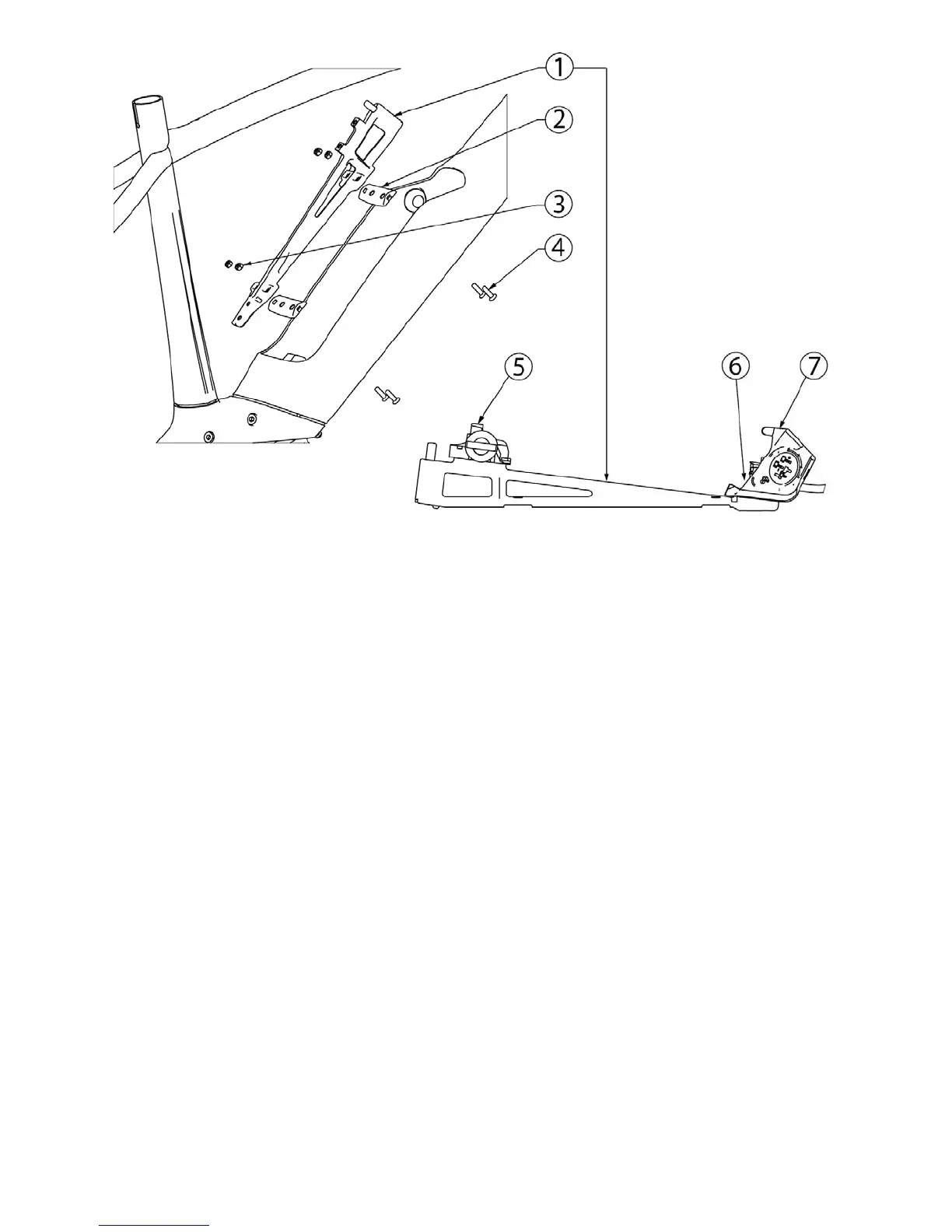
1. Battery rail
2. Spacer (2x)
3. Nut M5, A2, Nylon lock ring (4x)
4. Bolt M5x18, A2, black
5. Battery lock docking (from Bosch kit)
6. Bolt M5x14, A2 (2x)
7. Battery docking (from Bosch kit)
Overview of the battery rail assembly
6.2 Replacing the battery lock
To replace the lock, it is not necessary to remove the battery rail from the frame.
To exchange the battery lock, follow these steps:
1. Remove the battery.
2. Remove the key from the lock (1).
3. Mark* the position of the old lock (2).
4. Remove the screw that holds the lock cover (3).
5. Remove the cover.
6. Unscrew the bolts that secure the locking mechanism.
7. Replace the locking mechanism, use the marking as base of its location.
8. Tighten the bolts of the locking mechanism.
9. Install the battery. If necessary, fine-tune the position of the lock to have the correct fit.
The battery fit should not be too loose (possibly leads to bad contacts or a rattling battery) or too tight
(difficult to remove).
10. Remove the battery to mount the lock cover and fasten it with the screws.
11. Re-install the battery.
*The official way is to use the Bosch dealer calibration tool to determine the correct distance between the battery lock and battery
docking. This leads to more work, because to apply the Bosch tool, both the covers of the locking device and the battery docking should
be removed to make room for the tool
.









 To Next Page