34
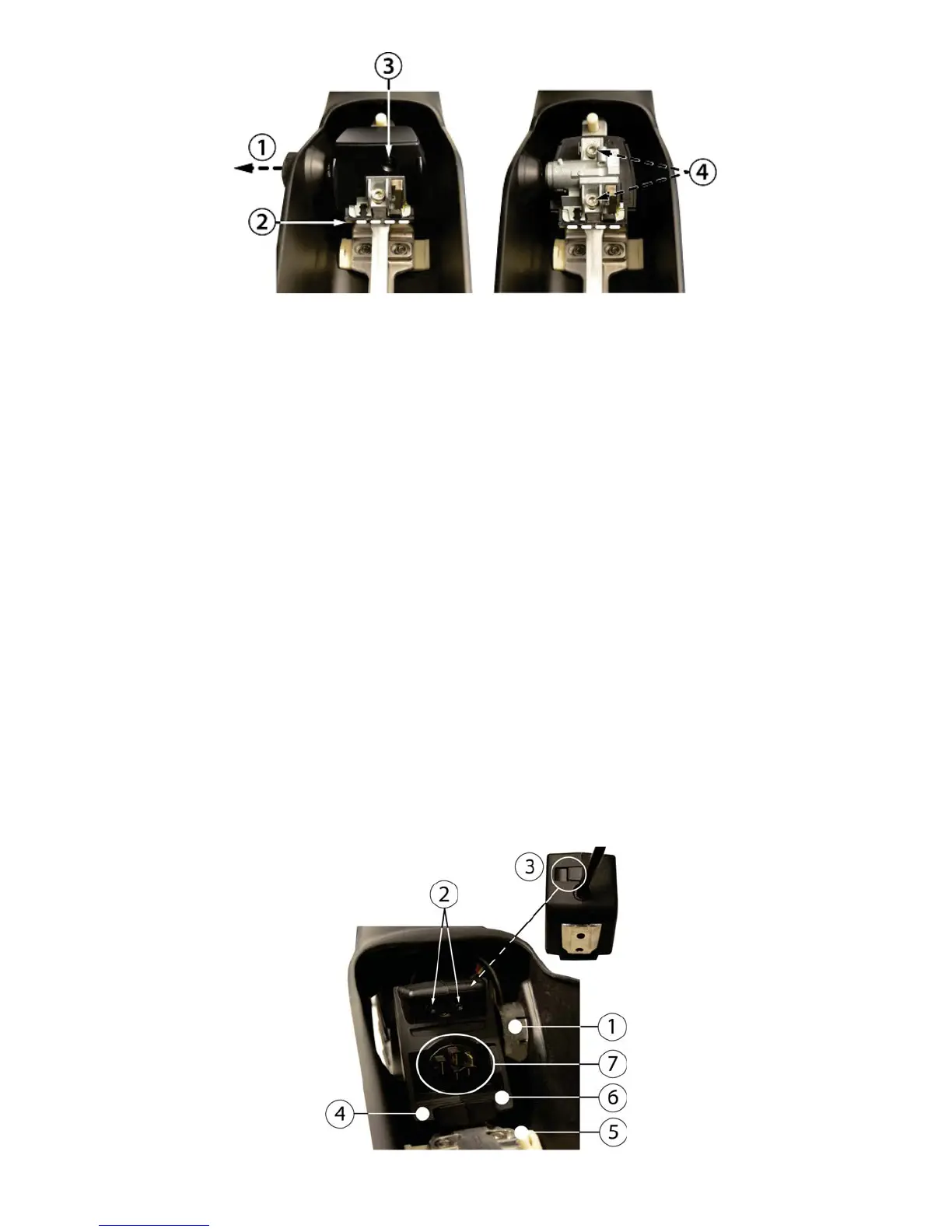
To replace the lock, it is not necessary to remove the battery rail completely
6.3 Replacing the battery docking
The battery docking is an OEM part from Bosch.
When replacing the battery docking, follow these steps:
1. Remove the battery, motor cover and motor armor.
2. Disconnect all connectors at drive unit side.
Tip. Take a picture, or notes, of the position of all cables to/near the drive unit.
3. Remove the drive unit.
4. Loosen the bolts of the battery rail a few turns.
5. Carefully remove the charge cover plug housing from the frame (1).
6. Loosen the two screws that hold the docking covers (2).
7. Loosen the clip at the back of the covers (3, seen from the side of the drive unit).
8. Remove the docking cover at non-charge side (4).
9. Slide the battery rail to the non-charge side to make space to free the other cover (5, 6).
10. Shift the docking cover away to charge side.
11. Carefully remove the battery docking and install the new docking (7).
12. Re-mount all parts in reverse order.
13. Adjust the position of the battery rail (refer to par.
6.1) and tighten the bolts.
14. Test the system for normal operation.
The steps to replace the battery docking




 To Next Page