EasyManua.ls Logo

TREND CDJ600 - Mounting to Workboard; Aligning Workpieces; Clamping Bars & Knobs

TREND CDJ600
50 pages
Print Icon
To Next Page IconTo Next Page
To Previous Page IconTo Previous Page
Loading...
CDJ300 & CDJ600
-10-
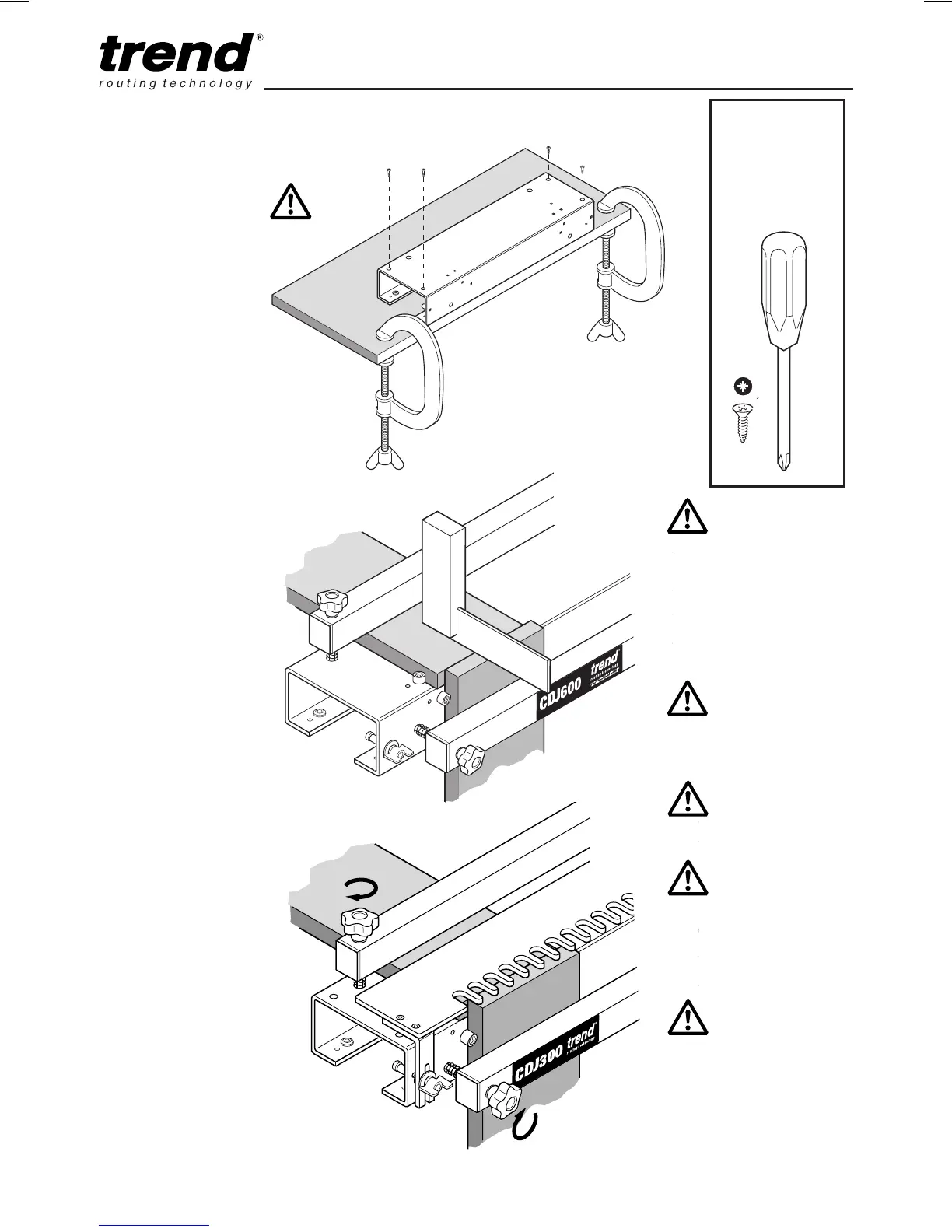
Mounting to
Workboard
Fix the jig body to a
workboard with the screws
supplied.
Aligning
Workpieces
Ensure top of front
workpiece is flush with
back workpiece using a
square.
Clamping Bars
and Knobs
Do not overtighten
clamping knobs. The
clamping bar must be
tightened parallel to the jig.
If working to one side of jig
it is advisable to release
the opposite side clamping
knob first.
Requires:
No.2 Pozi
®
Screwdriver
(not supplied)
No.2
x4
CDJ300 & CDJ600
All drawings show
left hand edge
guides being used.
The same procedure
is carried out for
right hand edge
guides.
Please note that
dimensions are
approximate.
All cutter depths are
as a guide only.
Ensure working
position is
comfortable. Keep
proper footing at all
times.
Ensure jig is clamped
securely to worktop
and placed at a
comfortable working
height.

Related product manuals