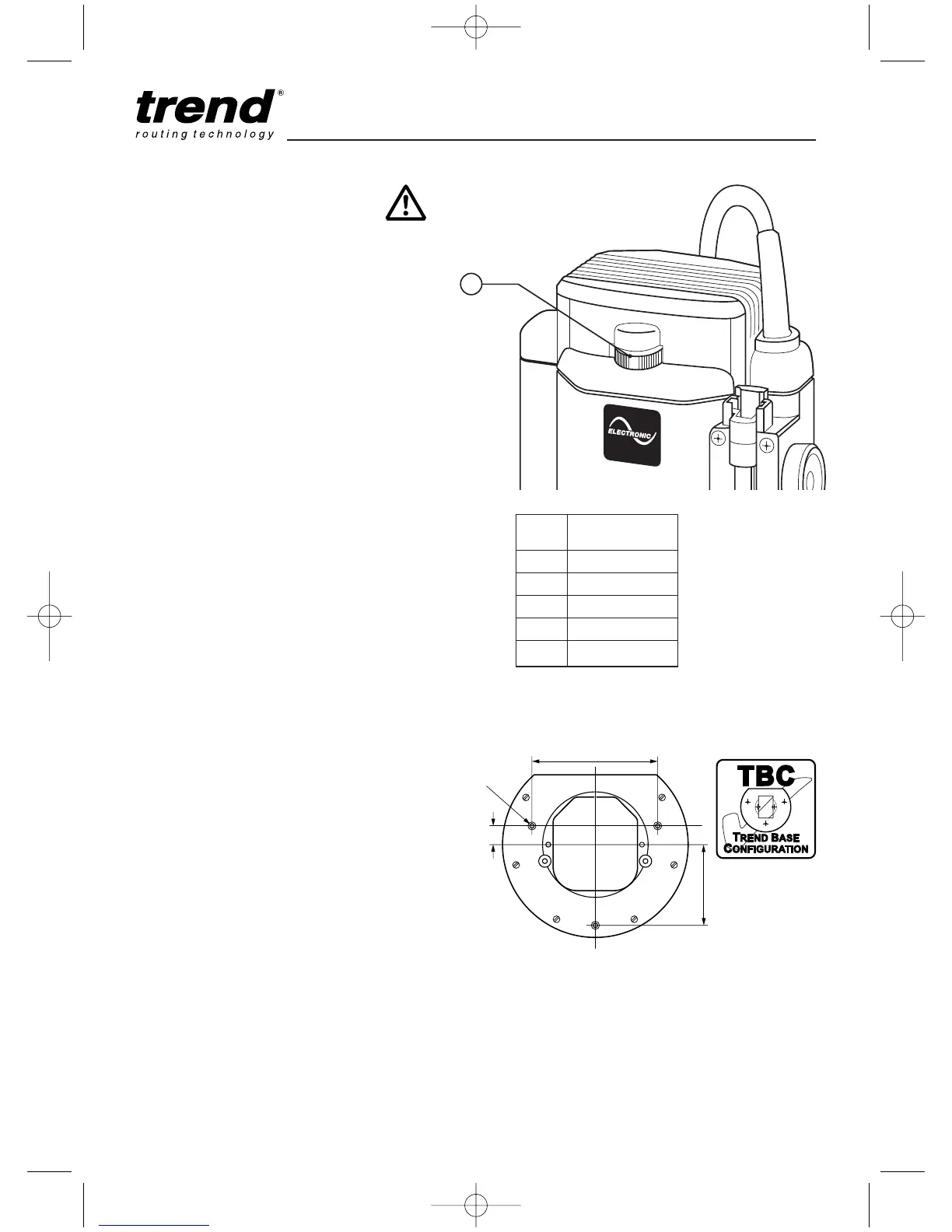
Setting the Electronic Speed
Control Dial
The speed is infinitely variable from 8,000 to
20,000 rpm using the electronic speed control
dial (1) for uniform cutting results in all types of
wood, plastics and in aluminium.
I Turn the electronic speed control dial to the
required level. The dial is numbered from 1 to
5 and corresponds to router speeds from
8,000 rpm to 20,000 rpm.
I Generally, use the lower settings for large
diameter cutters and the higher settings for
small diameter cutters. The correct setting will
also depend on the density of the material,
depth of cut and feed speed of the router, as
severe loss of rpm denotes motor overload.
Dial Router
No. Speed
1 8,000 rpm
2 12,000 rpm
3 16,000 rpm
4 18,000 rpm
5 20,000 rpm
Fixing Points for Accessories
The router has three threaded holes M6 in its
base that allow fitting of accessories and also
fitting to router tables.
A whole range of accessories are shown in the
Trend Routing Catalogue.
Using a Fine Height Adjuster
The T10 has an optional fine height adjuster
accessory Ref. FHA/003 and the T11 has a built
in fine height adjuster. These should be used
when fine height adjustment of the cutter is
required. This is especially recommended when
using dovetail jigs or router tables.



 To Next Page