15D01-060en202008 Manual nanoFlu
UseCalibration
Malfunction &
Maintenance
Introduction
General
Information
FAQ Technical DataWarranty
Customer
Service
Contact
Keyword
Index
Accessories
Commis-
sioning
nanoFlu // Commissioning
• Baud rate: Species the transmission speed.
• Flow control: Activates ow control on the software level (XON/XOFF).
• Parity: Activates the parity check for data transmission. Possible options are:
• None (deactivated)
• Even
• Odd
• Stop bits: Species the number of stop bits.
In the “Protocol settings” section, you can input settings for the active protocol.
• In the Modbus RTU protocol, the following properties are also available:
• Address: This is the slave address for the Modbus communication. It identies the
sensor in the bus system and must be unique.
3.2.2 Network
For the new TriOS G2 sensors, the IEEE 802.3 10BASE-T-compliant Ethernet interface is used as a universal
interface. This makes it possible to connect a single sensor or even to build a complex sensor network.
Network with a single G2 sensor
The easiest way to connect to the nanoFlu is with the G2 interface box. It serves as both the connection and the
power supply for the sensor and can be used with all TriOS G2 sensors.
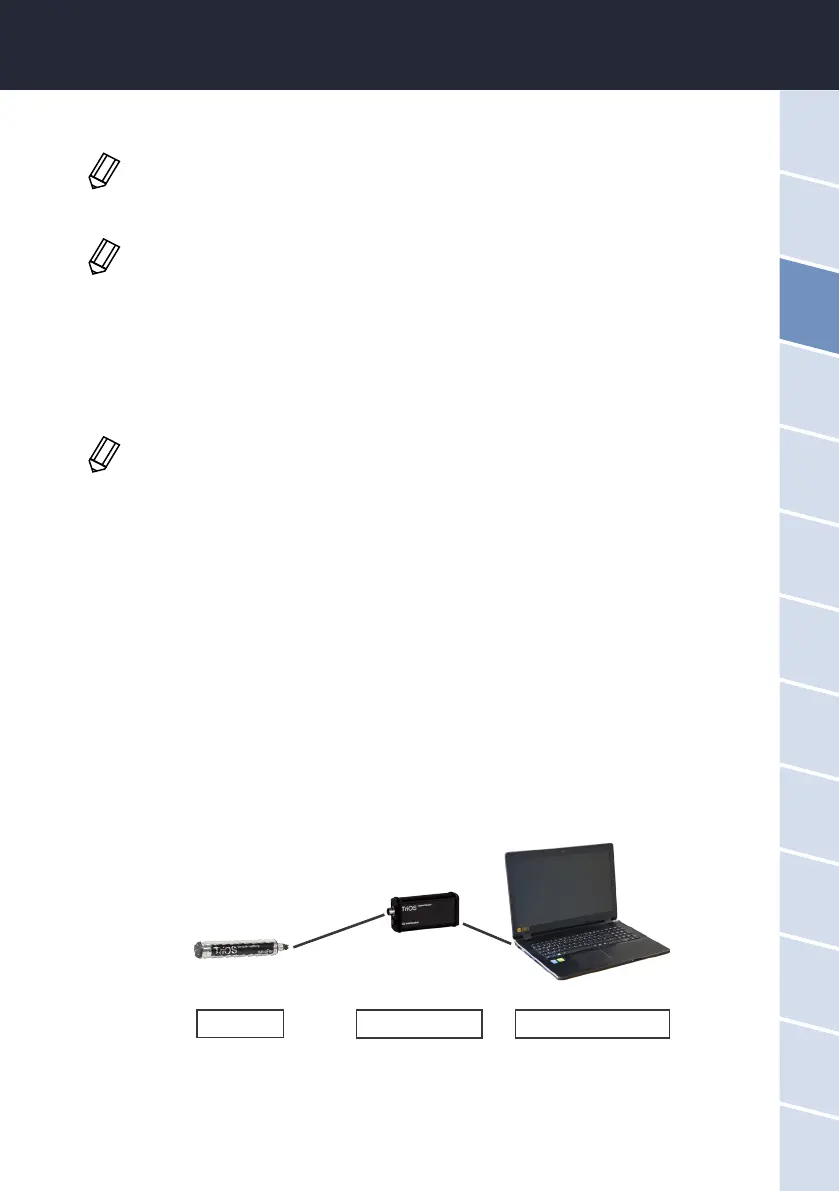
The following gure shows a connection to a single sensor:
The TriOS G2 interface box translates the 8-pin M12 sensor plug to the conventional power supply connections
(2.1 mm barrel connector) and to the network access (RJ45 socket).
G2 sensor
G2 interface box Ethernet-capable device
In the event of diculties in the communication, try to reduce the baud rate.
This is only supported with the internal TriOS data protocol and must be deactivated when
using the Modbus RTU.
In various Modbus devices, it may be necessary to set this to “Two” if a parity check does not
need to take place.


 To Next Page