27D01-060en202008 Manual nanoFlu
UseCalibration
Commis-
sioning
Introduction
General
Information
FAQ Technical DataWarranty
Customer
Service
Contact
Keyword
Index
Accessories
Malfunction &
Maintenance
nanoFlu // Malfunction & Maintenance
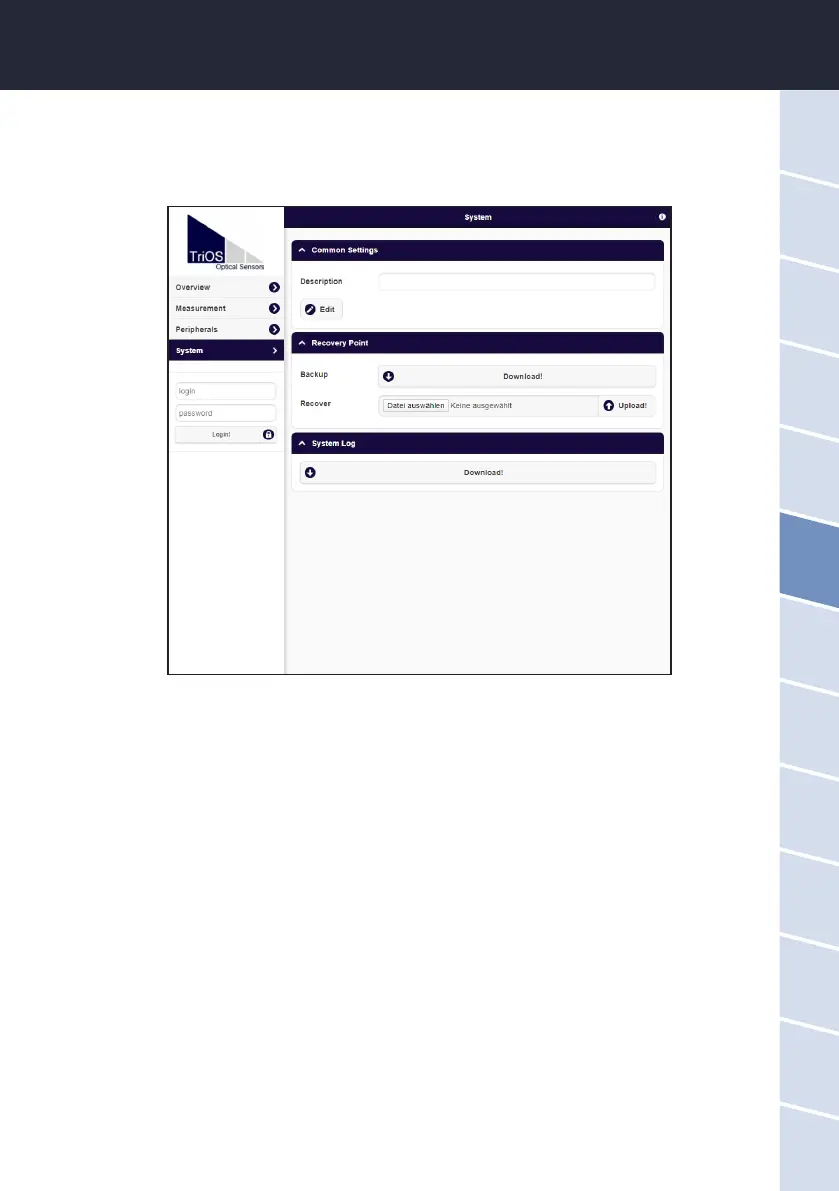
6.2.2 Restore Point
On the “System” page, a previously downloaded calibration can be restored or a calibration le created by the
service of TriOS Mess- und Datentechnik GmbH can be installed on the sensor.
To upload a previously saved restore point, use the le dialog located behind the "Browse..." button to enter the
save path to the corresponding calibration le in the "Recover" eld. Next, click on the “Upload” button to begin
the transfer. When the process has been successfully completed, this will be indicated by a green “Success”
box. If the process is not successful, a red box will be displayed with an error message.
The following error messages and warnings are possible:
• File not OK. The calibration le could not be read correctly. Make sure that you have selected the correct
le and repeat the process. If the error persists, please contact TriOS customer support at support@
trios.de.
• Device type or serial number does not match. The calibration le is not suitable for the sensor currently
connected. Make sure that the correct calibration le has been selected.


 To Next Page