8 D01-051en202111 Manual TriBox3
Use
Advanced
Use
Malfunction &
Maintenance
Commis-
sioning
General
Information
FAQTechnical Data Warranty
Customer
Service
Contact
Keyword
Index
AccessoriesIntroduction
Introduction // TriBox3
2.4 Control Elements
2.4.1 Display
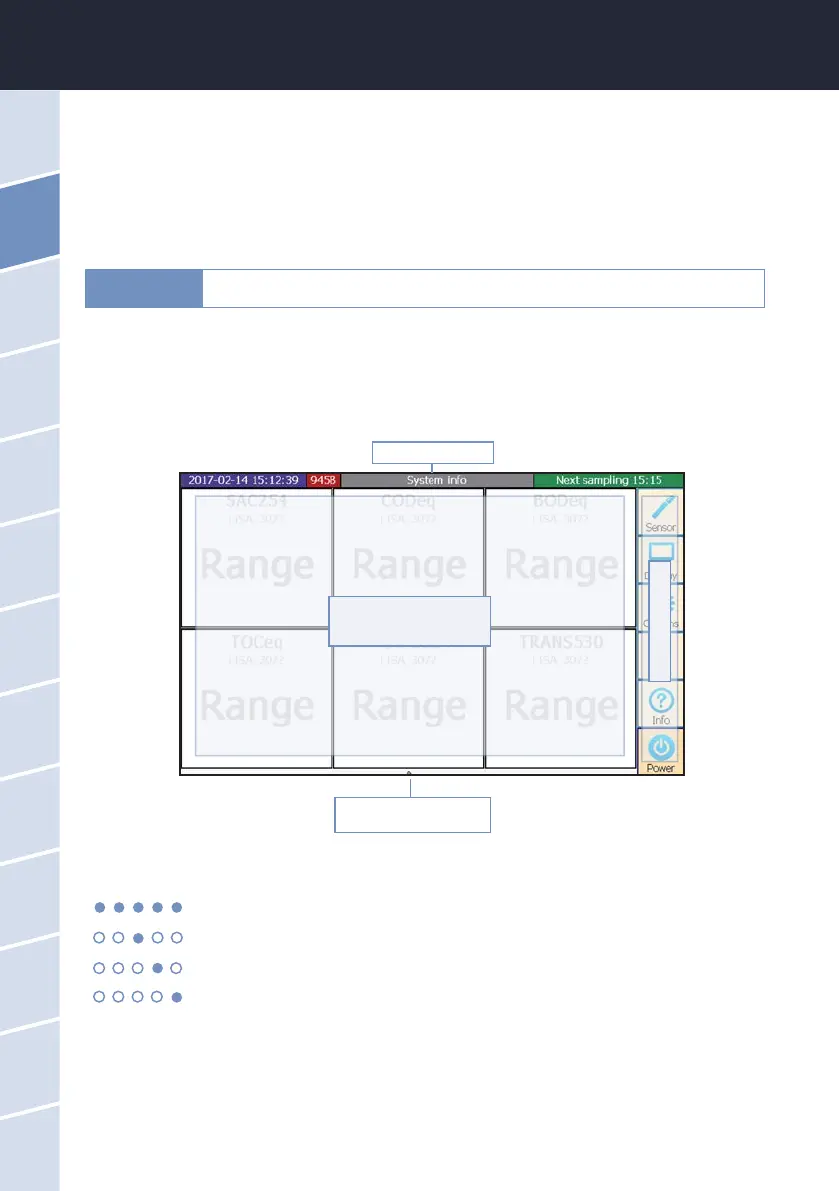
The TriBox3 has a capacitive touch-display with a resolution of 800x480 pixels. The display is not controlled
by pressure, rather by touch or light tapping. It can be operated with bare ngers or with a special touch pen.
The main screen as well as the xed control elements to the right and above can be congured individually.
The measurement values/spectra and the device conguration of the TriBox3 can be represented by the user
using dierent displays. With the touch screen, the various displays can be selected by “swiping” or touching.
Navigation bar
Individually congurable
display area
Menu page
Display of available
pages
2.4.2 Status LED
ashing in service mode
active power supply for the sensor (see chapter 3.4.4)
measurement active
cleaning active
The use of sharp or pointed objects when operating the touch-display can cause
damage to the display.
NOTICE



 To Next Page