26 D01-051en202111 Manual TriBox3
Advanced
Use
Malfunction &
Maintenance
Commis-
sioning
Introduction
General
Information
FAQTechnical Data Warranty
Customer
Service
Contact
Keyword
Index
AccessoriesUse
Use // TriBox3
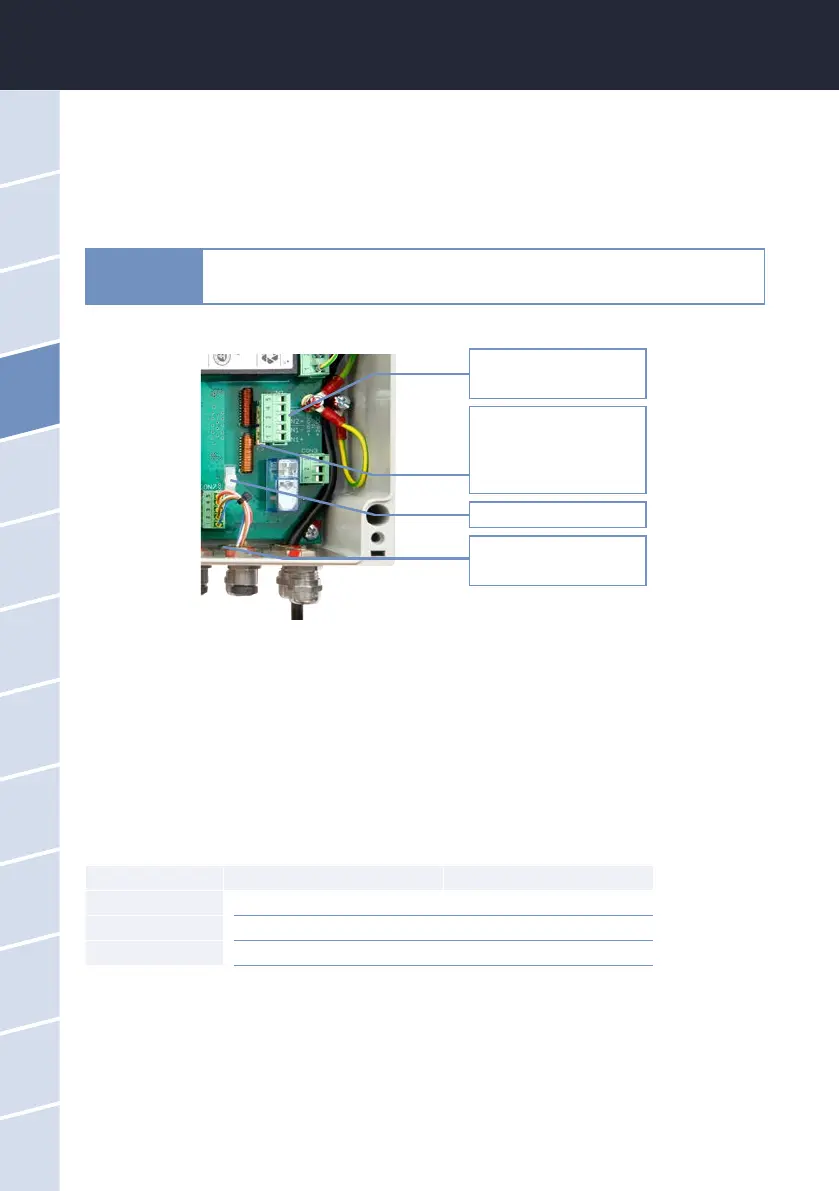
Fuses F2 and F3 for DC
power supply underneath
the plug (see chapter
6.3.1)
Cable bushing
DC power supply
Plug for DC power supply.
Cable-tie holder
5. Put the plug back in the socket and tighten the nut of the cable bushing until the power line rests snugly in
the cable bushing.
6. Attach the cable to the white cable-tie holder with a cable tie.
7. Close the housing of the TriBox3 and screw the cover closed. After the aluminium panels are attached, the
device can now be put into operation.
4.2.3 Prioritized Supply Voltage
The TriBox3 can be operated with AC or DC voltage. The TriBox3 automatically chooses the power supply with
the highest priority from the available input voltages. Prioritization is preset:
Priority Assignment Connectors/Pins
1 AC voltage CON1, pin 1-3
2 DC voltage VIN1 CON2, pin 1-2
3 DC voltage VIN2 CON2, pin 3-4
When more than one input voltage is being used at the same time, the power supply can also be switched or
chosen when the device is on, allowing operation without interruption. If two DC input voltages are being used,
these should have about the same potential (within 12 – 24 VDC (± 5%)).
Always use wire end ferrules with exible conductors. Keep the exible conduc-
tors short. Make the protective conductor longer than the other conductors. The
small cable glands are designed for sheath diameters of 3.5-7 mm.
NOTICE



 To Next Page