42 D01-051en202111 Manual TriBox3
Use
Malfunction &
Maintenance
Commis-
sioning
Introduction
General
Information
FAQTechnical Data Warranty
Customer
Service
Contact
Keyword
Index
Accessories
Advanced
Use
Advanced Use // TriBox3
5 Advanced Use
5.1 Data Export
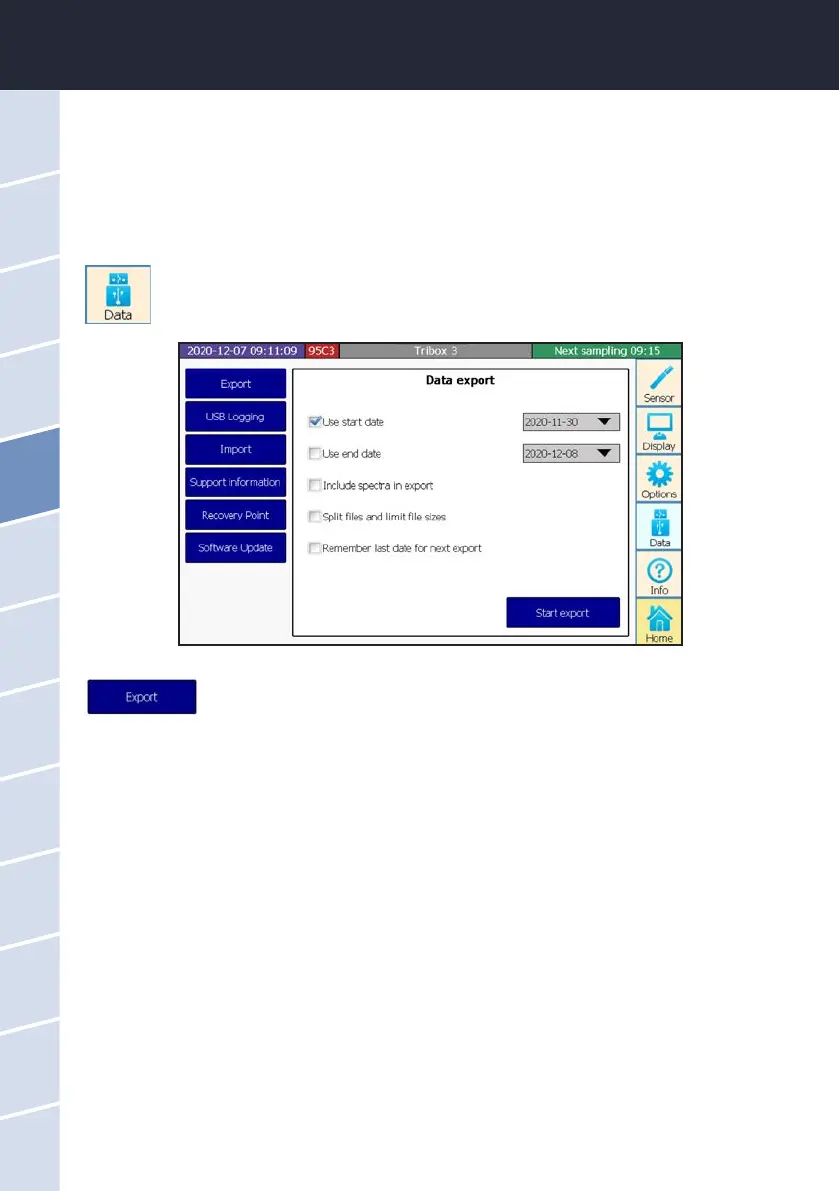
The “Data” button opens a submenu where all settings for data exchange using a USB stick (e.g.
data, software, calibration les, etc.) can be congured and executed.
The subitem “Export” allows data and spectra to be copied from the TriBox3 to USB
sticks, and this data can then be evaluated using standard programs.
Certain export characteristics can be dened in the ve checkboxes:
“Use start date”
All data beginning with the start datum is copied to the USB stick.
“Use end date”
All data up to the end date is copied to the USB stick.
“Include spectra in export”
If using spectral probes, this allows the spectra to also be copied to the USB stick.
This selection is justied because the data volume of a spectrum is signicantly greater than the calculated
number values. Export may take a while for spectra of longer time periods. If spectra are being used for evalu-
ation, it is always recommended to activate the following subitem “Log to USB”.
“Split les and limit le sizes”
The exported data will be written into several smaller les instead of one large le. For later evaluation, these
individual les are then easier to handle.
“Remember last date for next export”
The datum from the last exported measured value is saved internally and can then be used as the start datum
of the next export.



 To Next Page