63D01-051en202111 Manual TriBox3
Use
Advanced
Use
Commis-
sioning
Introduction
General
Information
FAQ Technical DataWarranty
Customer
Service
Contact
Keyword
Index
Accessories
Malfunction &
Maintenance
TriBox3 // Malfunction & Maintenance
6.3.3 Sensor is not displayed
As soon as a sensor is connected to the TriBox3, it is displayed under the corresponding COM port.
If the sensor does not appear in the display even after pressing the “Scan for Sensors” button, this can have
various reasons.
Settings for data communication do not match
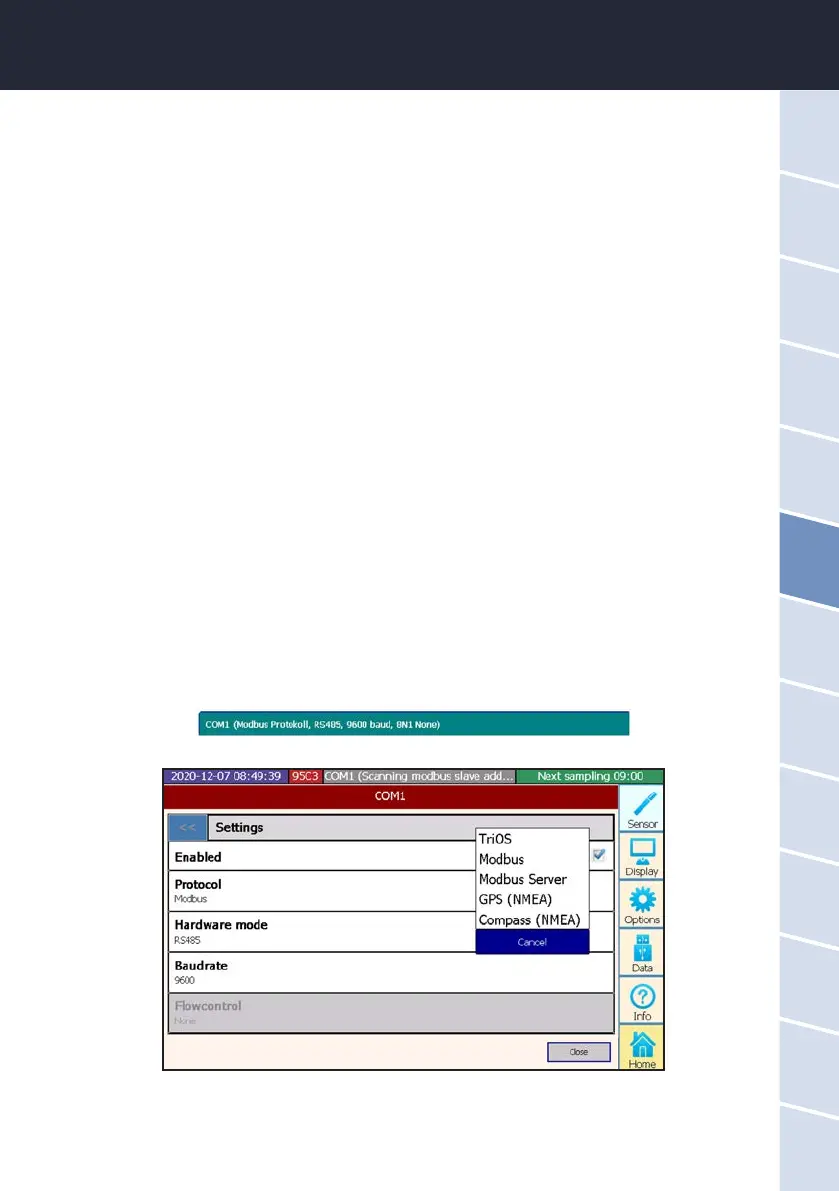
If the standard settings as shown in chapter 4.3 do not cause the device to be displayed, a G2 interface connec-
tion with the sensor should be established and the sensor settings should be set to the following:
Protocol: Modbus
Hardware mode: RS-485
Baud rate: 9600
Flow control: None (setting locked when using Modbus protocol)
Parity: None
Data bits: 8
Stop bits: 1
If sensors are not Modbus-capable (see FAQ), the protocol must be reset to the TriOS data protocol if neces-
sary.
Next, connect the sensor to the TriBox3 again and carry out the “Scan for Sensors” function once more.
The respective settings of the individual COM ports are visible in the green elds of the COM ports. The settings
menu opens by clicking on the COM port button.



 To Next Page