20 D01-051en202111 Manual TriBox3
Advanced
Use
Malfunction &
Maintenance
Commis-
sioning
Introduction
General
Information
FAQTechnical Data Warranty
Customer
Service
Contact
Keyword
Index
AccessoriesUse
Use // TriBox3
4.1 Mounting
The TriBox3 will be securely screwed to a solid wall or similar feature.
Make sure that the mounting surface selected is level and able to securely hold the device.
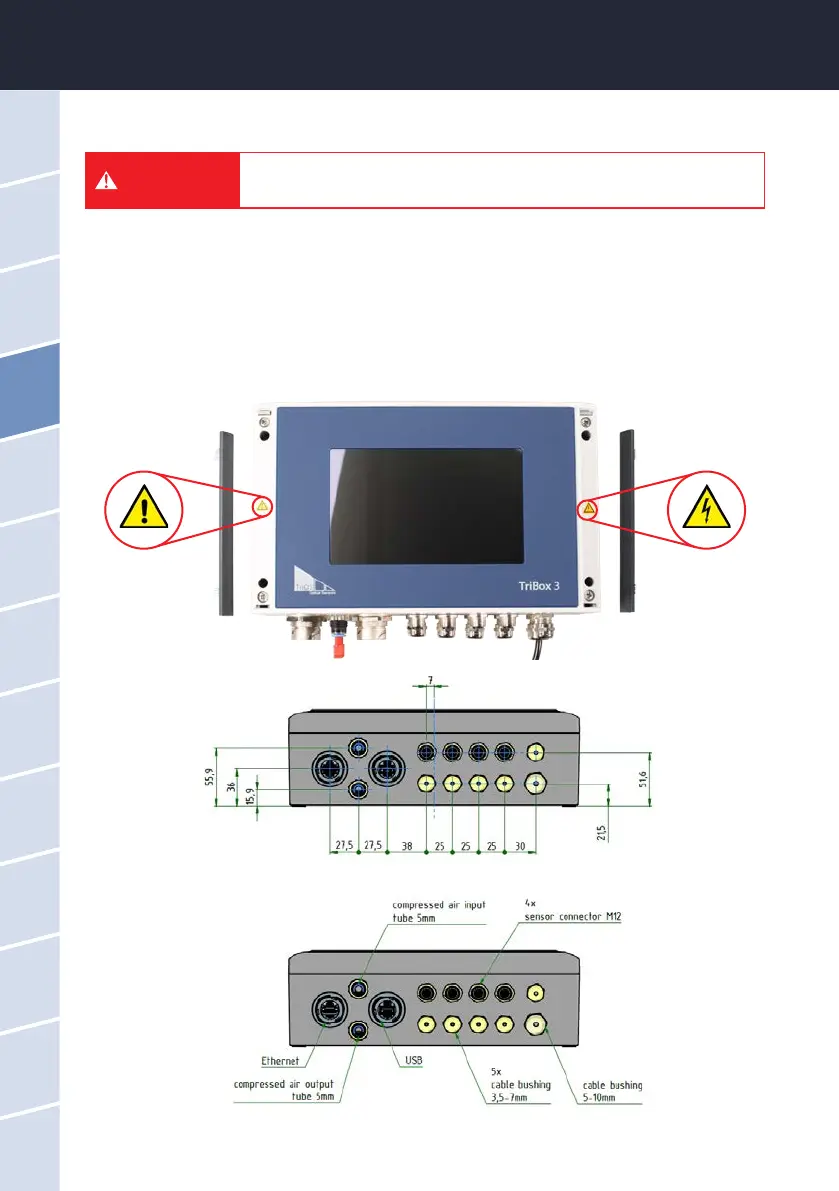
1. To mount the device, carefully remove the aluminium panels on both sides of the TriBox3 (see gure).
2. The device will be attached downward with the connection sockets. To ensure the IP protection level, all
unused connections must be sealed with the plugs used by the manufacturer.
3. There are two 5.3 mm holes on each side of the TriBox3 for mounting. Make sure the TriBox3 is securely
attached after installation.
Before making any changes to the power line or the plug, it is essential to
make sure that the power is disconnected and cannot be reconnected or
switched on.
DANGER



 To Next Page