47D01-051en202111 Manual TriBox3
Use
Malfunction &
Maintenance
Commis-
sioning
Introduction
General
Information
FAQ Technical DataWarranty
Customer
Service
Contact
Keyword
Index
Accessories
Advanced
Use
TriBox3 // Advanced Use
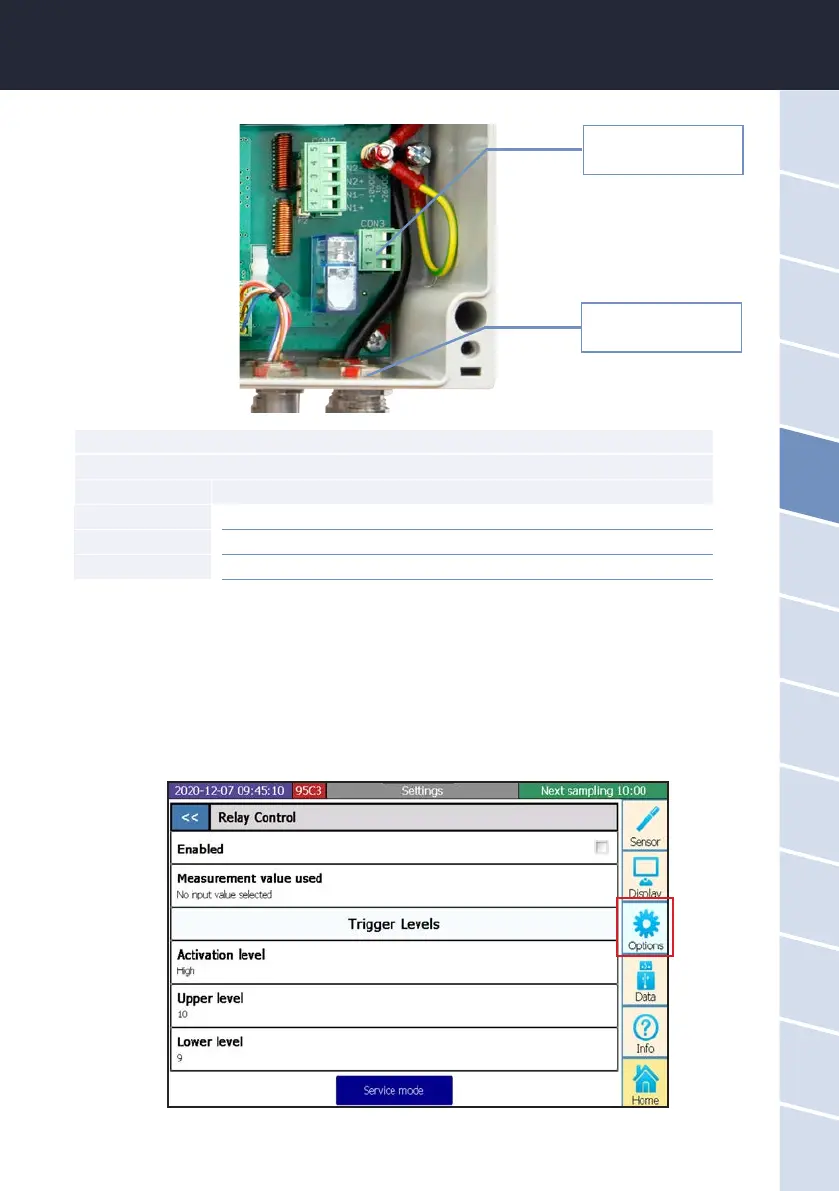
Clicking the checkmark in the subitem “Relay control” activates a routine that is congured in the subsequent
points.
This denes the parameter that inuences the relay trigger and its activation and deactivation limit.
Plug for relay change-
over contact
Cable bushing for relay
CON3 connector
Relay changeover contact
Pin Assignment
1 Normally closed contact (NC)
2 Changeover contact (CO)
3 Normally open contact (NO)
1. Put the plug back in the socket and tighten the cable bushing snugly but not too tightly.
2. Attach the cable to the white cable-tie holder with a cable tie.
3. Close the housing of the TriBox3 and screw the cover closed. After the aluminium panels are attached,
the device can now be put into operation.



 To Next Page