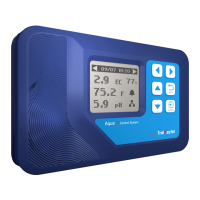
BUTTONS
The NFS-1 Aqua-X Controller is extremely easy to use. The backlit
128x128 LCD display will provide the user with the current conditions
and access all settings. All settings are accessed by using the 6 push
buttons on the front of the unit. The button functions are described
below.
Familiarize yourself with the function of the 6 buttons on the front
of the NFS-1 Controller in order to able to access settings, and to better
understand how to use the NFC-1 Control System to its greatest
potential.
START SETTINGS
Once you have connected 24V Control Board, 110V Control Board(s),
Sensor Board(s) and Water Detectors to the NFS-1 Controller , we can
start using the unit.
Connect the plug-in power supply to the power connector on the bottom
of the NFS-1 Controller . NFS-1Controller will turn on and boot up.
If it is the first time you have used the NFS-1Controller , when you power
on the NFS-1 Controller , the Welcome screen / page will display and
remind user to press “ENTER” to set system time.
Welcome to
Aqua-x
Control Sustem
Press “ENTER” to
set system
time
TrolMaster
Aqua-x
Control System
V-0.3
First-Use Welcome Page
Normal Start Page
Default Time
Current Time (Example)
NOTE: Press theENTER button to set system time before use.
Time Setting: please refer to P23 for the time setting so as to change the default
time into the current time before use.
00 00 00
16 15 58
Jan 01 2018
Mar 08 2018
UP / DOWN: The UP and DOWN buttons move the cursor up and down
to select
the item on the LCD display.
LEFT / RIGHT: The LEFT and RIGHT buttons move the cursor to previous
page or next page, left item or right item.
BACK: The BACK button goes backwards to the previous page.
ENTER: The ENTER button is used to open the menu item to be
changed
as well
as to accept and save the new setting.
10 11


 To Next Page
 Loading...