Page 8
13. Installing Batteries
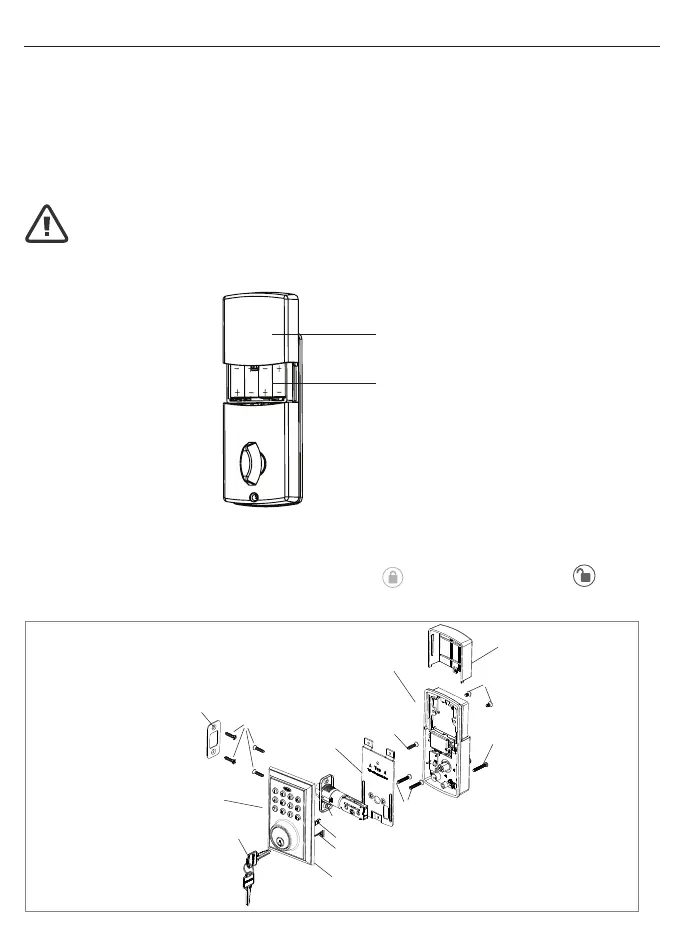
a. Slide battery cover up and remove.
b. Insert 4 AA high quality Alkaline batteries into the Battery Compartment in the
direction noted +/- on the Compartment. The Lock will beep 2 times, the keypad
will illuminate blue, and the Tru-Bolt button will ash green twice to signify that
it has received power (Figure 13a).
c. Replace battery cover and slide down on to the Interior Assembly to cover the
batteries (Figure 13b).
14. Testing Lock
a. Always test with the Door Open
b. Test the Lock using the Interior Knob. The bolt should move smoothly in and out.
c. Test the Lock using the Keypad. To lock press and then press “1234”
to unlock.
INSTALLING INTERIOR ASSEMBLY (CONT.)
Battery
Cover
4 AA
Batteries
NOTE: Do not touch the Keypad until the blue light turns off.
Do not use rechargeable batteries or non-alkaline batteries.
Figure 13a-b
INSTALLATION OVERVIEW
Strike Plate
Mounting Plate
C - Optional
3/4”(19mm)
Interior Assembly
Battery Cover
A - 5/16”(8mm) screws
D - 1”(25mm) screw
B - 7/8”(22mm) screws
Latch
Vertical Tailpiece
Exterior Assembly
Rubber Gasket
Control Wire
Keys
C - 3/4”(19mm)
screws



 To Next Page