Page 9
II. MY KEY MOBILE™ APPLICATION INSTALLATION & USE
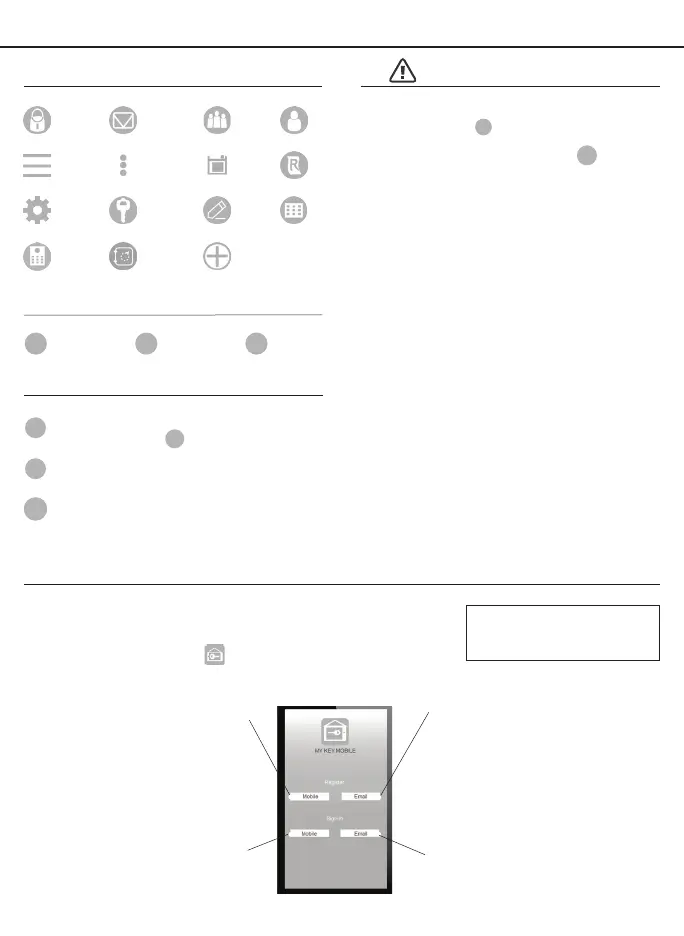
PRIMARY APP ICONS
Messages
User
Unlock
Users
Save RecordsMenu Dropdown
Edit
Settings
eKey Passcode
KEYPAD SYMBOLS
USER TYPES
Administrative User
- Able to send & delete eKeys &
Passcodes, change
AP
,
and remove connected lock(s)
Authorized User
- Able to send eKeys & Passcodes, can
delete only the eKeys & Passcodes they send
User
- Able to use eKeys & Passcodes assigned from
Administrative & Authorized Users
A
AU
U
Download and Install
a. Search “My Key” and download the App on your smart device
b. Find the corresponding icon, and install the App
APPLICATION SETUP OPTIONS
Register an Email Account
a. Click “Email” under Register
b. Follow prompts on screen
c. Click conrmation link in email
Email Sign In
a. Click “Email” under Sign In
b. Follow prompts on screen
Register a Mobile Phone Number
a. Click “Mobile” under Register
b. Follow prompts on screen
c. Select “Get Code”
d. Input received verication code
Mobile Sign In
a. Click “Mobile” under Sign In
b. Follow prompts on screen
You may register using an
email or a mobile number
account.
Administrator
Passcode
AP
New
Passcode
NP
Received
Passcode
RP
VERY IMPORTANT
Before connecting to a lock
please ensure that Bluetooth
is enabled on your phone and
you are standing in front of the
lock, and it is activated.
Once the door is unlocked
with the App, you will have to
manually lock it. (See page 11
to set the Auto Lock feature)
Ensure that Push Notications
are enabled for the App.
After connecting to a new lock
as an
A
, the factory default
Passcode will be deleted, and
replaced with a new
AP
, which
is randomly assigned, and
should be changed in the lock’s
settings immediately.
Add Device
Locks
Safes
See page 16 for information on
features and settings for the App.
Registering with a mobile
phone will provide for a more
convenient user experience



 To Next Page