100 of 171
Truetness.com / 800.426.6570 / 636.272.7100
CHAPTER 4B: ESCALATE
15
OPERATION
CONSOLE NAVIGATION:
Home Screen:
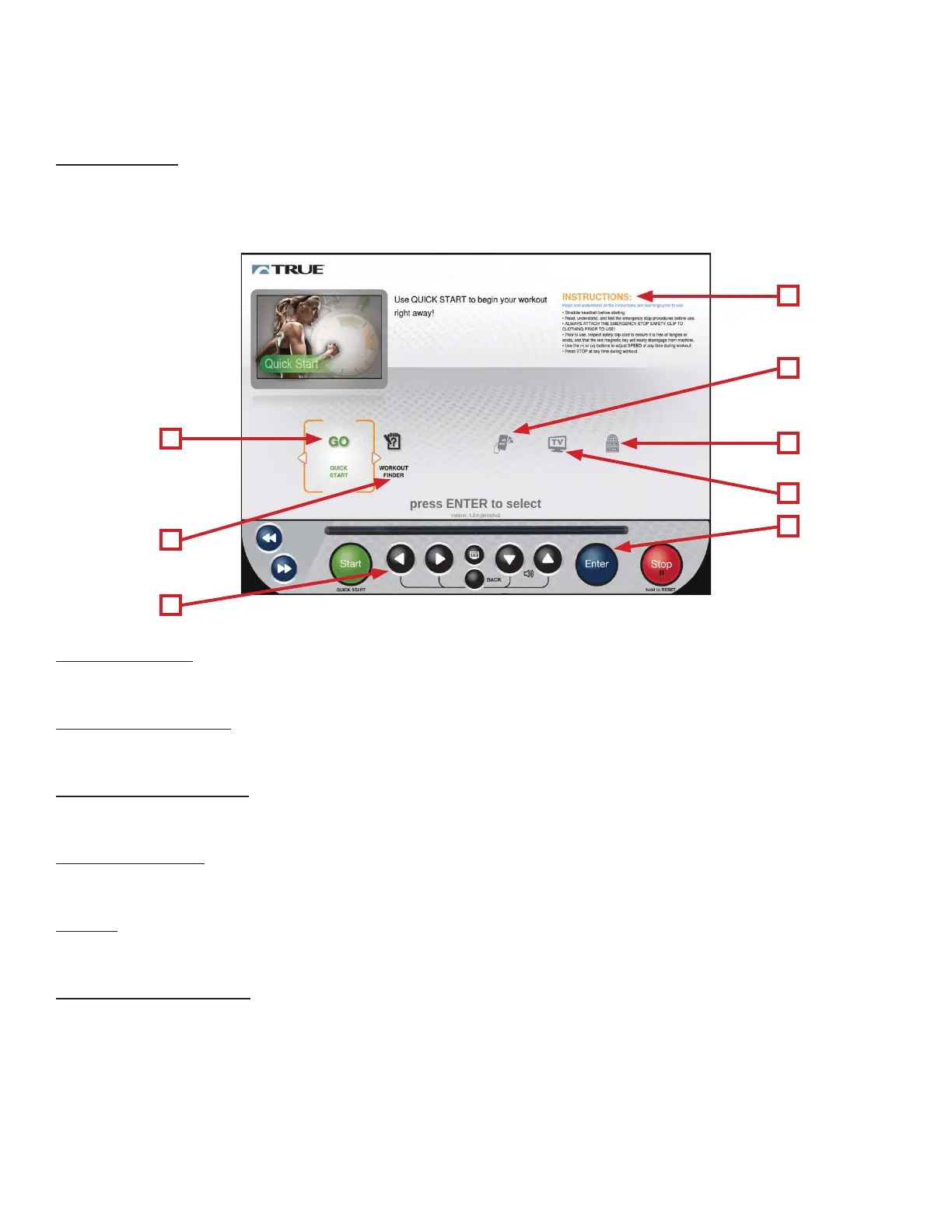
e Home Screen is displayed on the console when there is no workout in progress. From this screen the user is able to
select from various options to begin a workout or view media. To select an item, use the Le/Right Selection Buttons (A)
to highlight the item and then press the Enter button (B).
C
E
B
G
H
F
D
A
C) Quick Start:
Starts a Quick Start workout in which the user controls all settings. e workout continues until it is ended by the user.
D) Workout Finder:
Displays preset workouts categorized by goal focus categories.
E) Safety Instructions:
Displays a list of safety instructions for users to review prior to beginning a workout.
F) Audio Device:
Displays the Audio Device interface without starting a workout.
G) TV:
Displays TV interface without starting a workout.
H) Language Options:
Allows users to choose between 12 language options.



 To Next Page