104 of 171
Truetness.com / 800.426.6570 / 636.272.7100
CHAPTER 4B: ESCALATE
15
OPERATION
CONSOLE NAVIGATION:
Workout Summary Screen:
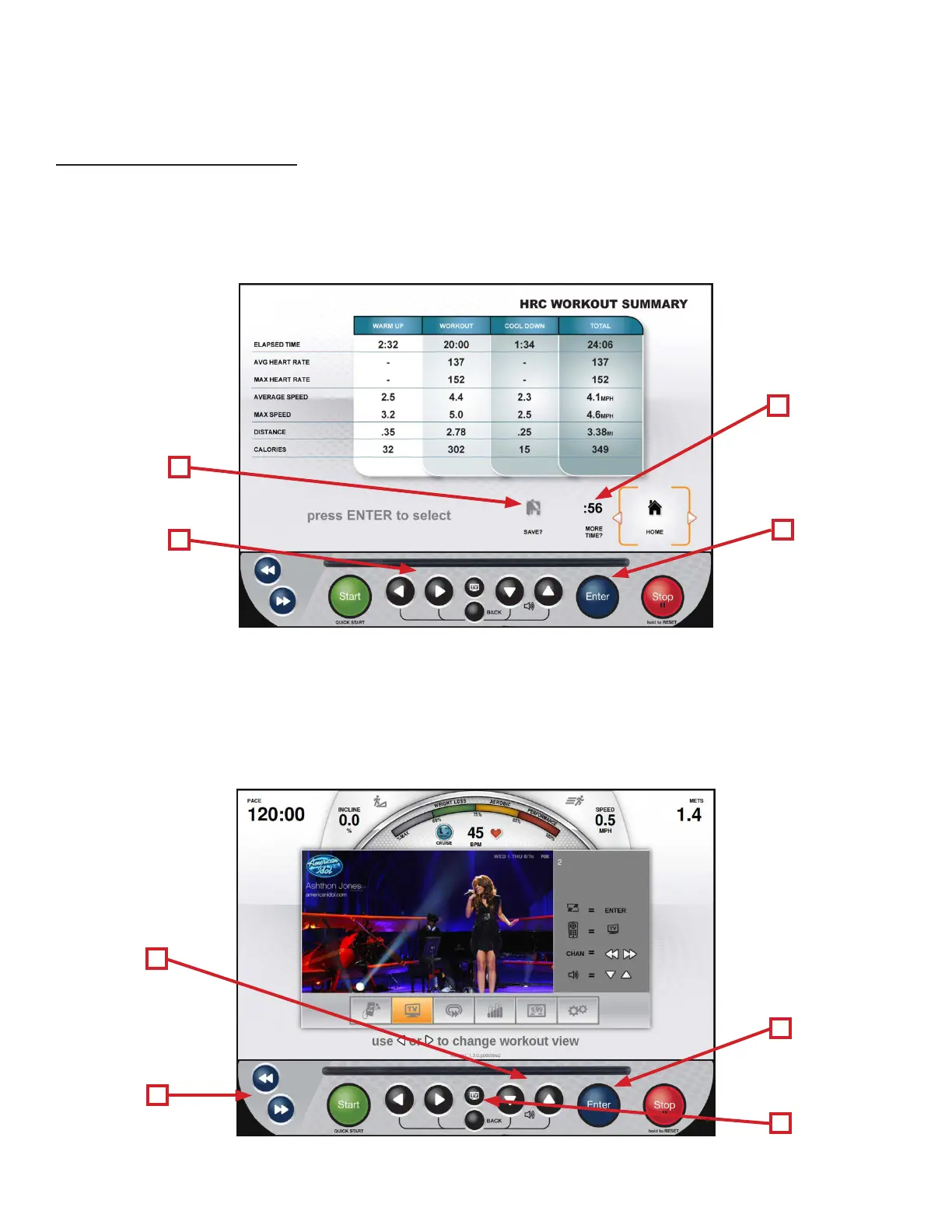
At the end of a workout the Summary Screen will display an overview of the workout data. e workout data can be
exported to the TRUE Fitness App via Bluetooth or to a USB drive that is connected to the console’s USB port. To export
the Workout Data, use the Le/Right Selection Buttons (A) to select Save (B) and then press the Enter Button (C). If the
user requires more time to view the summary or to export the workout data, they can select More Time (D) and press the
Enter Button (C) to extend the time that the summary remains on the screen.
A
B
D
C
TV CONTROLS:
is console has an integrated HDTV Tuner which allows the user to watch live programming in crisp, clear high
Denition. e TV controls are built in to a Workout View Screen to allow the user to monitor their workout while
enjoying their favorite shows. While watching TV, users can control volume using the Up/Down Selection Buttons (A)
and change channels using the Navigation Buttons (B) or by selecting a channel from the list of available channels by
pressing the TV Button (C). To enter full screen mode, press the Enter button (D).
A
B
D
C



 To Next Page