Truetness.com / 800.426.6570 / 636.272.7100 79 of 171
CHAPTER 4A: TRANSCEND OPERATION
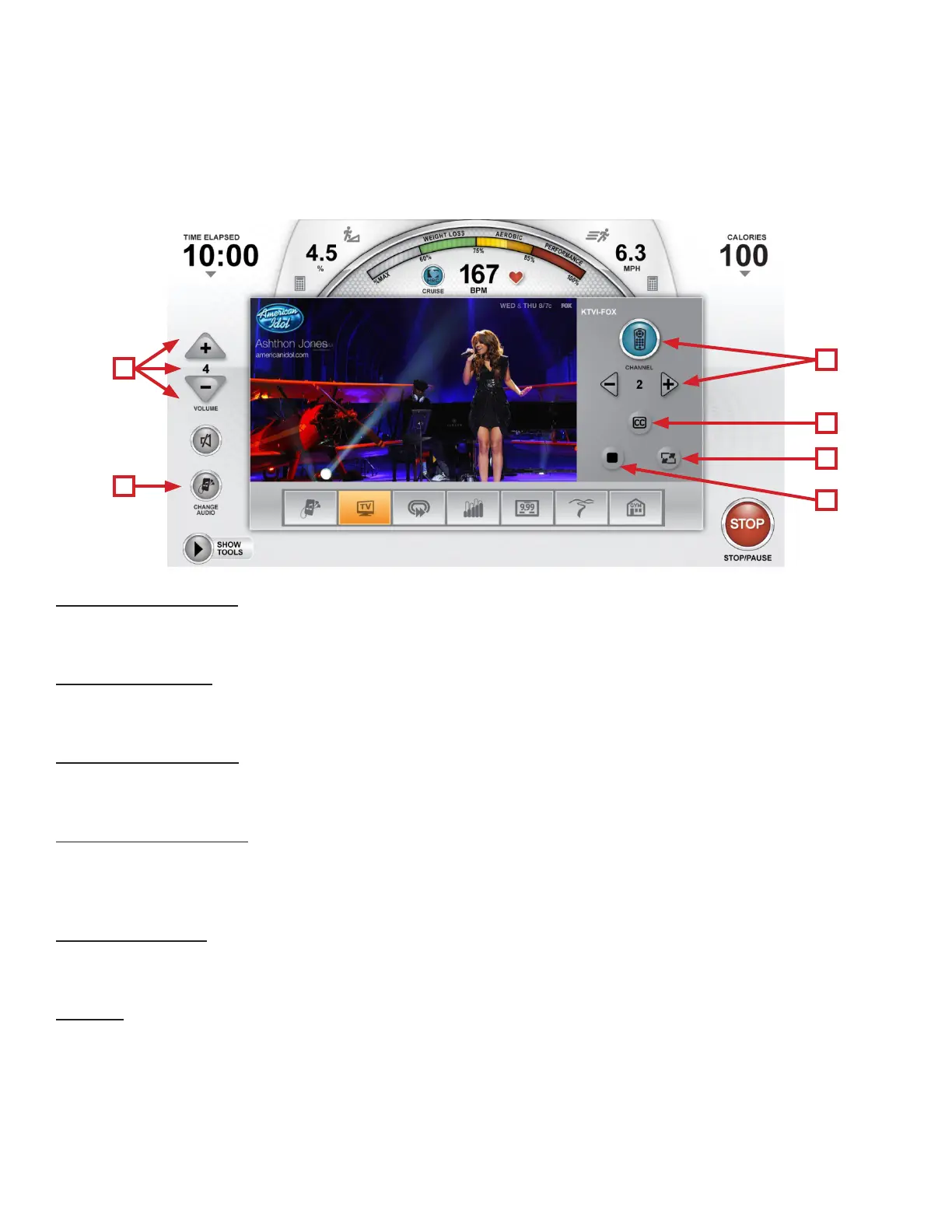
TV Controls:
is console also features an integrated HDTV Tuner which allows the user to watch live programming in crisp, clear
high Denition. e TV controls are built in to a Workout View Screen to allow the user to monitor their workout while
enjoying their favorite shows.
A) Volume Controls:
Increases, Decreases or Mutes the audio volume from the TV program.
B) Change Audio:
Toggles between available audio sources.
C) Channel Controls
Used to display a full list of available channels or to change channels one at a time.
D) Closed Captioning
Toggles the closed captioning on or o.
*is button will only be visible when the program displayed supports closed captioning.
E) Screen Toggle:
Allows the user to switch back and forth between full screen and regular mode.
F) Stop:
Stops the current TV/TV audio feed.
A
B
C
D
E
F



 To Next Page