Truetness.com / 800.426.6570 / 636.272.7100 103 of 171
CHAPTER 4B: ESCALATE
15
OPERATION
CONSOLE NAVIGATION:
Tools Screen Controls:
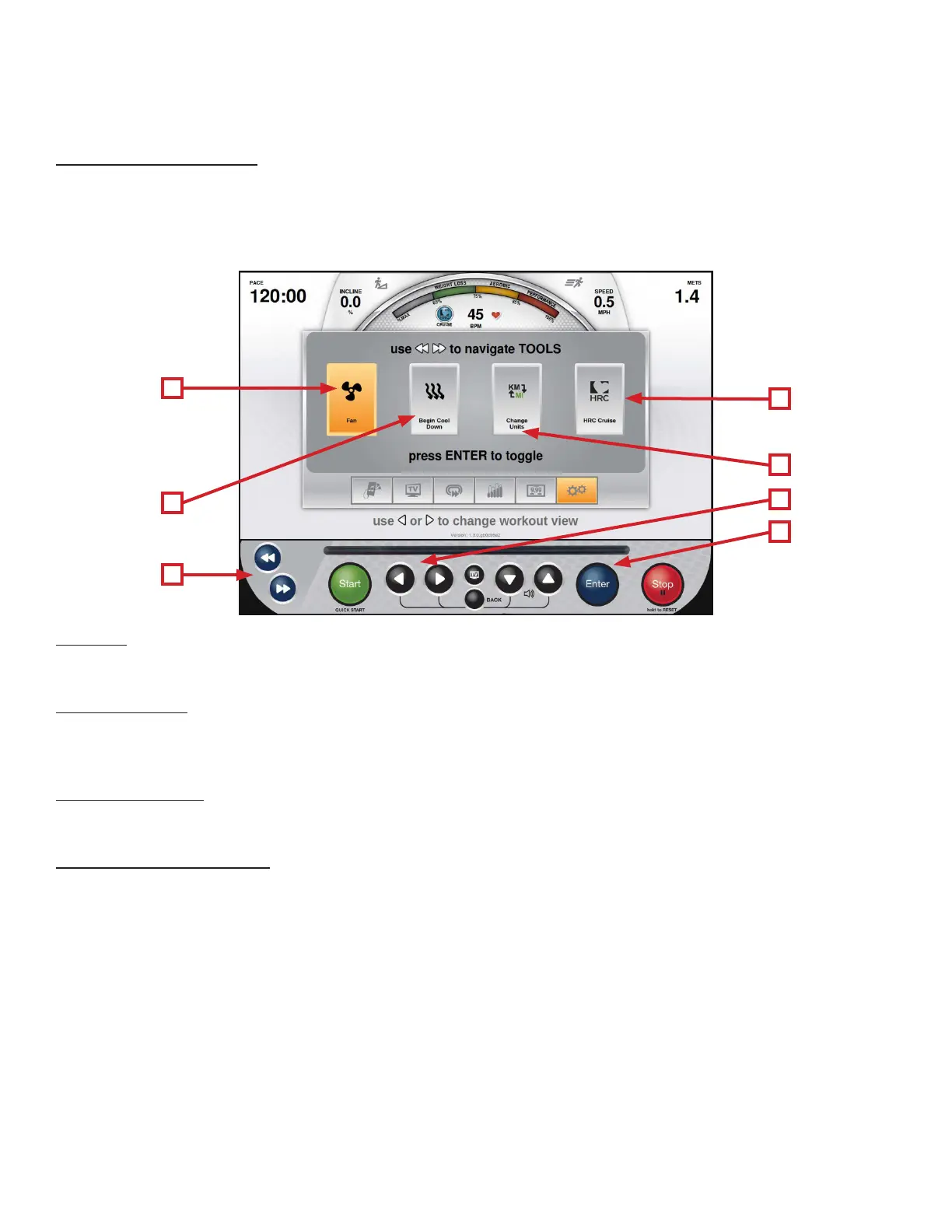
e Tools Screen contains controls that allow users to adjust settings during their workout. e Tools screen can be
reached by using the Le/Right Selection Buttons (A) during any workout. e Navigation Buttons (B) are used in the
Tools Screen to select between the available options. Once the desired tool has been selected, press Enter (C) to conrm
the selection.
D
A
C
B
F
G
E
D) Fan:
is tool toggles the cooling fan on and o.
E) Cool Down:
Allows the user to end their current workout with a two minute low intensity cool down period. When Cool Down is
activated the unit is in manual mode and the user directly controls all settings.
F) Change Units:
Allows users to change the data readouts between English Standard and Metric Units.
G) HRC Cruise Control:
Engages Heart Rate Control to allow the equipment to maintain the user’s current heart rate through automatic speed and
incline adjustments (when the user is utilizing heart rate monitoring).



 To Next Page