102 of 171
Truetness.com / 800.426.6570 / 636.272.7100
CHAPTER 4B: ESCALATE
15
OPERATION
CONSOLE NAVIGATION:
Workout View Screens:
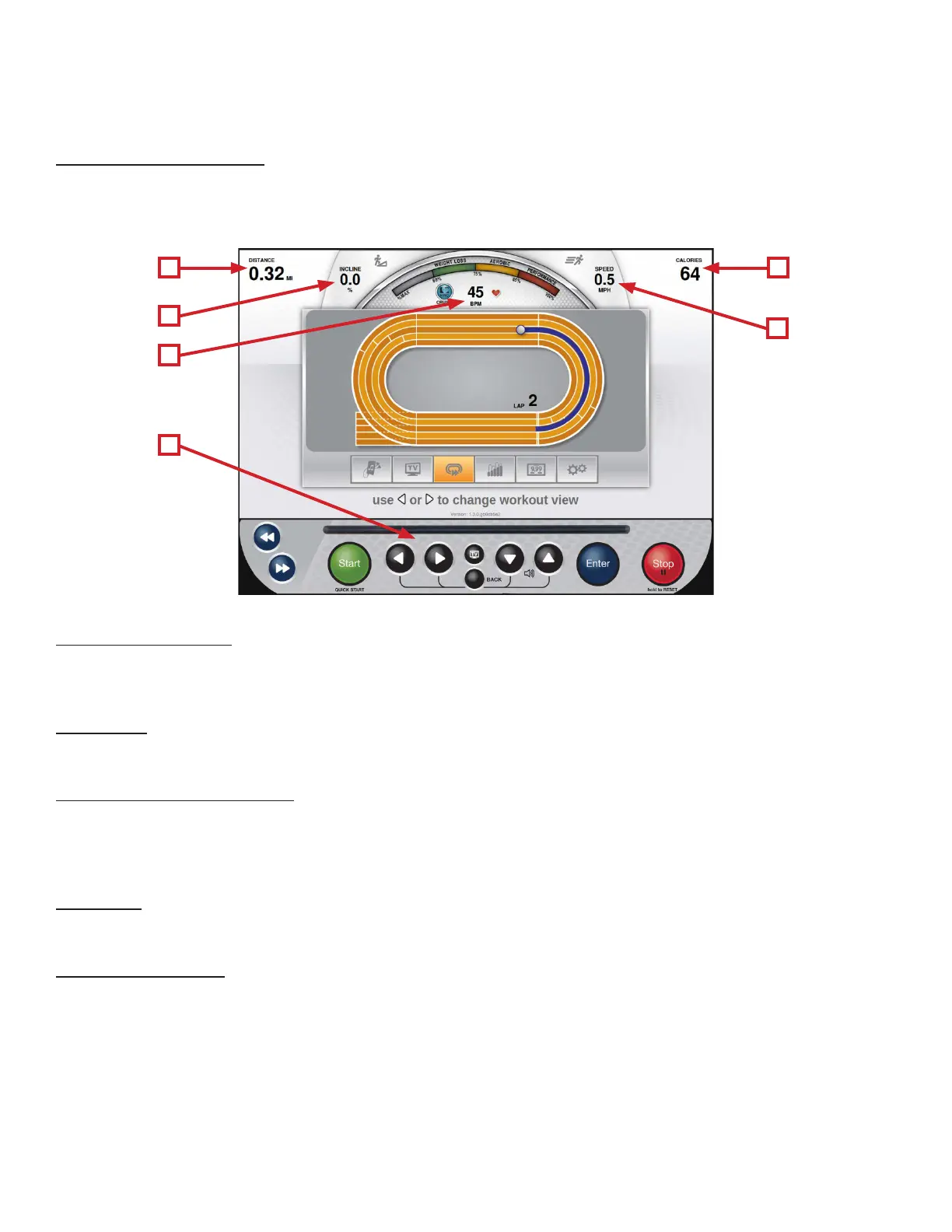
During any workout a Workout View Screen will be displayed to give the user a comprehensive visual overview of their
current workout data. Users can switch between the available Workout View Screens by using the Le/Right Selection
Buttons (F).
A E
D
B
C
F
A) Data Display #1:
is display will toggle between multiple data points throughout the workout. ese data points vary by program, but
include Time, Distance, and Pace.
B) Incline:
Displays the current incline level.
C) Heart Rate Information:
When the user is wearing a heart rate chest strap or utilizing the contact heart rate system, their heart rate will be
displayed in beats per minute (bpm) and in the graphic meter. e graphic meter is based on age and will gauge the user’s
approximate heart rate within 3 target levels; Weight Loss, Aerobic or Performance.
D) Speed:
Displays the current speed of the treadmill belt.
E) Data Display #2:
is display will toggle between multiple data points throughout the workout. ese data points vary by program, but
include Calories, Distance, and METS.



 To Next Page