Truetness.com / 800.426.6570 / 636.272.7100 129 of 171
CHAPTER 4C: ESCALATE
9
OPERATION
CONSOLE NAVIGATION:
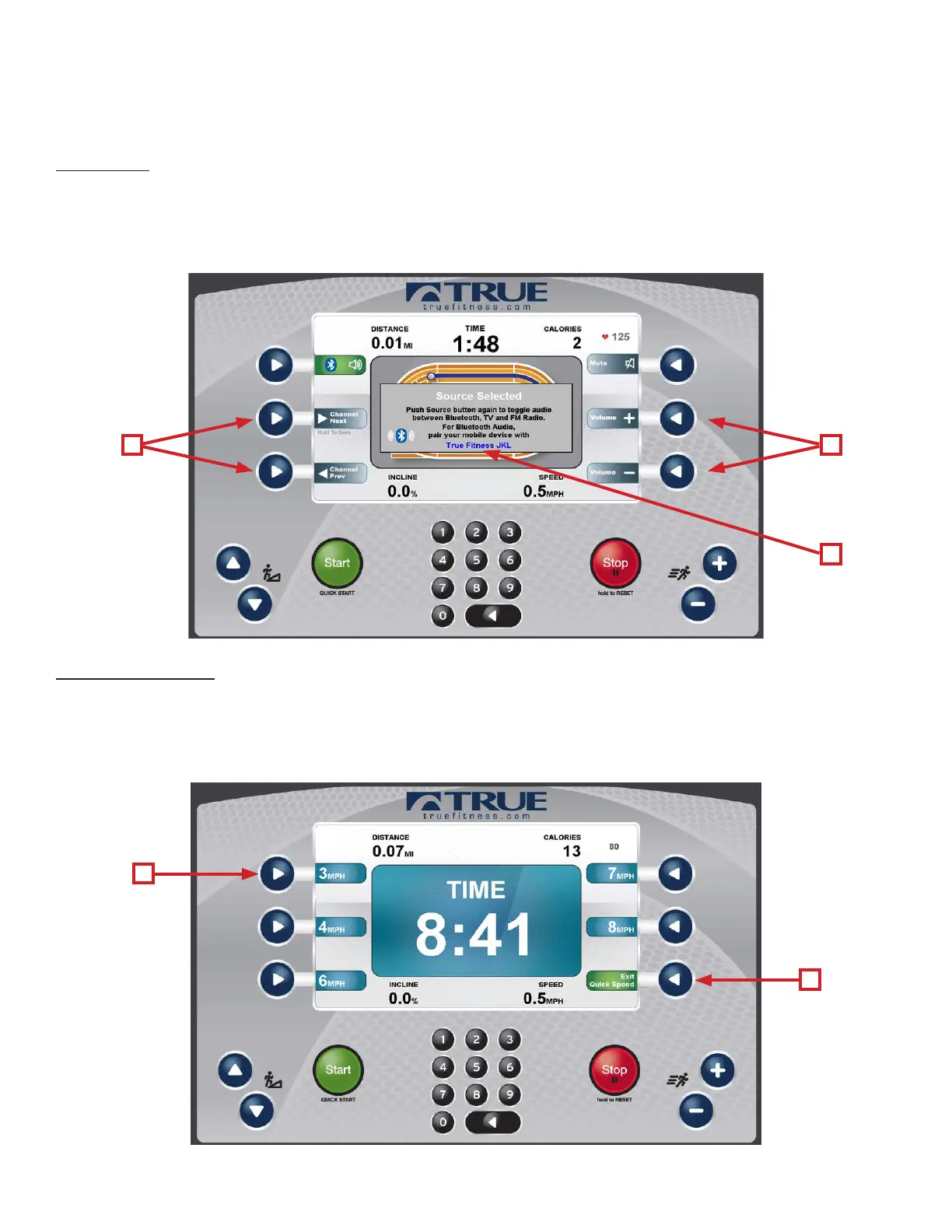
D) Source:
Toggles between available audio sources which include; Bluetooth Audio, TV* and FM radio*. When an audio source is
selected the user is given control over volume (A), and channel adjustments (B). To pair a Bluetooth audio device, select
the console name (C) from the list of available sources on your device.
*TV and FM Radio require the optional Broadcast Vision receiver.
E) Activate Speed:
When the Activate Speed Selection Button is pressed, various preset speeds will appear. Pressing one of the Speed Selection
Buttons (A) will allow the user to quickly and conveniently switch to that preset speed. Pressing the selection button (B)
again, will display the Quick Incline Buttons. To return to the Workout Data Screen press the Selection Button (B) a third
time.
B A
C
B
A



 To Next Page