Truetness.com / 800.426.6570 / 636.272.7100 145 of 171
CHAPTER 4D: EMERGE OPERATION
ADVANCED CONSOLE FUNCTIONS:
Maintenance Mode Navigation:
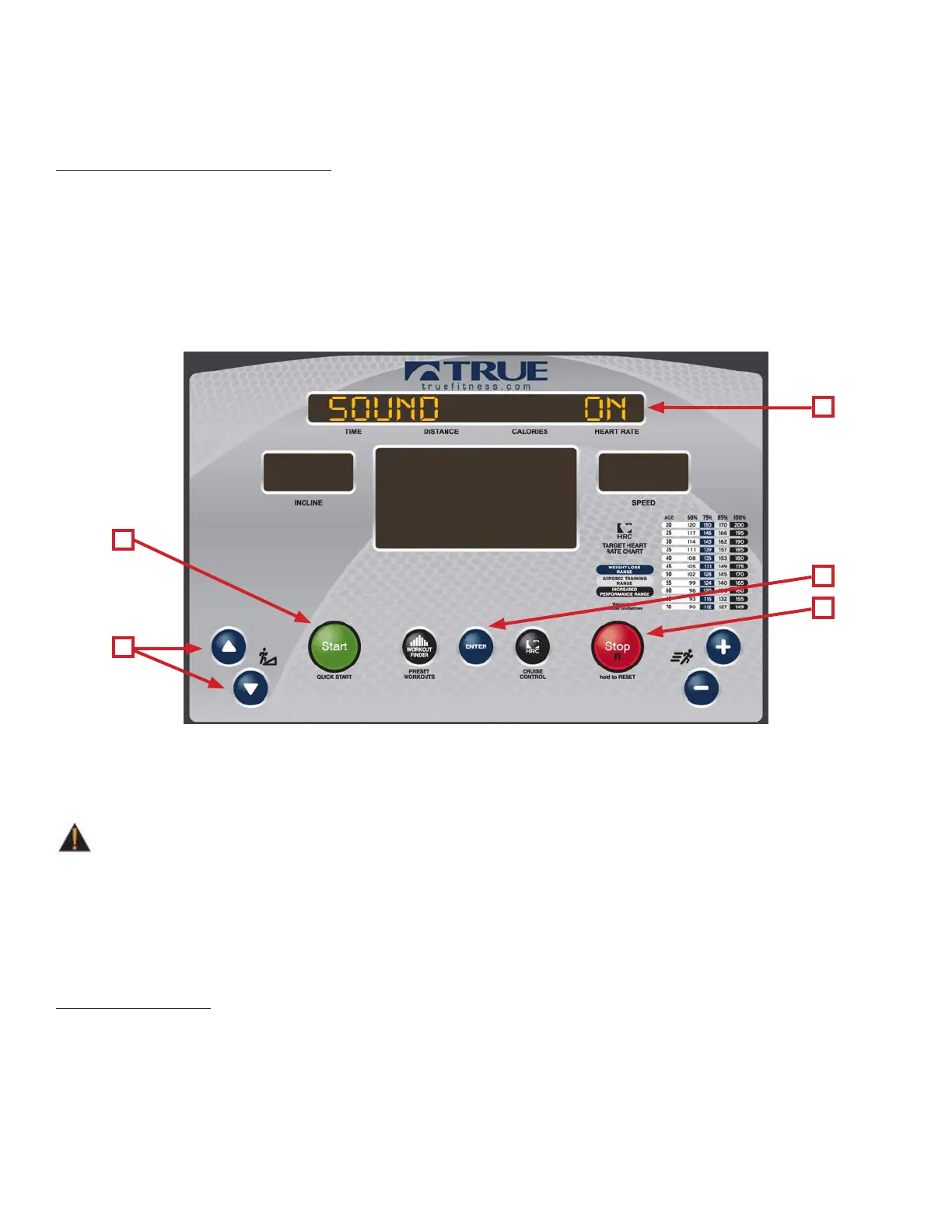
Within a category users can scroll through available options using the UP and DOWN Incline Keys (A). Once the desired
setting is shown in the Upper LED Display (B), press the Enter Button (C) to conrm the selection. Aer conrming the
selection, the + and – Speed Keys are used to change the options within the setting. Aer changing any setting the Start
Button (D) MUST be pressed to save the changes (if the start button is not pressed to save the changes, the setting will
revert to the default value). e Stop Button (E) is used as a back button in Maintenance Mode and will take the user back
one screen each time it is pressed. To exit the diagnostics mode press the Stop Button (E) repeatedly until “Maintenance
Mode” is displayed on the Upper LED Display (B) and then press and hold the Stop Button to reset the console or simply
remove and replace the safety key.
CALIBRATION:
Calibration will conduct a basic test of the drive and incline systems to ensure that they are operating as intended.
Calibration may also be used by technicians to troubleshoot system faults.
is process will take full control of the treadmill and can be dangerous if caution is not taken.
• Calibration can take up to two minutes to complete.
• Do not stand on the treadmill during the calibration procedure.
• Verify that the machine is free of all parts and tools.
• Keep children and animals at a safe distance.
Calibration Steps:
• Enter Maintenance Mode.
• Use the UP & DOWN Incline buttons to scroll through the options until “Calibration” is displayed on the Upper LED
Display.
• Press the Enter Button to Enter Calibration Mode and then press the Start button to begin the Calibration.
• Aer the Calibration is complete, remove and replace the safety key to return to the standard user mode.
WARNING:
B
C
E
D
A



 To Next Page