Truetness.com / 800.426.6570 / 636.272.7100 71 of 171
CHAPTER 4A: TRANSCEND OPERATION
TOUCHSCREEN NAVIGATION:
Selecting a Preset Workout:
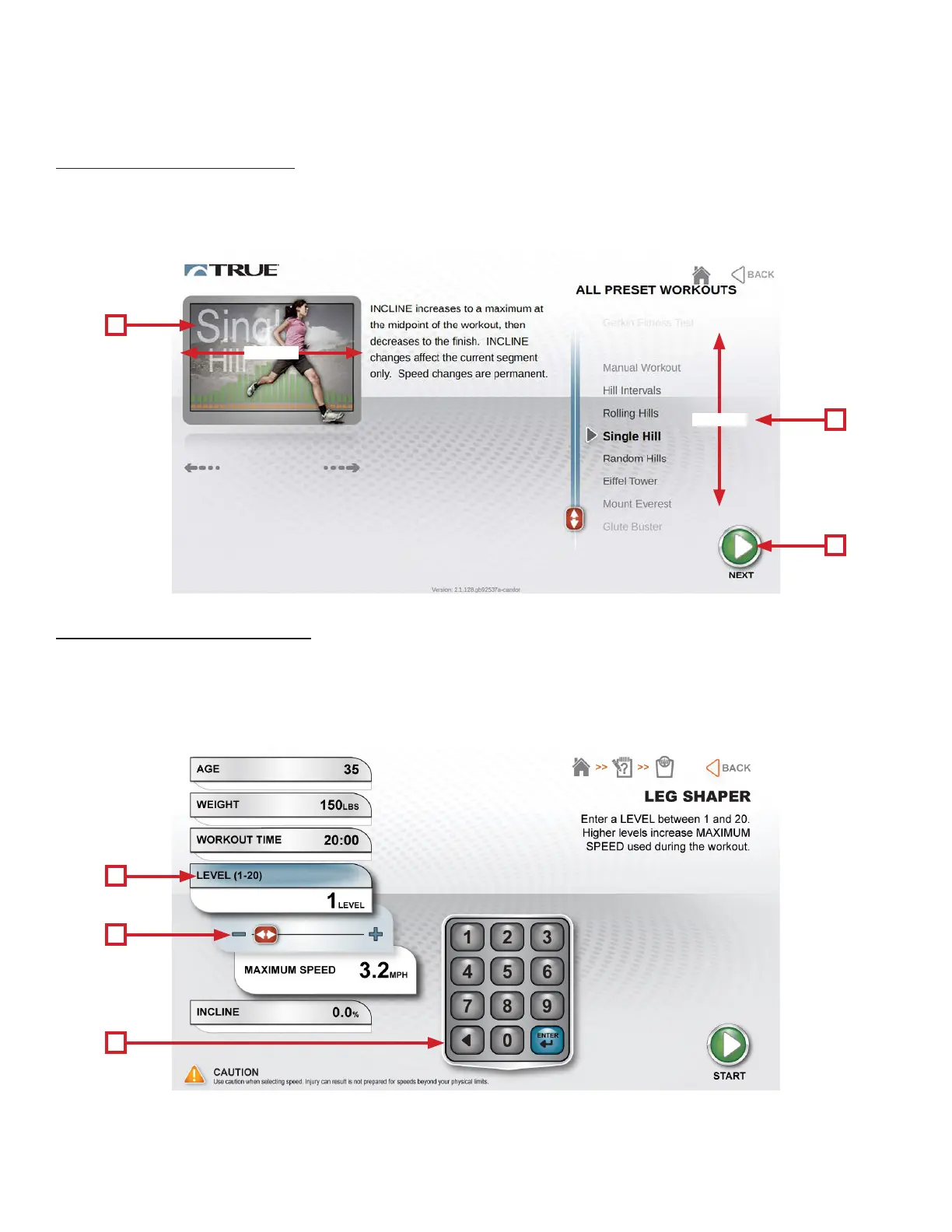
Preset workouts are accessed by touching the Workout Finder Button on the home screen. Workouts listed down the right
side of the screen. To begin a workout, swipe through the workout list (A) or the preview window (B) until the desired
workout is selected and press next (C).
B
A
B
C
A
C
SWIPE
Workout Data Entry Screens:
Workout data entry screens allow the user to input their personal information or workout goals prior to beginning a preset
workout. To set a value, touch the heading (A) of the value and adjust the slider (B) to the desired setting or manually
enter a value using the keypad (C).
*Workout Data Entry Screens vary by program selection.
SWIPE



 To Next Page