Truetness.com / 800.426.6570 / 636.272.7100 81 of 171
CHAPTER 4A: TRANSCEND OPERATION
ADVANCED CONSOLE FUNCTIONS:
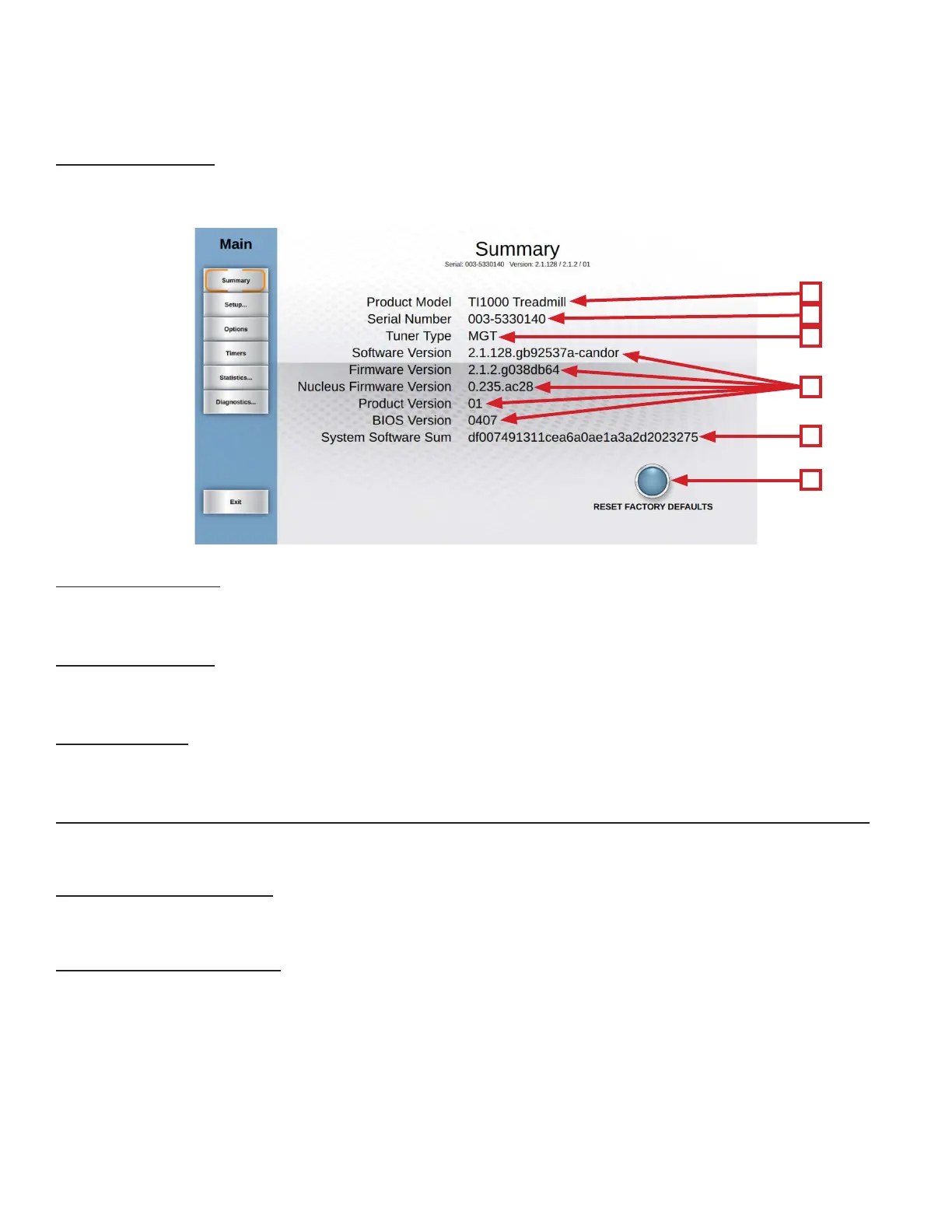
Summary Screen:
e Summary Screen will be the rst screen displayed aer entering service mode. is screen will give a general overview
of the unit’s setup.
A) Product Model:
e model number that the console is currently congured to.
B) Serial Number:
e serial number of the console (not the base unit).
C) Tuner Type:
e type of TV tuner installed in the console.
D) Soware Version / Firmware Version / Nucleus Firmware Version /Product Version / Bios:
e current versions of soware and rmware that are installed on the console.
E) System Soware Sum:
Displays OS data that is used in the production of the console.
F) Reset Factory Defaults:
Resets all console settings to their factory defaults.
A
B
C
D
E
F



 To Next Page