~ 5 ~
WHEN NOT IN USE ALWAYS SWITCH IT OFF AND REMOVE THE KEY
2.3 SWITCHING ON THE HANDSET
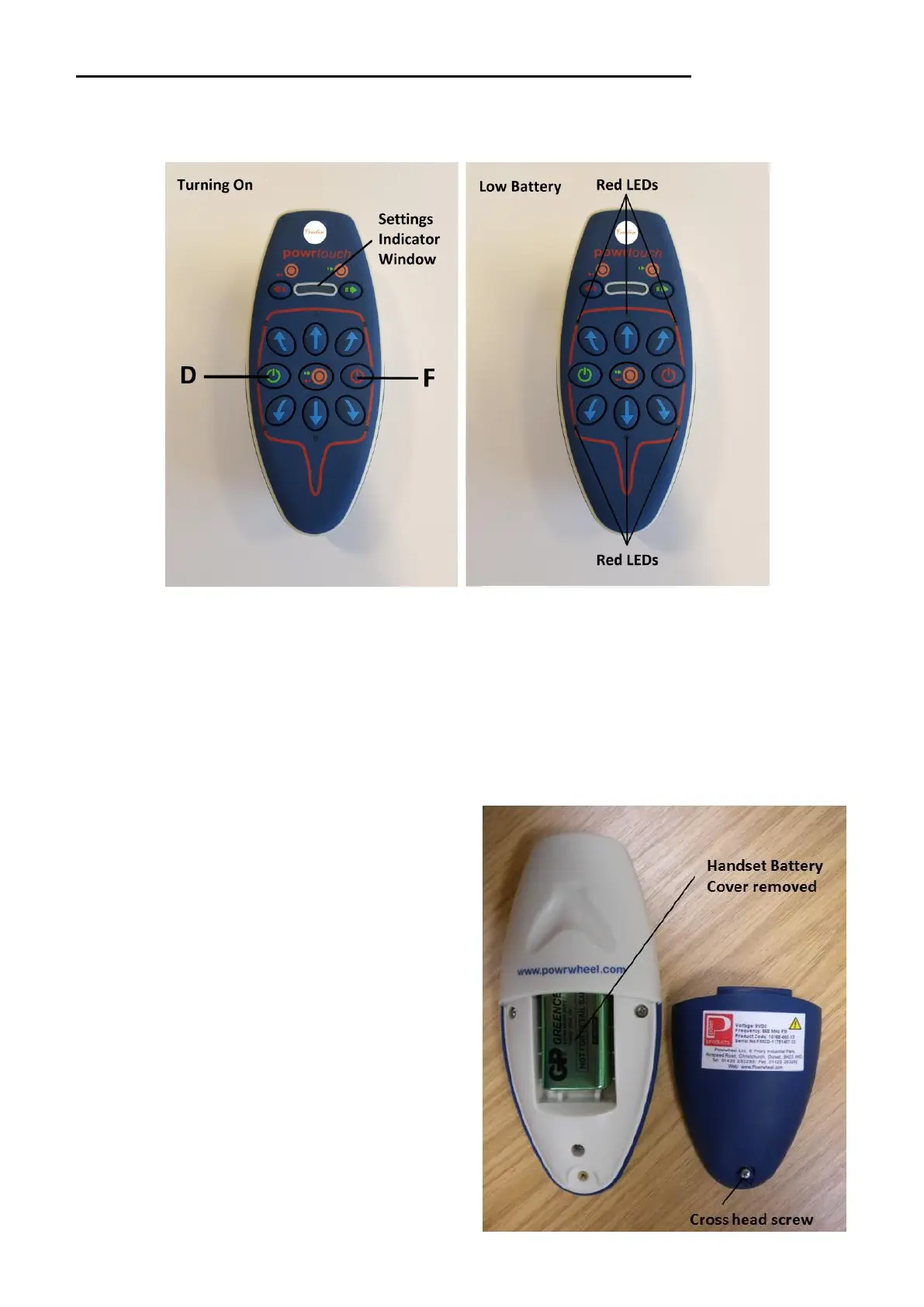
To switch on the handset press both the ‘On’ buttons (D and F) buttons at the same time.
Release them both when the LED array lights up in the settings indicator window. Once it is
ready to operate then one green LED on the extreme right of the settings indicator window will
remain on. If the top row & bottom row of Red LED’s flash alternating, then this in an indication
that the handset battery voltage is low and the battery should be changed as soon as possible.
2.4 HANDSET BATTERY REPLACEMENT
To replace the handset battery the first step
is to remove the small cross head screw on
the back of the handset. When the small
cross head screw is removed the battery
box cover can be taken off providing
access to the battery. The battery can then
be removed from its connections and a
new battery can be installed and the cover
replaced. The battery required is a 9volt
DC PP3 (mn1604) or equivalent. NB. The
use of rechargeable batteries is not
recommended.



 To Next Page