38
Automatic Mode
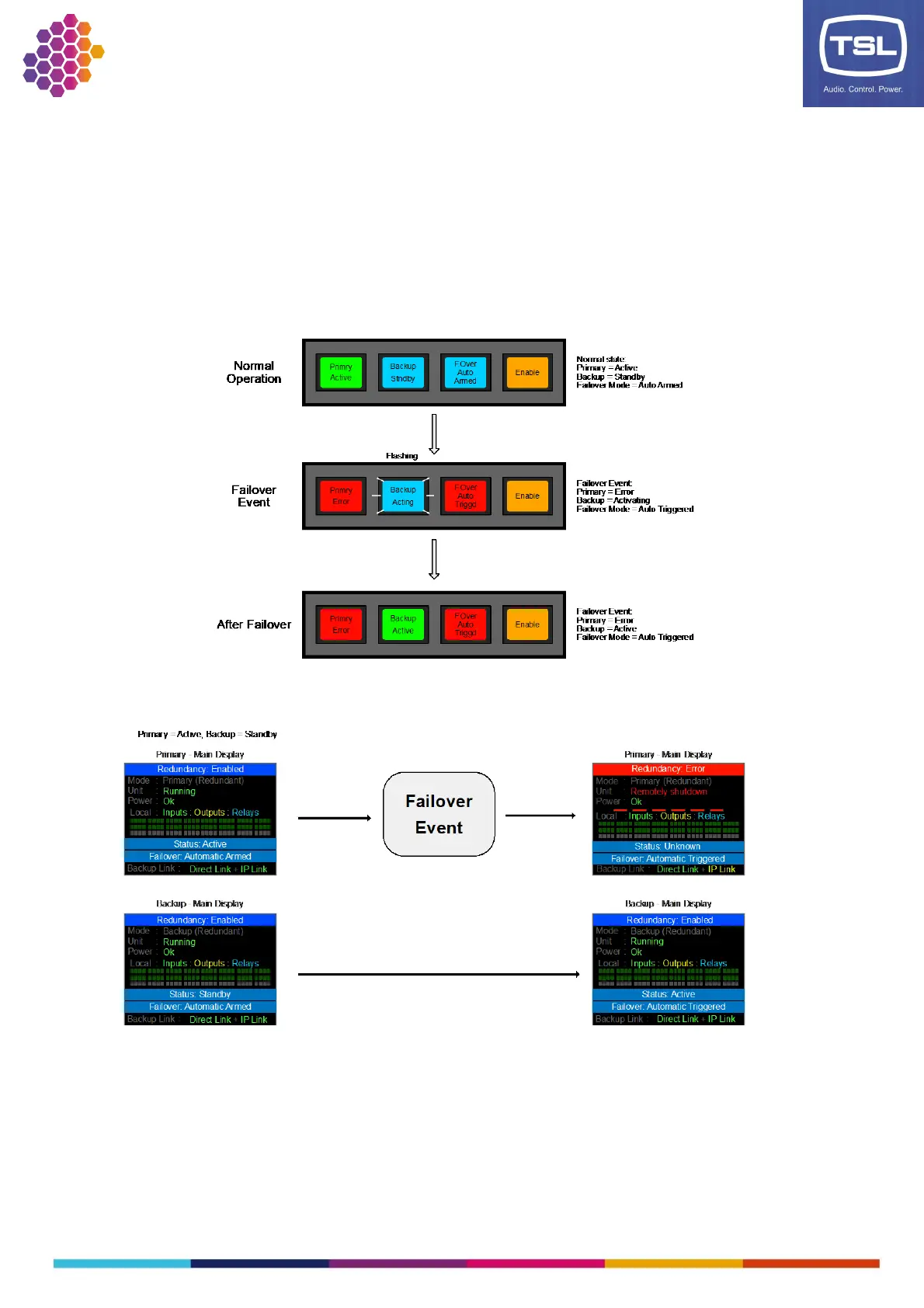
The auto mode has a few different states related to the current failover status. The redundancy system is
a one-way failover system meaning a failover can only occur from the Primary to the Backup. Once a
Failover has occurred, restoring the Primary as the Active unit is a manual operation and as such the
Failover mode is required to be set to Manual to perform this operation. Once the Failover mode is
returned to Auto and the Primary is Active as well as the Backup being in Standby, then the Failover
mode will show Auto Armed meaning it is ready to Failover when a Failover event occurs. Once the
Failover event has occurred and the system has failed over, the Failover mode will still be in Auto
however will display ‘Auto Triggered’ to show a Failover has taken place.
TMRP:
TM1-Mk3+ Front Panel:
If a Failover is not available due to an issue such as the Backup not being in Standby, then the Auto mode
will display an ‘Unavailable’ message on both the TM1-Mk3+ front panel and the TMRP.



 To Next Page