Field Production Monitor
20
05 MENU OPERATIONS
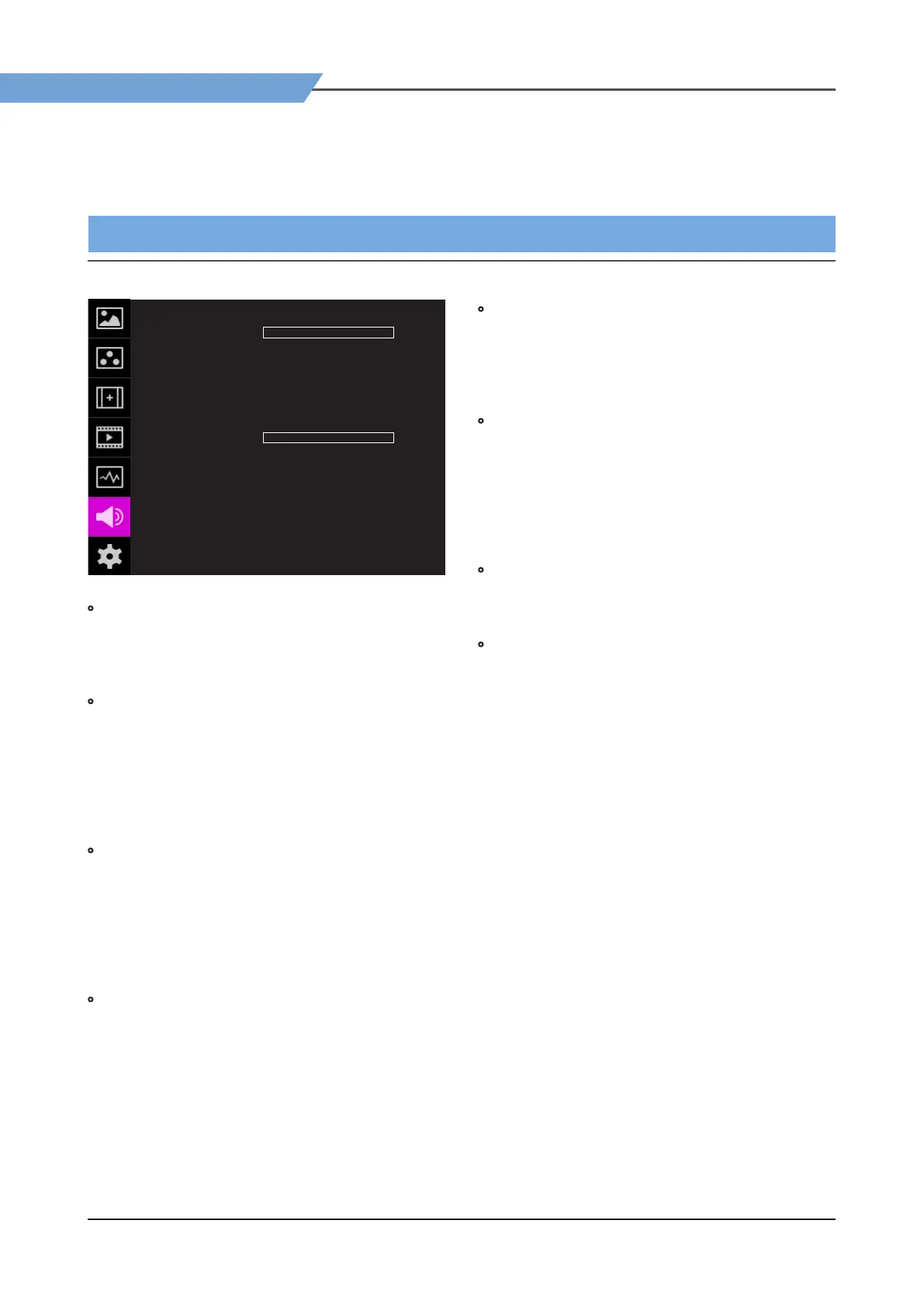
[6] AUDIO
AUDIO F-10A
VOLUME
AUD LEFT
AUD RIGHT
LEVEL METER
LVM DISPLAY
LVM REFERENCE
LVM SIZE
PEAK DECAY TIME
OFF
FOF
OFF
PAIR
-18dB
SMALL
0
0
• VOLUME
- Used to control the output volume for the
[AUDIO OUT] on the back of the monitor.
- Control range is from 0 to 30.
• AUD LEFT (Audio Left)
- Used to set embedded audio channel for left
audio out of [AUDIO OUT] terminal on the back
of the monitor.
- Available values are between CH1~CH16 and
Ext..
* In the HDMI mode, Left is set to CH1.
• AUD RIGHT(Audio Right)
- Used to set embedded audio channel for right
audio out of [AUDIO OUT] terminal on the back
of the monitor.
- Available values are between CH1~CH16 and
Ext..
* In the HDMI mode, Right is set to CH2.
• LEVEL METER
- Used to set the Level Meter for the embedded
audio.
- Available options are :
SDI Input : [O]-[16CH(Hor.)]-[16CH(Ver.)]
HDMI Input: [O]-[2CH(Hor.)]-[2CH(Ver.)]
*
16 CH(HOR.) : Displays 8 channels on top
left and 8 channels on top right of the screen
horizontally.
*
16 CH(VER.) : Displays 8 channels on center
left and 8 channels on top right of the screen
vertically.
• LVM DISPLAY (Level Meter Display)
- Used to set the display method for audio level
meter.
- Available modes are Group and Pair.
* In the HDMI mode, the mode is set to Pair.
• LVM REFERENCE (Level Meter Reference)
- Display the default audio level meter value,
- Available options are -18dB and -20dB.
- Audio level meter within selected value turns to
green and exceeded audio level is displayed in
yellow.
- Audio level exceeding -4dB is displayed in red.
• LVM SIZE (Level Meter Size)
- Used to control the size of the audio level meters.
- Available options are NORMAL and LAGRE.
• PEAK DECAY TIME
- Sets the reduction time for max value indication
of audio signals.
- Control range is from MIN 0 to MAX 100. Bigger
number means a longer display time for max
value.


 To Next Page