Field Production Monitor
19
05 MENU OPERATIONS
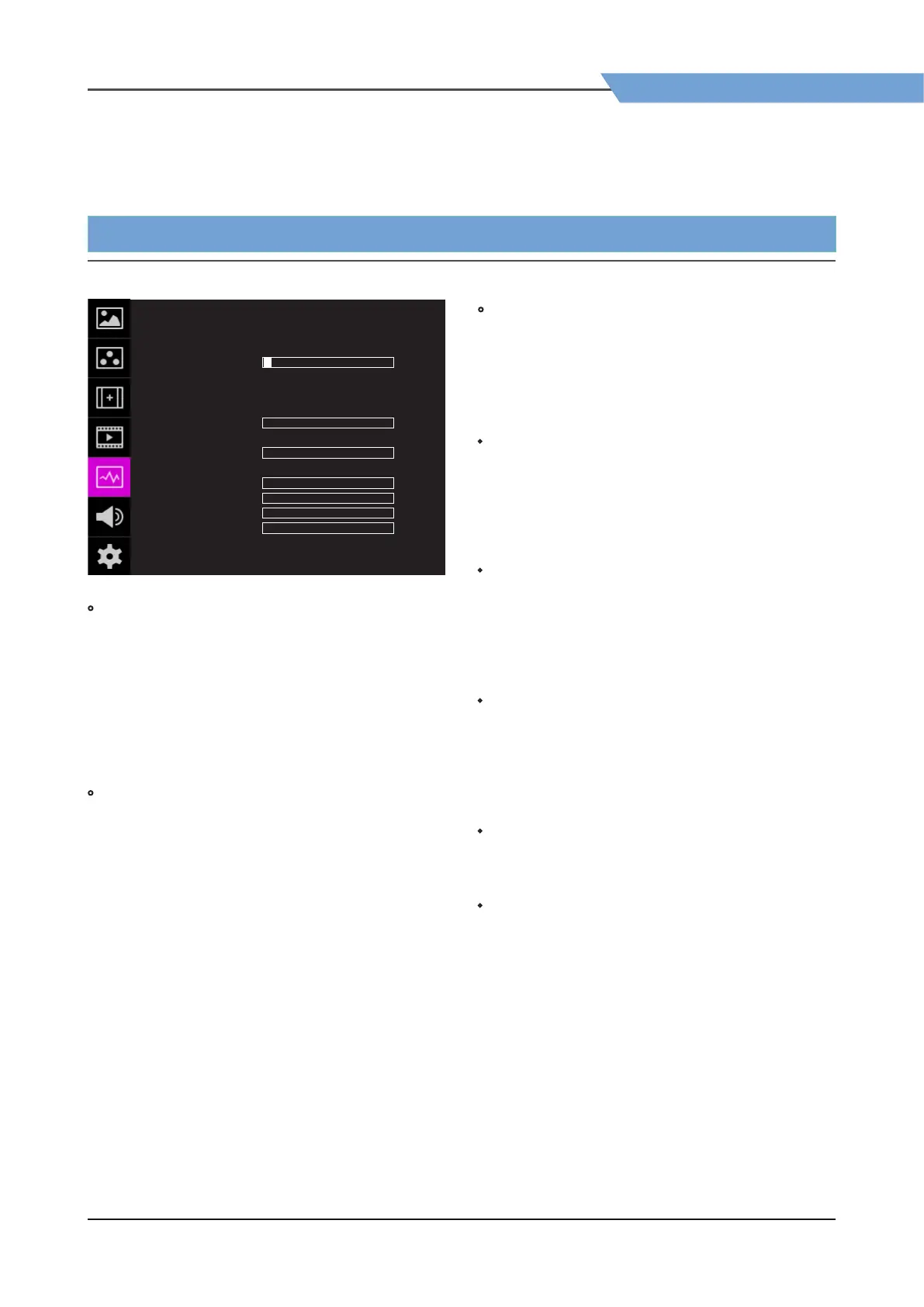
WAVEFORM F-10A
ENABLE
TYPE
INTENSITY
TRANS
SIZE
LINE WAVEOFORM
SEL LINE POS
LUMA CHECK
LUMA ADJUST
RANGE ERROR
Y MAX
Y MIN
C MAX
C MIN
Y PICTURE BLINK
C PICTURE BLINK
OFF
OFF
OPAQUE
SAMLL
OFF
OFF
OFF
OFF
OFF
1
0
0
0
0
0
0
[5] WAVEFORM
• LUMA ADJUST
- Used to set the Y’ level to be colored Yellow, Pink
and Cyan in [Color Pattern] mode, or to set Y’
level zone to be displayed with diagonal lines in
[Zebra Pattern] mode simply by scrolling the
Knob.
- Available values are 0w ~ 100%.
*
See section “7. Other Function [5] Luma(Y’) Zone
Check” for more information.
• RANGE ERROR
- Used to set whether or not to activate Y MAX,
Y MIN, C MAX, C MIN, Y PICTURE BLINK and C
PICTURE BLINK functions.
- The values of Y MAX, Y MIN, C MAX, C MIN are
indicated in Waveform/Vectorscope.
- If [Y PICTURE BLINK] or [C PICTURE BLINK] is
enabled, the section of image that exceeds the
selected values of Y MAX, Y MIN, C MAX and C
MIN shall blink.
* In the case of RGB input, Range Error is not
supported.
*
See section “7. Other Function [7] Range Error”
for more information.
• Y MAX
- Used to set the maximum Luma(Y’) level from 0
to 255.
- Pixels with values exceeding the max Y’ level will
blink on the screen, and be displayed in red on
the Waveform.
• Y MIN
- Used to set the minimum Luma(Y’) level from 0
to 255.
- Pixels with values exceeding the max Y’ level will
blink on the screen, and be displayed in red on
the Waveform.
• C MAX
- Used to set the maximum chroma(C’) level from
0 to 255.
- Pixels with values exceeding the max Y’ level will
blink on the screen, and be displayed in red on
the Waveform.
• C MIN
- Used to set the minimum chroma(C’) level from
0 to 255.
- Pixels with values exceeding the max Y’ level will
blink on the screen, and be displayed in red on
the Waveform.
• Y PICTURE BLINK
- Used to set whether or not to blink pixels with
values exceeding Y MAX and Y MIN.
• C PICTURE BLINK
- Used to set whether or not to blink pixels with
values exceeding C MAX and C MIN.


 To Next Page