ULEAD VIDEOSTUDIO USER GUIDE
113
• Play Selected Track: Plays the selected audio CD track. Click again to
stop playing the track.
• Record Voice: Opens the Adjust Volume dialog box where you can
first test the volume of your microphone. Click Start to start recording.
VideoStudio creates a new clip to the right of the existing audio in the
Voice Track on the Timeline. This changes into Stop during the
recording process.
• Import from Audio CD: Opens a dialog box where you can import
music tracks from an audio CD.
• Playback Speed: Opens a dialog box where you can change the speed
and duration of an audio clip.
• Audio Filter: Opens the Audio Filter dialog box where you can apply
audio filters to the selected audio clip.
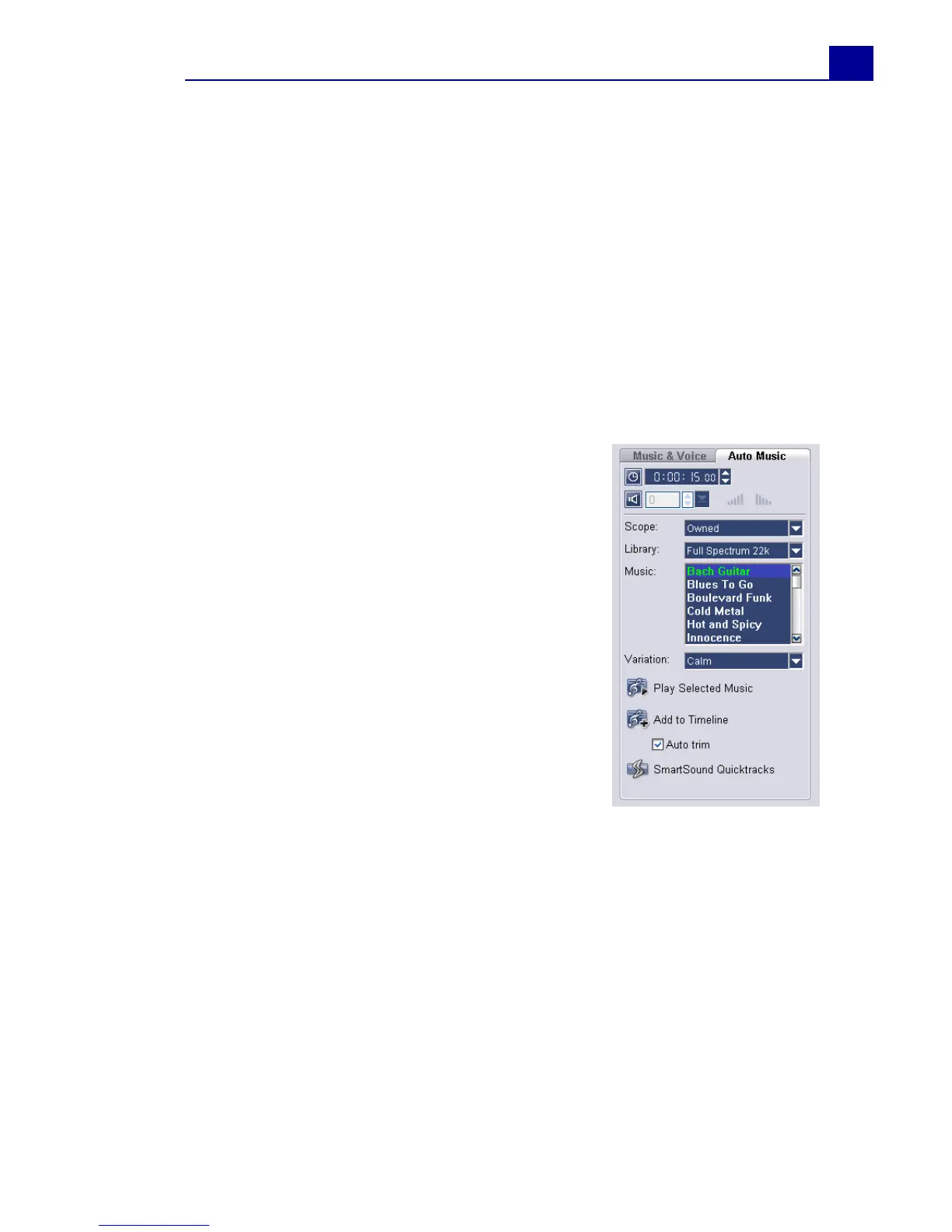
Auto Music tab
• Duration: Displays the total duration of the
selected music.
• Volume: Adjusts the volume level of the
selected music. A value of 100 retains the
music’s original volume level.
• Fade-in: Gradually increases the volume of
the music.
• Fade-out: Gradually decreases the volume of
the music.
• Scope: Specify how the program will search
for SmartSound files.
Local: Searches for SmarSound files stored in
the hard disk.
Mounted: Searches for SmartSound files
stored in the hard disk and CD-ROM drives
Owned: Searches for SmartSound files that
you own including those stored in CDs.
All: Searches for all SmarSound files available in your desktop computer
and the Internet.
• Library: Lists the available libraries from which music can be imported.
• Music: Select the desired music to add to your project.
• Variation: Select from a variety of musical instruments and tempo to
apply to the selected music.
• Play Selected Music: Plays back the music with the selected Variation.
• Add to Timeline: Inserts the selected track to the Music Track of the
Timeline.
• Auto trim: Automatically trims the audio clip to fit the empty space
based on the Jog Slider position.



 To Next Page