15 30A216 REV A Oct 2009
System
Programming
CONTINUED
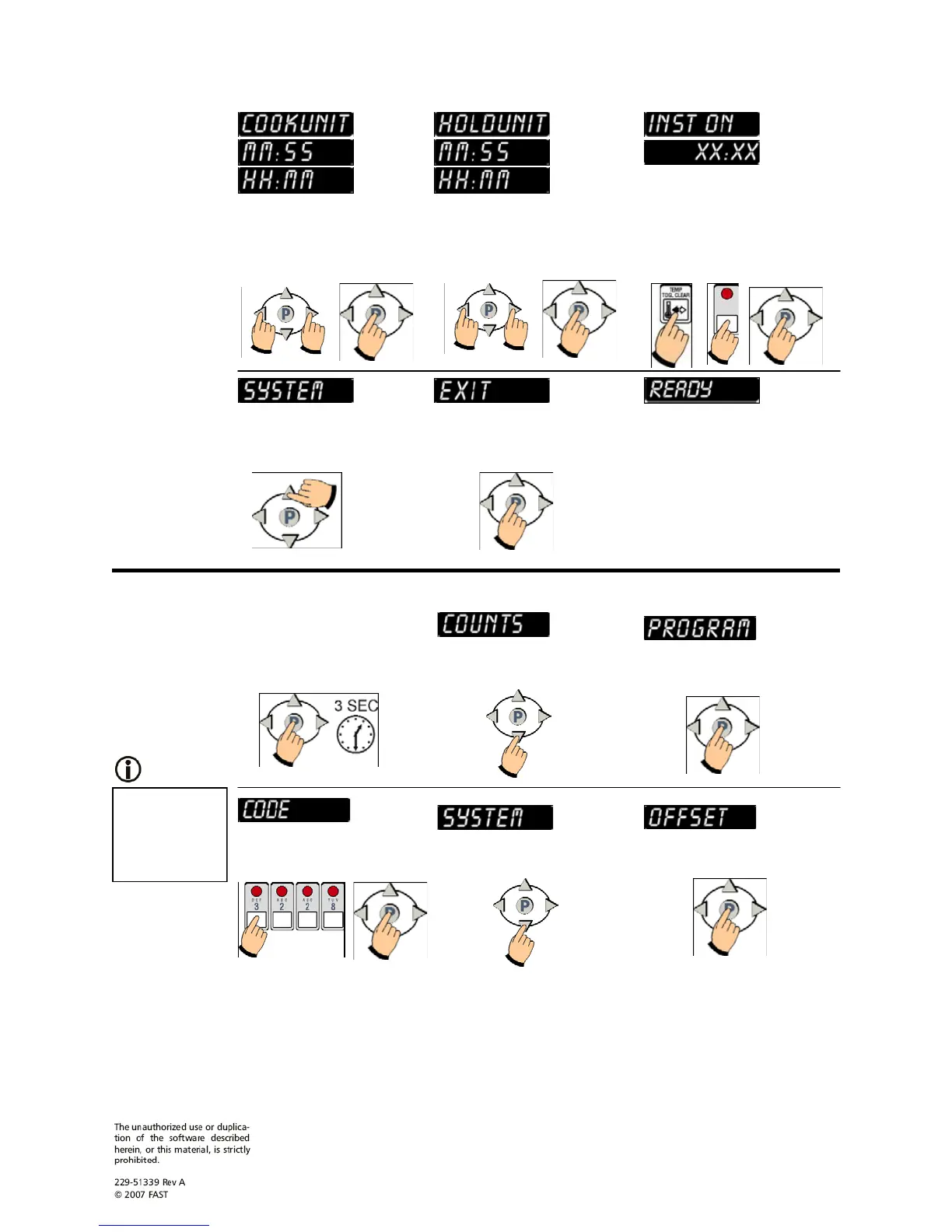
SET COOK UNIT. Use the
left and/or right arrow keys to
choose Minutes/Seconds or
Hours/Minutes. Press the P key.
SET HOLD UNIT. Use the
left and/or right arrow keys to
choose Minutes/Seconds or
Hours/Minutes. Press the P key.
SET INSTANT ON TIME.
To change, press toggle clear to
change the time to zero. Type
in a new time using the product
keys (0-99:99). Press the P
key.
EXIT SYSTEM
PROGRAMMING MODE.
Press the up arrow key.
Press the P key.
Offset
Programming
SYSTEM 3228
STORE
MANAGER
Offset
Temperature
can be set from
20 to -20F
(-6.6 to -28.8C).
ENTER OFFSET
PROGRAMMING MODE.
Press and hold the P key for 3
seconds.
Press the down arrow key.
Press the P key.
You have now EXITED
System Programming Mode and
can operate the controller.
Press the P key. Press the down arrow key
UNTIL Offset is displayed.
Type in 3 2 2 8 using the
product keys. Press the P key.


 To Next Page
 Loading...