
EasyManua.ls Logo

ULTRAFRYER Systems ULTRASTAT23 - User Manual

ULTRAFRYER Systems ULTRASTAT23
20 pages
Print Icon
To Next Page IconTo Next Page
Loading...
30A216 REV A Oct 2009
ULTRASTAT23
Operating Instructions
For the MEC-110 with ENHANCED SMS
10-Product Cooking Controller
302 Spencer Lane • P.O. Box 5369 San Antonio, Texas 78201
(800) 525-8130 • (210) 731-5000 • Fax: (210) 731-5099
www.ultrafryer.com
THIS APPLIANCE IS FOR PROFESSIONAL USE AND IS TO BE USED ONLY BY QUALIFIED PERSONNEL

Questions and Answers

ULTRAFRYER Systems ULTRASTAT23 Specifications

General IconGeneral
BrandULTRAFRYER Systems
ModelULTRASTAT23
CategoryController
LanguageEnglish

Summary

Controller Features

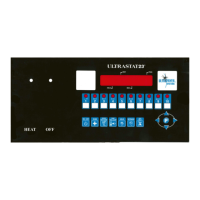
Product Keys Functionality

Used to start cook cycles and for programming. Includes replaceable menu strip.

Programming Center Functionality

Allows access to programming mode and changing cooking parameters.

Features Explained

Programmable Cooking Control

Includes action alarms, flex/straight timing, stage temps/times for precise cooking.

Programmable Hold Times

Tracks product quality through a specified holding period, alerting to discard expired product.

Oil Management Features

Programmable filter/polish modes, filter lockout, and global filter lockout for oil quality.

Energy Saving Features

Manual setback feature lowers oil temperature after inactivity.

Hold Time Management

Programmable hold times and linking for tracking product quality during holding periods.

Operating the Controller

Starting and Stopping Cook Cycles

Instructions for initiating, stopping, and responding to alarms during cook cycles.

Special Operating Modes

Covers Boil Mode for cleaning and Fill Mode for post-filtration oil replenishment.

Oil Filtration and Maintenance

Details on filter/polish operations, forcing a filter, and managing product counts.

Holding Timers and Alarms

Functionality of holding timers and action alarms during operation.

Display Status Indicators

Product Key Programming

Entering and Navigating Programming

Steps to enter programming mode, access counts, and navigate options.

Set Stage 1 Cook Time

Set cook time for stage 1 by entering time and pressing P key.

Program Product Key

Program a product key by pressing the desired product key, then P key.

Set Stage 1 Cook Temperature

Set cook temperature for stage 1 by entering temp and pressing P key.

Set Stage 1 Timing Mode

Set timing mode (Straight or Flex) for stage 1 by using arrow keys and P key.

System Programming

Enter System Programming Mode

Press and hold the P key for 3 seconds to enter system programming mode.

Set Programsetback Temperature

Set Program Setback Temperature by entering new temp and pressing P key.

Core System Configuration

Setting appliance mode, control type, language, tone volume, and preheat mode.

Filter and Count Settings

Setting global filter count, disposal count, filter time prompts, and delay.

Setback and Timing Configuration

Configuring program setback time and temperature for energy saving.

Set Polish Oil Time

Set Polish Oil Time by entering new time and pressing P key.

Set Filtering Mode

Set Filtering Mode (e.g., Manual, Auto) using arrow keys and P key.

Library Programming

Enter Library Programming Mode

Press and hold the P key for 3 seconds to enter library programming mode.

Troubleshooting Guide

Common Operational Issues

Addresses problems like no power, no sound, button issues, and heating failures.

Probe and Temperature Errors

Diagnosing and resolving issues related to the temperature probe and incorrect readings.