User manual for NERO / NERO INSTANT
Page 24Version 3.2 / December 2017
ТМ
3.5.12Mainboard(controller)
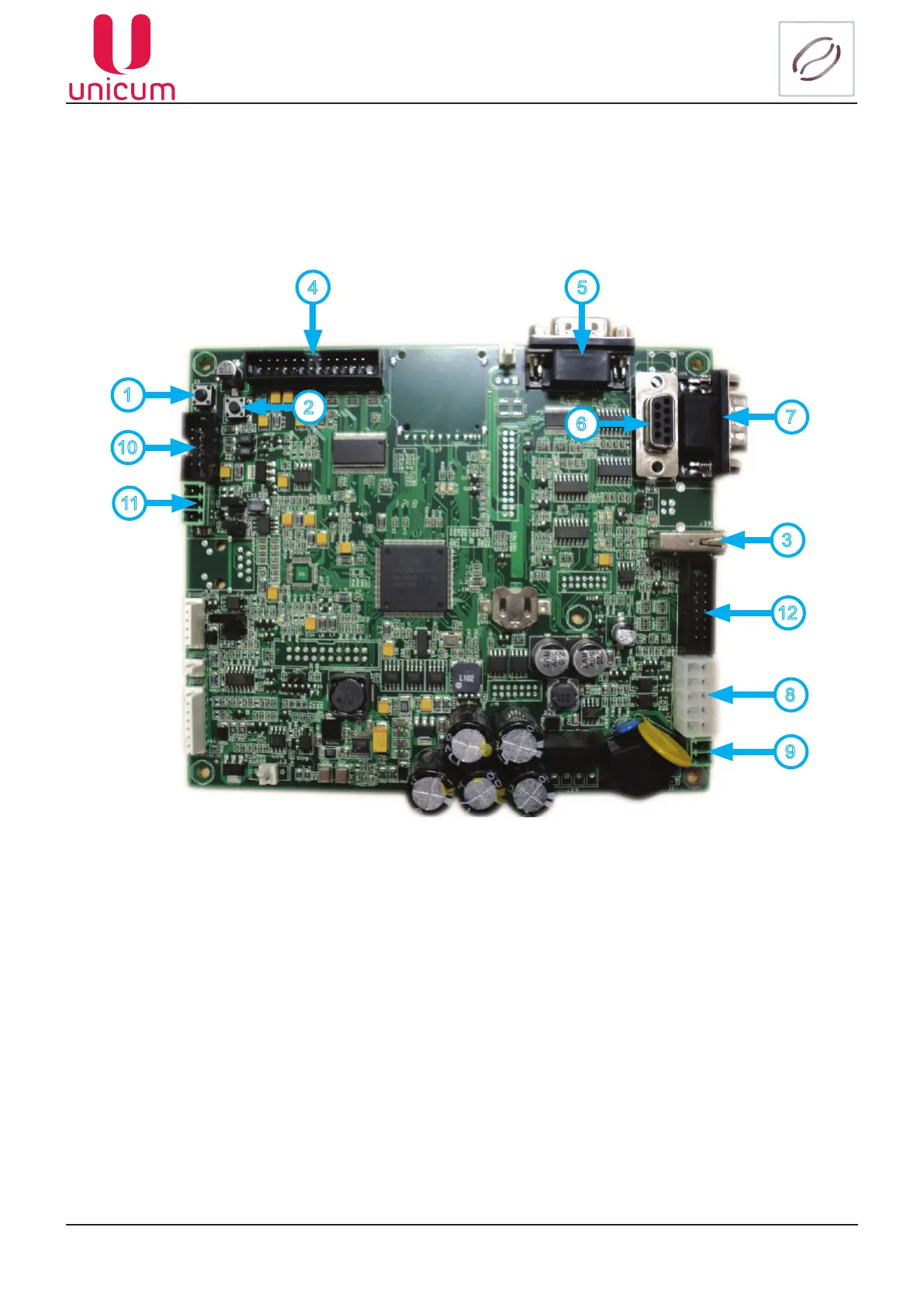
All the units and devices within the vending machine are regulated (controlled) by the Main board
(hereinafter called the “controller”) (see gure 33). The Main Board keeps track of the statistics, controls
payments and machine’s functional mode, handles USB-ash drives to store data and to load congura-
tion les. The controller functions according to the algorithms set in the built-in software – control software
(rmware).
Figure 33 - Main board (019-02)
Рисунок 7
1
2
3
4 5
6
7
8
9
11
1. Operator’s menu access button (used as reserve button, for use when regular service button does not
work – see 3.5.13);
2. Technician’s menu access button (used as reserve button, for use when regular service button does
not work – see 3.5.13);
3. USB connector (socket);
4. Display connector;
5. Modem connector;
6. Slot for programming and connection of RS-232 cartridge;
7. Cash register \ cheque printer connector (Not used);
8. Modem and MDB power supply connector;
9. Main board power supply connector (~24Volts);
10. Connector for sensor keypad board, which is used to select drinks;
11. CAN-BUS connector;
12. Connector for lighting for the drink selection buttons and disposal tray.
10
12



 To Next Page