User manual for NERO / NERO INSTANT
Page 57Version 3.2 / December 2017
ТМ
4.2.2 Menu item ‘‘2.2 CASH’’
Thisisusedonlyifthemachineisttedwithapaymentsystem.
4.2.3 Menu item ‘‘2.3 SNACK 1’’ & ‘‘2.4 SNACK 2’’
The following menu items are meant to congure snack vending machines and are not used for NERO
vending machines.
For proper functioning of the machine, in sub-menu “1.1.12 Snack number” set value to 0. In this case
the menu items “1.7 SNACK 1” and “1.8 SNACK 2” will be hidden.
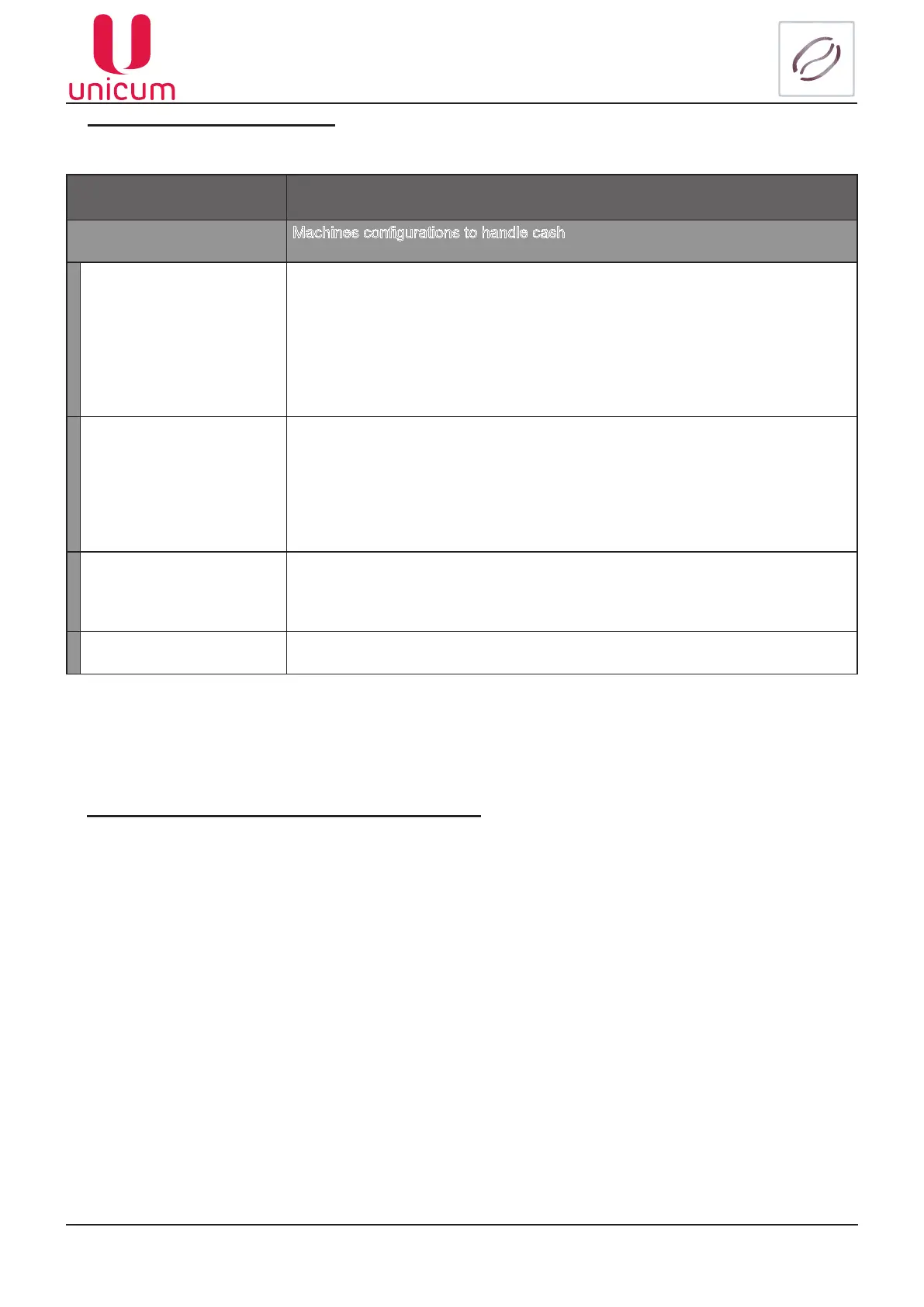
Sub-menu Description
2.2 Cash Machines congurations to handle cash
2.2.1 Manual Coin ln Upon entry it is allowed to load coins in tubes manually through coin entry slots,
located on the front of the management compartment and loading banknotes to
recharge change availability.
At the same time the LCD shows information regarding the selected tube: denom-
ination of the loaded coin. Letter “F” indicates that the tube is full.
After recognizing the loaded coins, you will see information about the tube to which
that given coin was deposited
2.2.2 Manual Coin Out This menu item is hidden if the Machine is in Operator’s menu, but Operator’s
privileges do not give access to coin discharge (privileges are set in technician’s
menu).
In the given mode the LCD shows information about the tube selected for dis-
charge (withdrawal) of coins: coin denomination, number of coins.
For discharge of one coin from the selected tube press “→”
2.2.3 Bill cash box (provided
if the modem is installed)
When entered sends a simulated stacker emptying signal to the server (collection
signal) in cases when there is no Bank Note Acceptor (BNA), or the stacker sensor
is broken
2.2.4 Print Z-report(s) This sub-menu position is displayed, but not used



 To Next Page