User manual for NERO / NERO INSTANT
Page 31Version 3.2 / December 2017
ТМ
4.0 SERVICE MODE
The vending machine can be serviced in the SERVICE MODE. For optimum service results the vending
machine comes with two different types of SERVICE MENUS.
• Service engineer’s / technician’s menu: machine conguration, checking the working of equipment
and product management. To access the “Technician’s menu” press button №2 from the left hand side
of the “Technician” on the quick access keypad. To nd the keypad see section 3.5.13.
• Operator’s menu: controlling the equipment’s functioning, browse through details information about
the machine’s condition, controlling cash, product management, statistics and cash removal. To ac-
cess this mode “Operator’s menu” press button №1 from the left hand side of the “Operator” on the
quick access keypad. To nd the keypad see section 3.5.13.
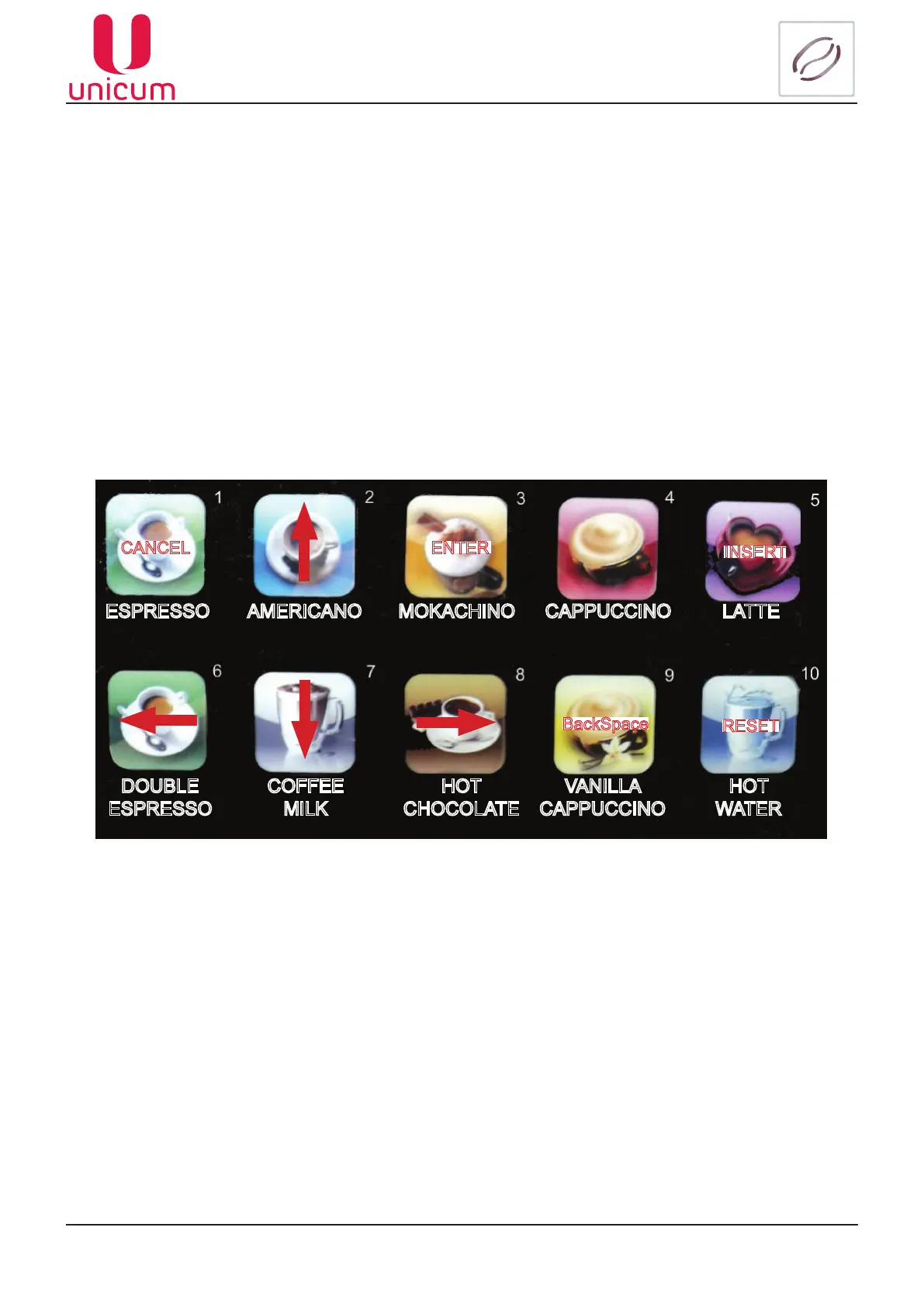
When inside the required menu use the product selection buttons (see gure 38) to navigate through
the menu and to edit parameter values.
Button 1 - CANCEL - exit editing mode and cancel all changes made / exit menu item / exit menu;
Button 2 - ↑ go up one menu item (position) / select next set parameter during editing;
Button 3 - ENTER - enter editing mode / exit editing mode and conrm (apply) changes;
Button 4 - not used for navigation;
Button 5 - INSERT - insert character during editing;
Button 6 - ← shift left within the edited line;
Button 7 - ↓ shift one menu position down / select next set parameter during editing;
Button 8 - → enter sub-menu / shift right within the edited parameter;
Button 9 - BACKSPACE - delete the last entered character while editing the line;
Button 10 - RESET - reset entry or delete charter during editing.
Figure 38 - Navigation buttons
ESPRESSO AMERICANO MOKACHINO CAPPUCCINO LATTE
DOUBLE
ESPRESSO
COFFEE
MILK
HOT
CHOCOLATE
VANILLA
CAPPUCCINO
HOT
WATER
CANCEL ENTER
INSERT
BackSpace
RESET



 To Next Page