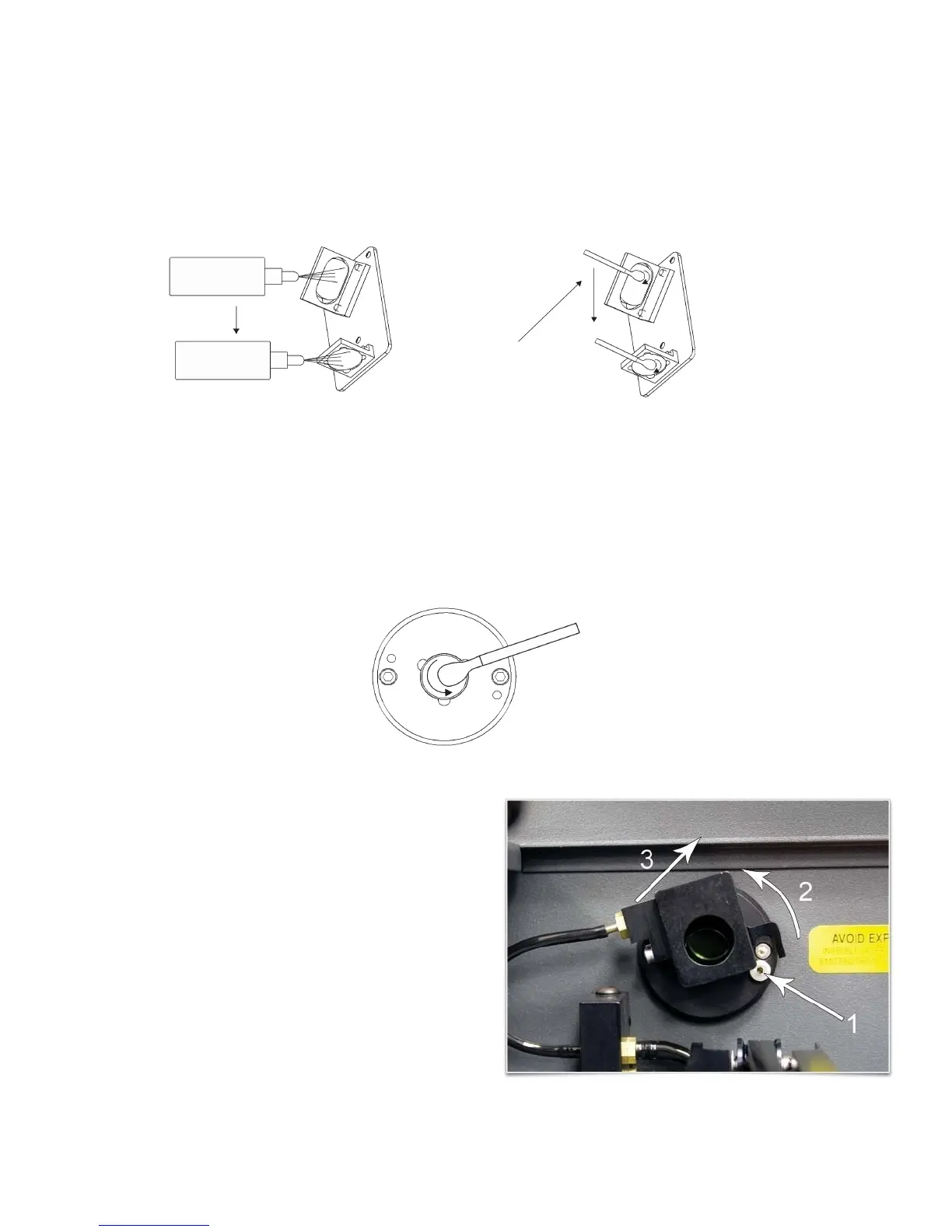
3. Tilt the front cover enough to enable you to apply the lens cleaning solution directly to the #3 mirror and to
the focus lens.
4. Flood the reflective surface of the #3 mirror with the solution. If heavy debris is present, let the solution
soak in for a minute.
5. Roll a fresh cotton swab across the mirror in one direction. Use a fresh swab for each pass. Be gentle
when cleaning the optic to avoid scratching the surface. Repeat this procedure for the focus lens, but
make sure you clean both sides of the lens.
Beam Window or Collimator
The beam window or collimator is where the laser beam enters into the processing area. It is located in the
upper left hand corner of the engraving area against the back wall and is yellow in color. It is only necessary
to clean the front side of the beam window. Do not remove the optic to clean it; simply clean it in the same
manner as the #2 mirror.
Note: If your system is equipped with Air Assist, you
must remove the optics protection housing to gain
access to the optic to clean it. Rotate the beam
window cover counter-clockwise (2) and then off at a
45-degree angle (3). If the beam window cover is
stuck, use a 1/16 Allen wrench to slightly loosen the
screw (1) and try again. Set the cover off to the side
and clean the optic, if necessary. Reinstall the beam
window cover being careful not to scratch the optic.
115



 To Next Page