Calibrate Scanner: Click ‘Calibrate’ icon,it will enter calibrate interface.
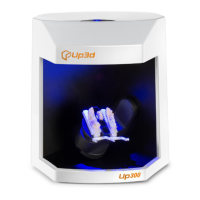
Select column function: Right click in the title bar of the order list,select column in the pop-up
window,select ‘Hide’ or ‘Show’ column.( as shown in the figure 2-6)
figure 2-6
Sharing and checkout function
Applicable scenario: For computer A, it is only responsible for scanning orders. (ie,the scanned
model files are in the A’s disk), the other computers B, C and D are just responsible for designing
orders.



 To Next Page